4-12 QX-830 Compact Industrial Scanner User’s Manual
Output Format
Symbol Parse
Extract
Output Index
Output Index
refers to the database entry to be modified with this command.
A formatted
output is built by extracting data from a symbol’s original data output and/or inserting
user-defined characters.
It may be helpful to think of individual indexes as positions in the final formatted output.
Starting with index # 1, enter either an extract or insert command to begin building the
desired output string. Then, with the next index number, enter either an extract or insert
command to continue building the output string. Continue this process until the string is
built.
Start Location
Defines the location within the symbol data where the character extraction will begin. The
first character extracted will also be the first character in the sequence displayed in user-defined
output.
Length
Defines the length (in consecutive characters) that will be extracted and placed in user-defined
output.
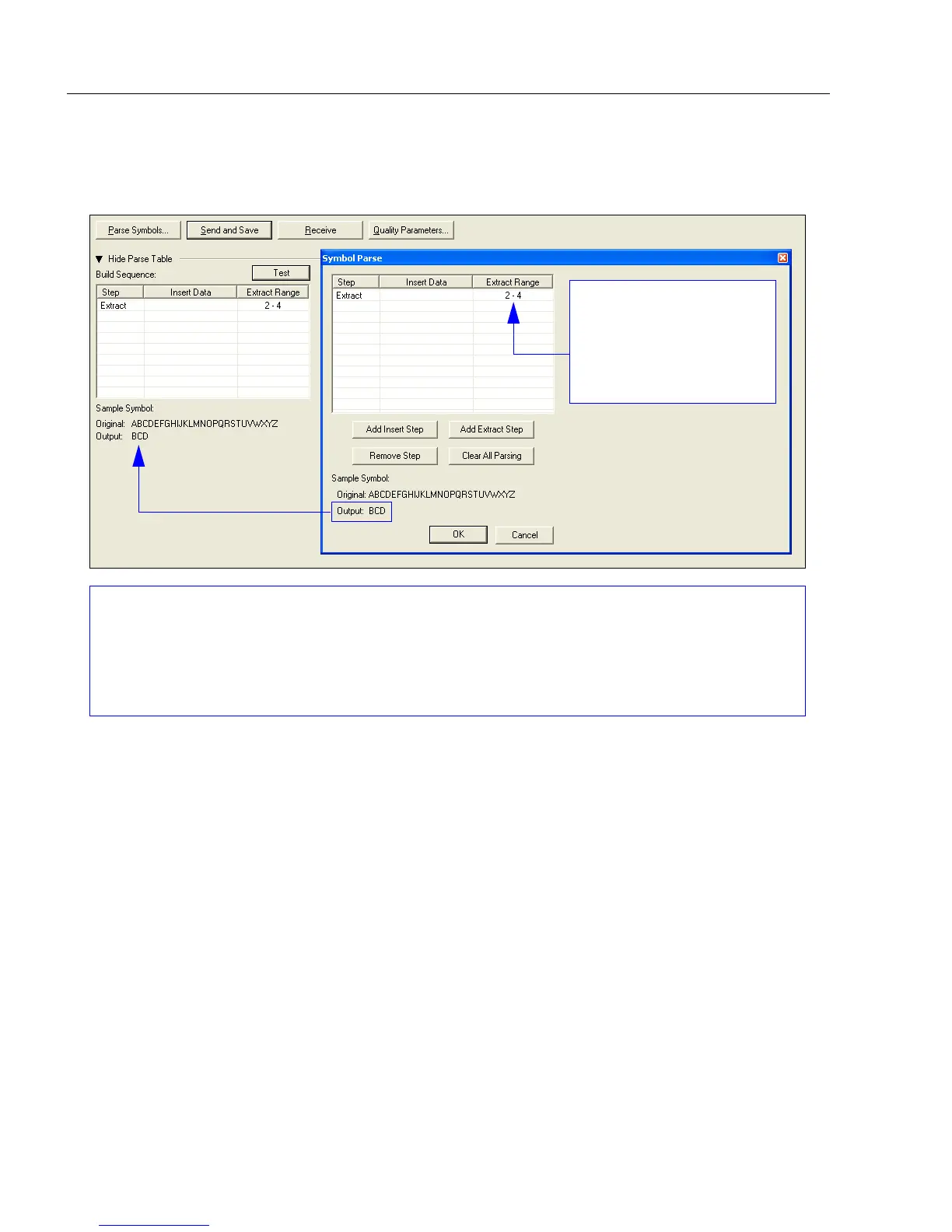
Multiple character sequences can be extracted and inserted using Symbol Parse. In this example,
the selected extraction range is characters 2-4. The “Sample Symbol” example on the Symbol
Parse
dialog shows the selected character positions extracted and output as desired. Simultaneously,
the data string from the selected symbol is displayed at the bottom left of the Parse Table, followed
by the user-defined extracted output.
The Extract Range
function corresponds to
the Start Location and
Length parameters in
the Format Extract
serial command.



 To Next Page