EasyManua.ls Logo

Mirion Technologies AVIOR-2 - Page 28

Mirion Technologies AVIOR-2
120 pages
Print Icon
To Next Page IconTo Next Page
To Previous Page IconTo Previous Page
Loading...
USE MANUAL
AVIOR-2/AVIOR-2 I/O & MIP-2/MIP-2 I/O
26 / 118
106491_C User manual AVIOR-2 MIP-2_En.docx
MIRION TECHNOLOGIES (Canberra) S.A.S, BP249, ZI de Vauzelles, 3760
2
Loches Cedex
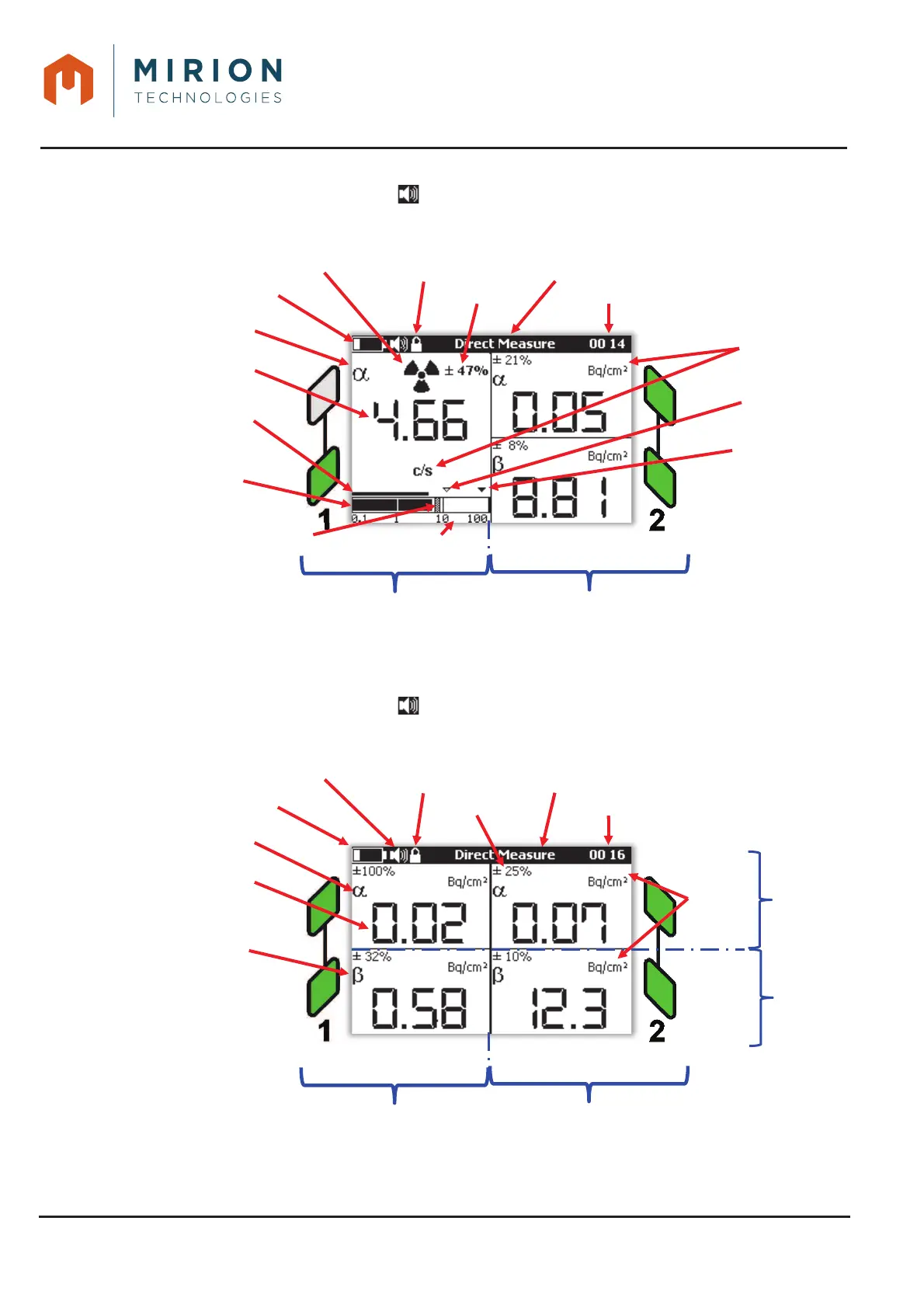
1-channel probe on interface 1 and 2-channels probe on interface 2
Note: In this configuration, the icon may be present, but the simulated sound is disabled.
1-channel probe on interface 1 and 2-channels probe on interface 2Figure 9 :
2-channels probe on interface 1 and 2 (Only for AVIOR)
Note: In this configuration, the icon may be present, but the simulated sound is disabled.
2-channels probe on interface 1 and 2Figure 10 :

Low threshold
alarm
Battery level
Screen title
Hour
Hight threshold
alarm
Logarithmic scale
Numeric value of
smoothed measurement
Transmitter Type
channel 1
Bargraph of the smoothed
measure
Bargraph of instantaneous
measurement
Indicator of the maximum value reached
every 3 s
Units
Interface 2
Interface 1
Keyboard lock
Alarm tag
Uncertainty
Battery level
Screen title
Hour
Numeric value of
smoothed
measurement
Transmitter Type
channel 1
Units
Interface 2
Interface 1
User level
Uncertainty
Transmitter Type
channel 2
Simulated sound
Channel 1
Channel 2

Table of Contents

Related product manuals