106491_C User manual AVIOR-2 MIP-2_En.docx
MIRION TECHNOLOGIES (Canberra) S.A.S, BP249, ZI de Vauzelles, 3760
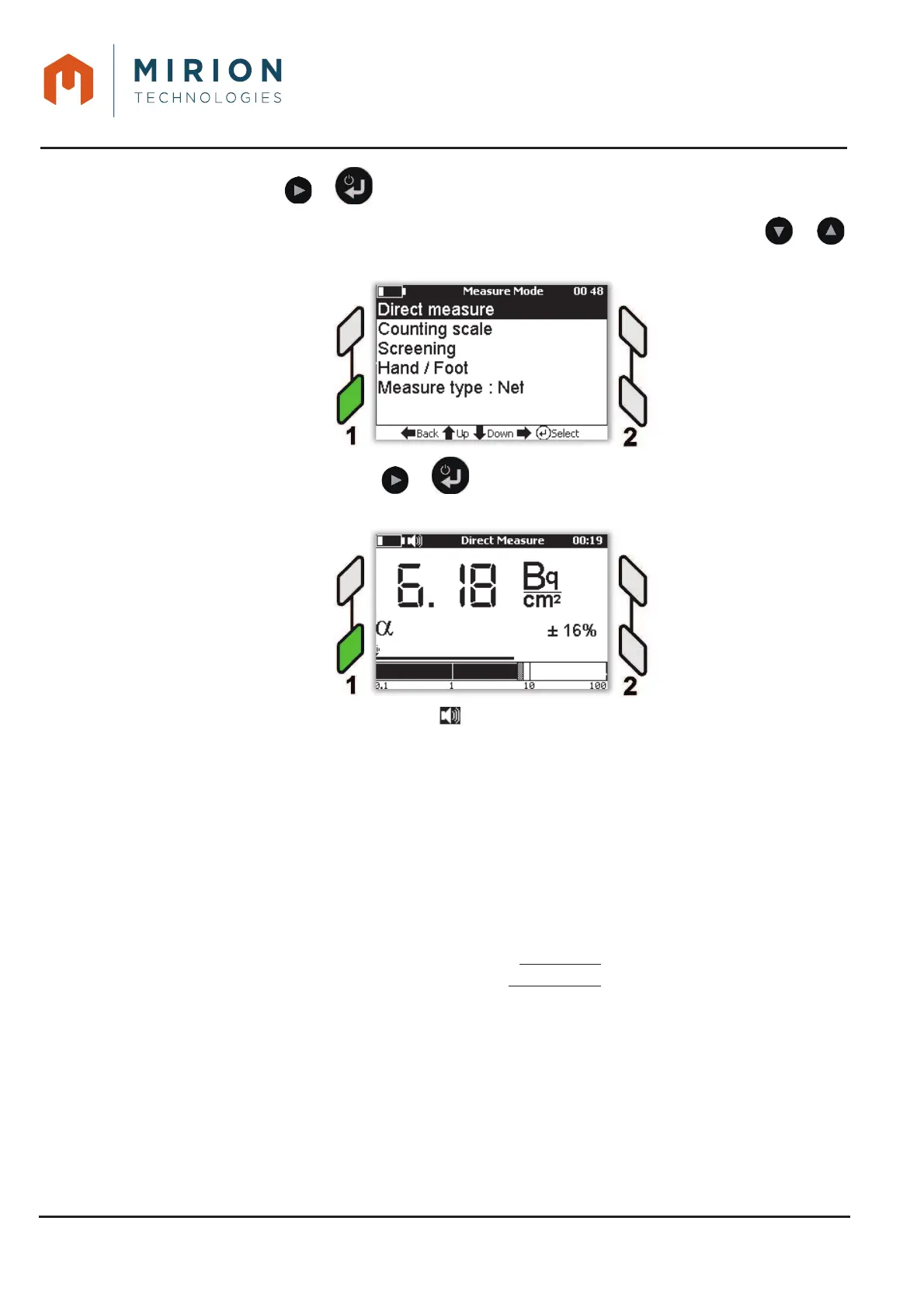
Press the key or to display the screen « Measure Mode ».2.
Note: The line « Direct measure » is selected by default. If necessary press the keys or
to select the line.
Press the key a second time or to display the screen of « Direct Measure »3.
depending on the type and the number of connected probe (See Figure 7 : Figure 8 :Figure 9 :)
If the simulated sound is activated (Symbol at the top of the screen, see § 13.4), the count is done
with
x 1 simulated sound of activity for 1-channel probe,
x 2 simulated sounds of activity for 2-channel probe.
The bar graphs are updated continuously.
The maximum value indicator of the instantaneous value is reset after a few seconds.
The statistical uncertainty of the measurement is calculated at 2
ı: the smoothing algorithm of the
AVIOR-2 works in a blow and uses a stack of 40 measurements to calculate the smoothed value. It
calculates the value to be displayed every 250 ms and makes the decision to refresh the current value
or to keep it.
The calculation of the uncertainty at 2 ı displayed in direct measurement mode is carried out as follows:
ܷ݊ܿ݁ݎݐܽ݅݊ݐݕ 2ߪ
(
%
)
= 2 כ100 כ
ඥ
σ
ݏݐܽܿ݇
(
݊
)
ଵ
σ
ݏݐܽܿ݇(݊)
ଵ
Where:
x n is the number of measurements used in the stack to calculate the smoothed value
displayed.
x stack (n) being the value contained in box n of the measuring stack
The uncertainty value is capped at 100%. Each significant count variation causing a decision of the
smoothing algorithm to reduce the number of measurements used causes a sudden upward variation of
the uncertainty.













 To Next Page