USER MANUAL
AVIOR-2/AVIOR-2 I/O & MIP-2/MIP-2 I/O
106491_C User manual AVIOR-2 MIP-2_En.docx
MIRION TECHNOLOGIES (Canberra)S.A.S, BP249, ZI de Vauzelles, 37602
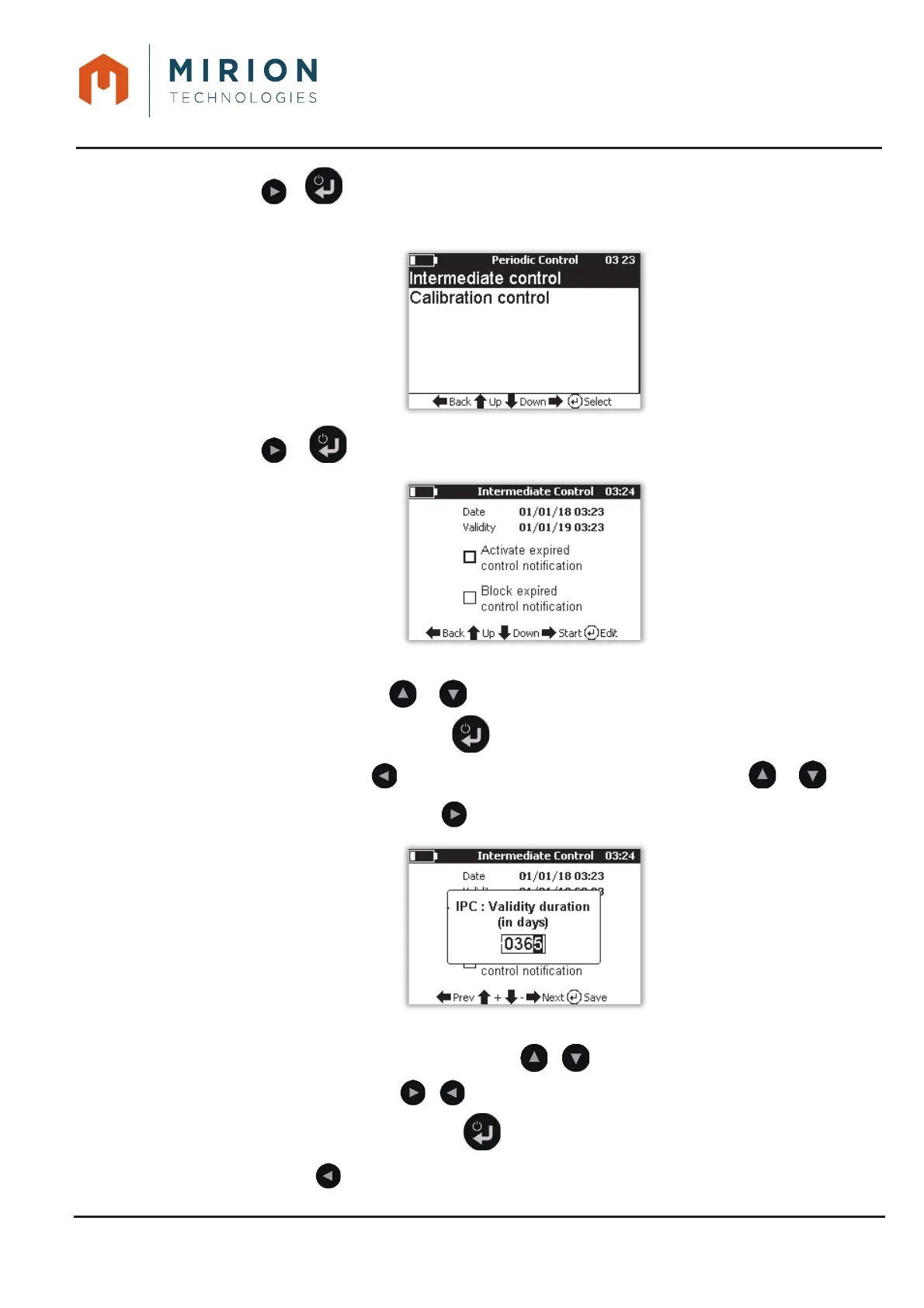
Press or to display the choice of control.4.
Note: The line « Intermediate control » is selected by default.
Press or to display the « Intermediate control » menu5.
To activate the notification of the expired control and / or block the measurement:
x Select the line with or ,
x Activate the box with the key ,
x Exit with the key and / or select another line to be modified with the or keys.
To perform a IPC, press the key and enter the validity date.6.
To change the validity period:
x Increase or decrease the number with or ,
x Change column with or ,
x Save the duration with the key .
Press the key several times to return to the main menu.7.













 To Next Page