9 Fault elimination
Maschinenfabrik Reinhausen 2014 147222/08 EN TAPCON® 240
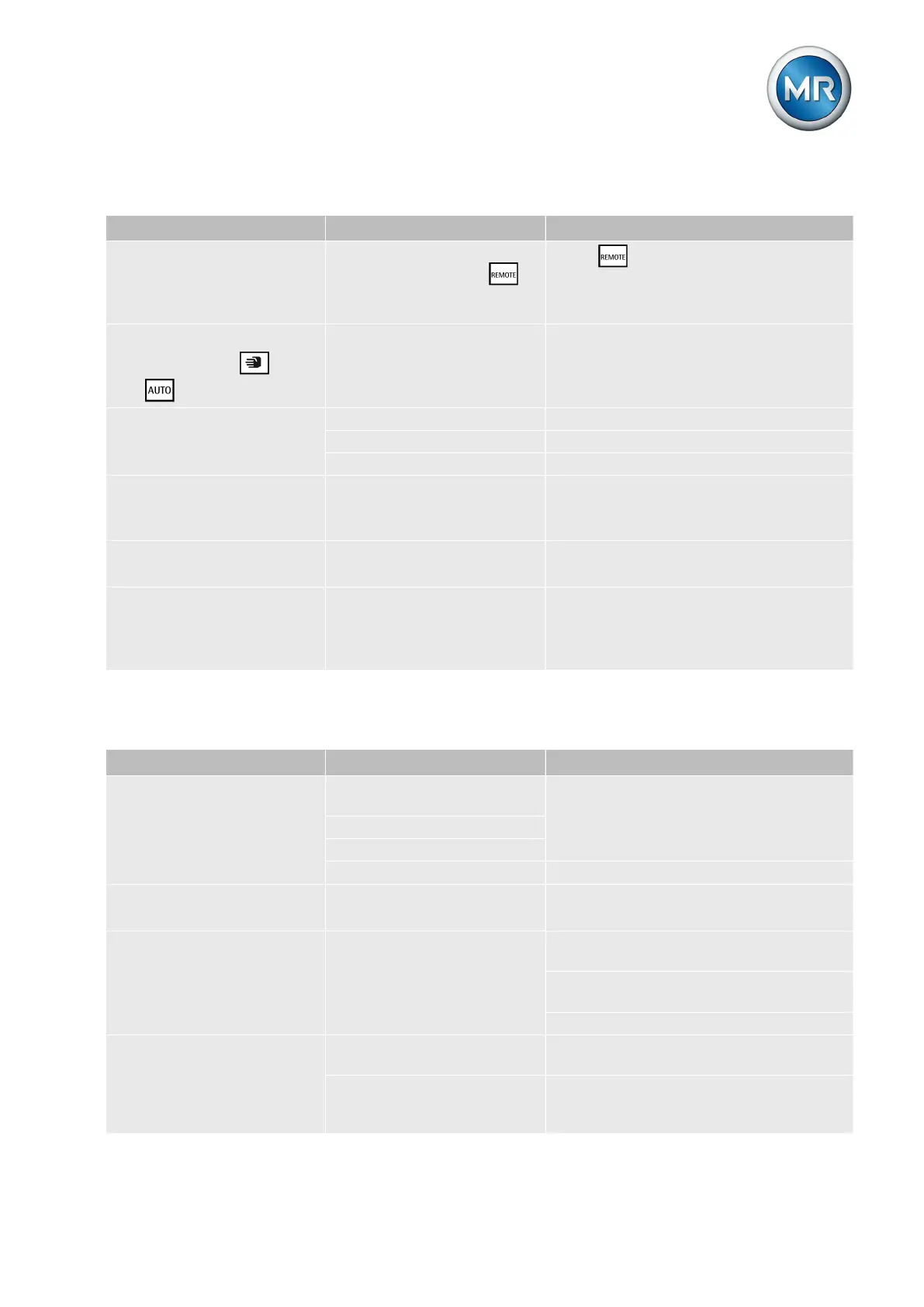
Man-machine interface
Characteristics/detail Cause Remedy
Keys
▪ MANUAL/AUTO operat-
ing mode cannot be
changed
REMOTE operating mode
active and LED in key il-
luminated.
Press to activate LOCAL mode.
Keys
▪ LEDs in keys and
not illuminated.
Parameter error Reset parameters to factory settings
[► 141].
Display
▪ No display.
Contrast incorrectly set. Set contrast [► 41].
Voltage supply interrupted. Check voltage supply.
Fuse faulty. Contact Maschinenfabrik Reinhausen.
LEDs
▪ Freely configurable LED
lights up
Customized LED parameteri-
zation.
Check parameters.
LEDs
▪ LED flashing
Input signal not constant. Check input signal.
COM1
▪ Cannot be connected to
PC using TAPCON®-
trol.
Different baud rates set. Check baud rate set on device and PC.
Table 38: Man-machine interface
Incorrect measured values
Characteristics/detail Cause Remedy
Measured voltage
▪ No measured value.
Connection has no contact in
the plug terminal.
Check wiring and plug terminal.
Insulation trapped
Wire not inserted far enough.
Circuit breaker tripped. Check fuse.
Measured voltage
▪ Measured value too low.
Voltage drop on measuring
lead.
Check measured voltage at plug terminal
MI:01/MI:02.
Measured voltage
▪ Measured value fluctu-
ates.
Possible sources of fault:
▪ Leads laid in parallel.
▪ Tap-change operations.
Check measured voltage at plug terminal
MI:01/MI:02.
Increase distance from source of interfer-
ence.
Install filter if necessary.
Measured current
▪ No measured value.
Line to current transformer
interrupted.
Check wiring.
Short-circuiting jumper in
current transformer not re-
moved.
Remove short-circuiting jumper.
9.3
9.4



 To Next Page