7 Functions and settings
Maschinenfabrik Reinhausen 201480 222/08 ENTAPCON® 240
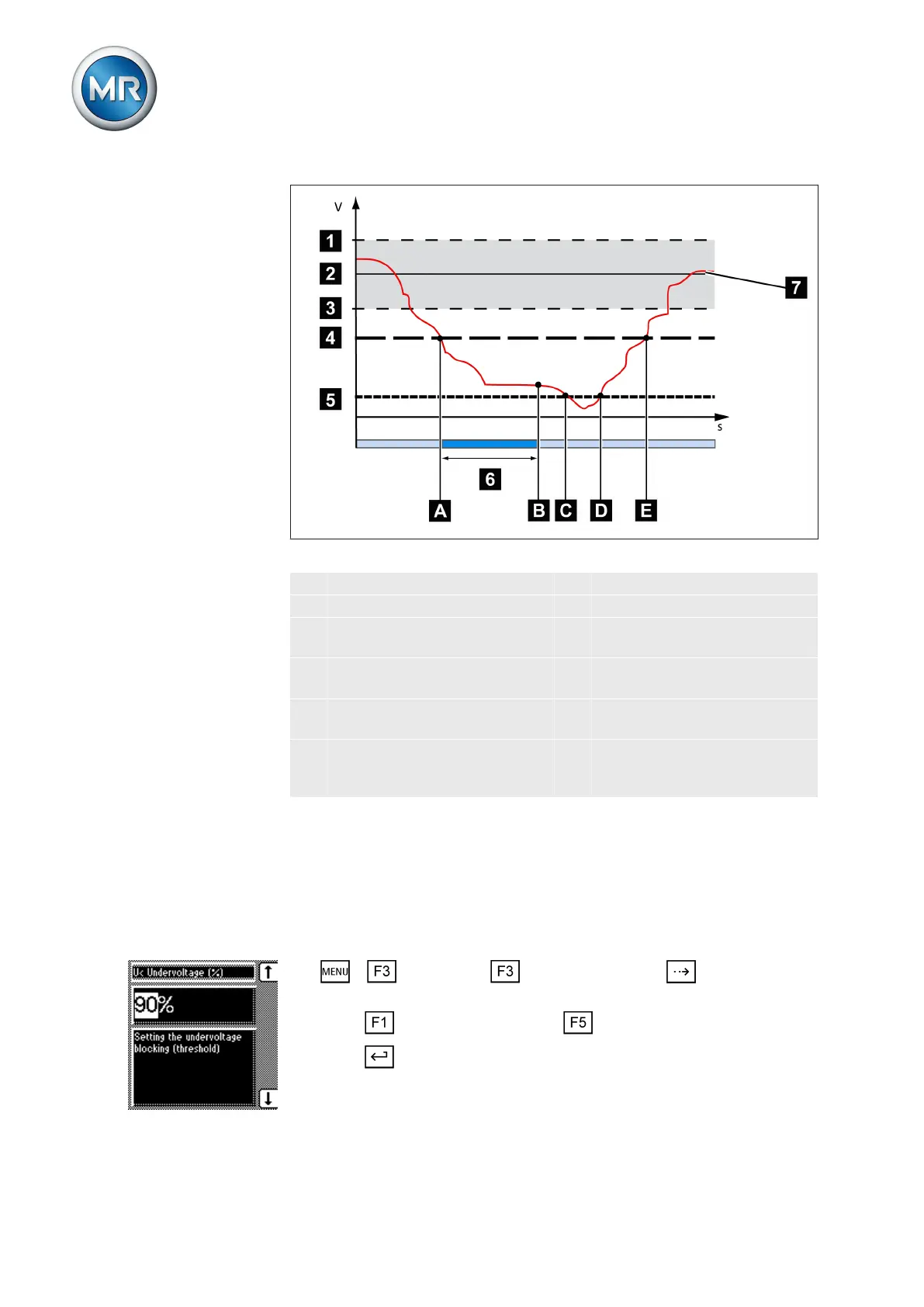
Figure 46: Response to value falling below limit value
1 + B %: Upper limit 7 U
actual
: Measured voltage
2 U
desired
: Desired value A Value falls below limit value
3 - B %: Lower limit B Undervoltage U< message is
displayed
4 Set limit value for undervolt-
age U<
C Voltage falls below 30 V
5 Limit value for suppressing
alarms below 30 V
D Voltage exceeds 30 V again
6 Set signaling delay time for
limit value for undervoltage
U<
E Value exceeds limit value
Setting undervoltage V< as %
You can use this parameter to set the limit value as a relative value (%). This
limit value refers to the desired value you have set. If you want to use the set
relative value as the limit value, go to Absolute limit values and activate
the Off selection.
To set the limit value for undervoltage V<, proceed as follows:
1. > Parameter > Limit values > Press until the desired
parameter is displayed.
2. Press to increase the value or to reduce it.
3. Press .
ð The limit value is set.



 To Next Page