7 Functions and settings
Maschinenfabrik Reinhausen 2014 83222/08 EN TAPCON® 240
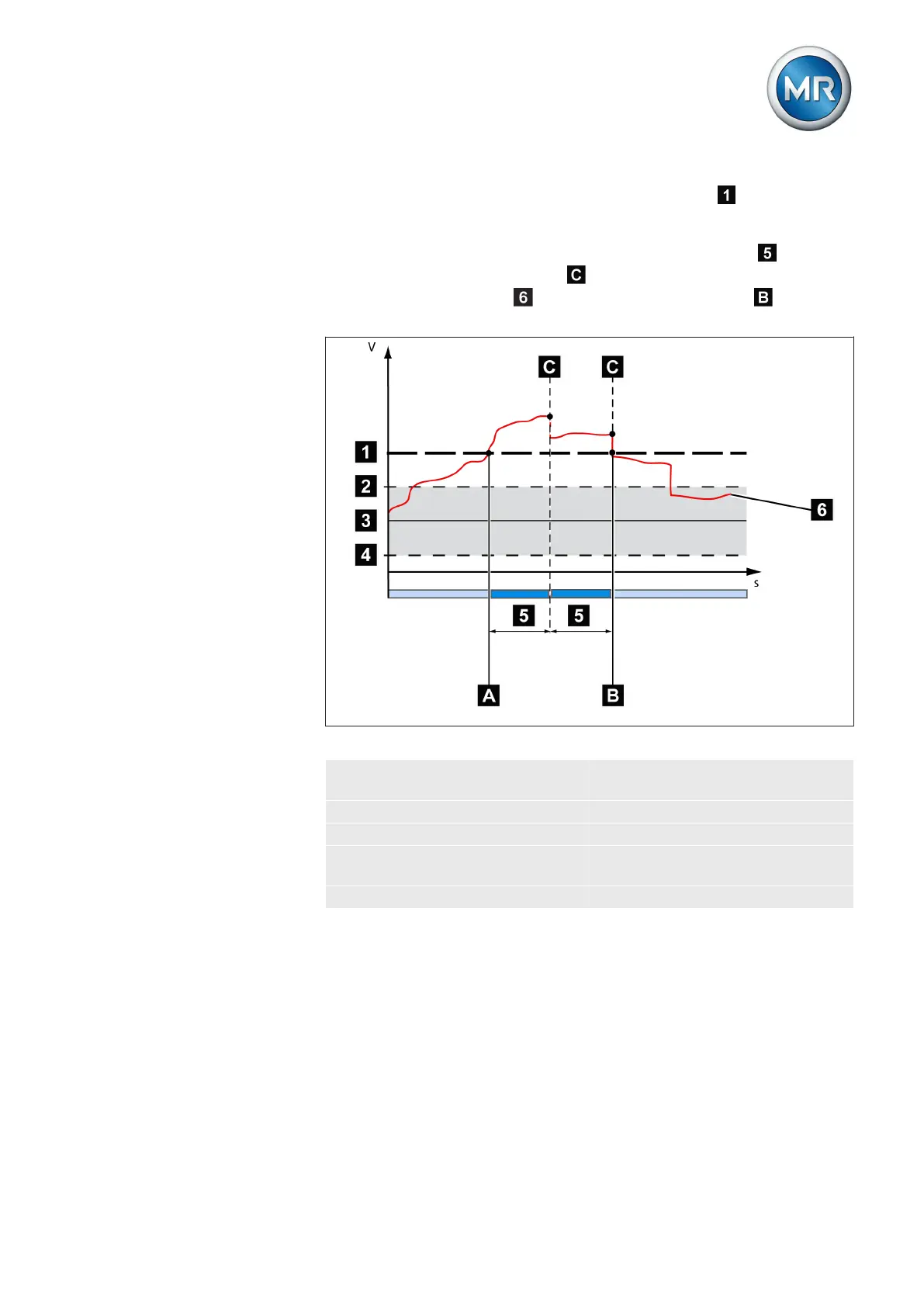
If the measured voltage U
actual
exceeds the set limit value , the red LED U>
and associated signaling relay activate. The Overvoltage U> message ap-
pears in the display. At the same time, the high-speed return function is acti-
vated without delay time T1. Once the set switching pulse time
has
passed, the tap position is lowered by activating the motor-drive unit until
the measured voltage U
actual
again falls below the limit value . The Over-
voltage U> message is reset.
Figure 47: Response to limit value being exceeded
1 Set limit value for overvoltage
U>
6 U
actual
: Measured voltage
2 + B %: Upper limit A Value exceeds limit value
3 U
desired
: Desired value B Value falls below limit value
4 - B %: Lower limit C High-speed return is started
(lower tap-change)
5 Set switching pulse time
The following sections describe how you can set the parameters for the
overvoltage monitoring V> limit value.
Set overvoltage V< as %
The limit value is entered as a relative value (%) of the set desired value. To
set the limit value, proceed as follows:
Response to high-speed
return



 To Next Page