7 Functions and settings
Maschinenfabrik Reinhausen 201486 222/08 ENTAPCON® 240
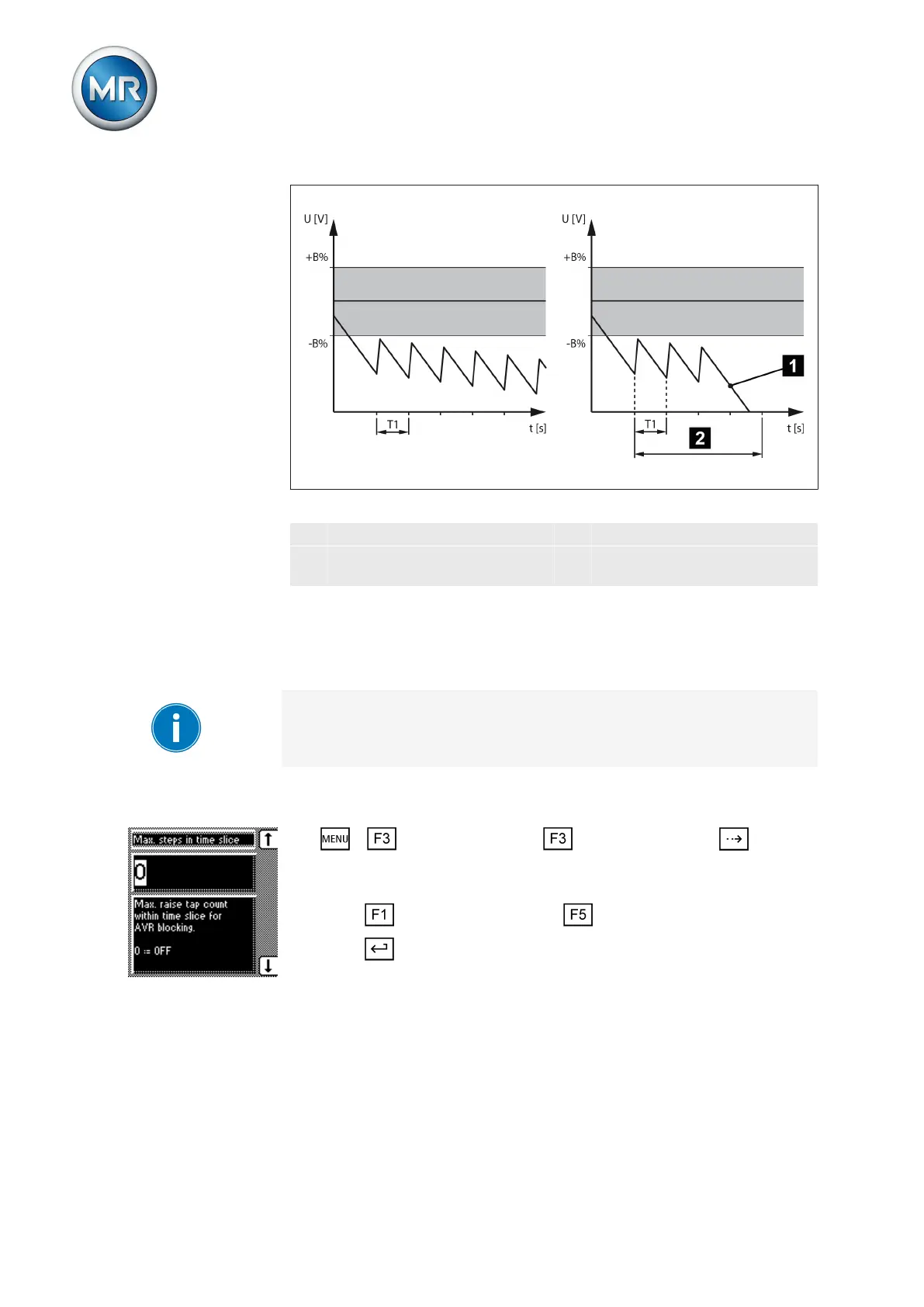
Figure 48: Normal control response (left); abnormal control response (right)
1 Device blocking T1 Delay time T1
2 Defined time period for moni-
toring RAISE operations
B
%
Bandwidth B%
Setting maximum number per time interval
You can use this parameter to define the maximum permissible number of
consecutive RAISE operations.
The 0 setting deactivates the tap-change supervisory control function. There
is no limit to the maximum number of consecutive RAISE operations.
To set the maximum number of permissible consecutive RAISE operations,
proceed as follows:
1. > Control parameter > Limit values > Press until the
desired parameter is displayed.
ð Max. steps in time window.
2. Press to increase the value or to reduce it.
3. Press .
ð The maximum number of permissible consecutive RAISE operations is
set.
Setting time window for monitoring RAISE operations
You can use this parameter to define the time interval for monitoring the
number of consecutive RAISE operations.
To set the time interval (time slice), proceed as follows:
7.5.6.1
7.5.6.2



 To Next Page