SW
26
Innovation. Quality. Performance. Best in Industry. Worldwide.
Saving Tool Parameters
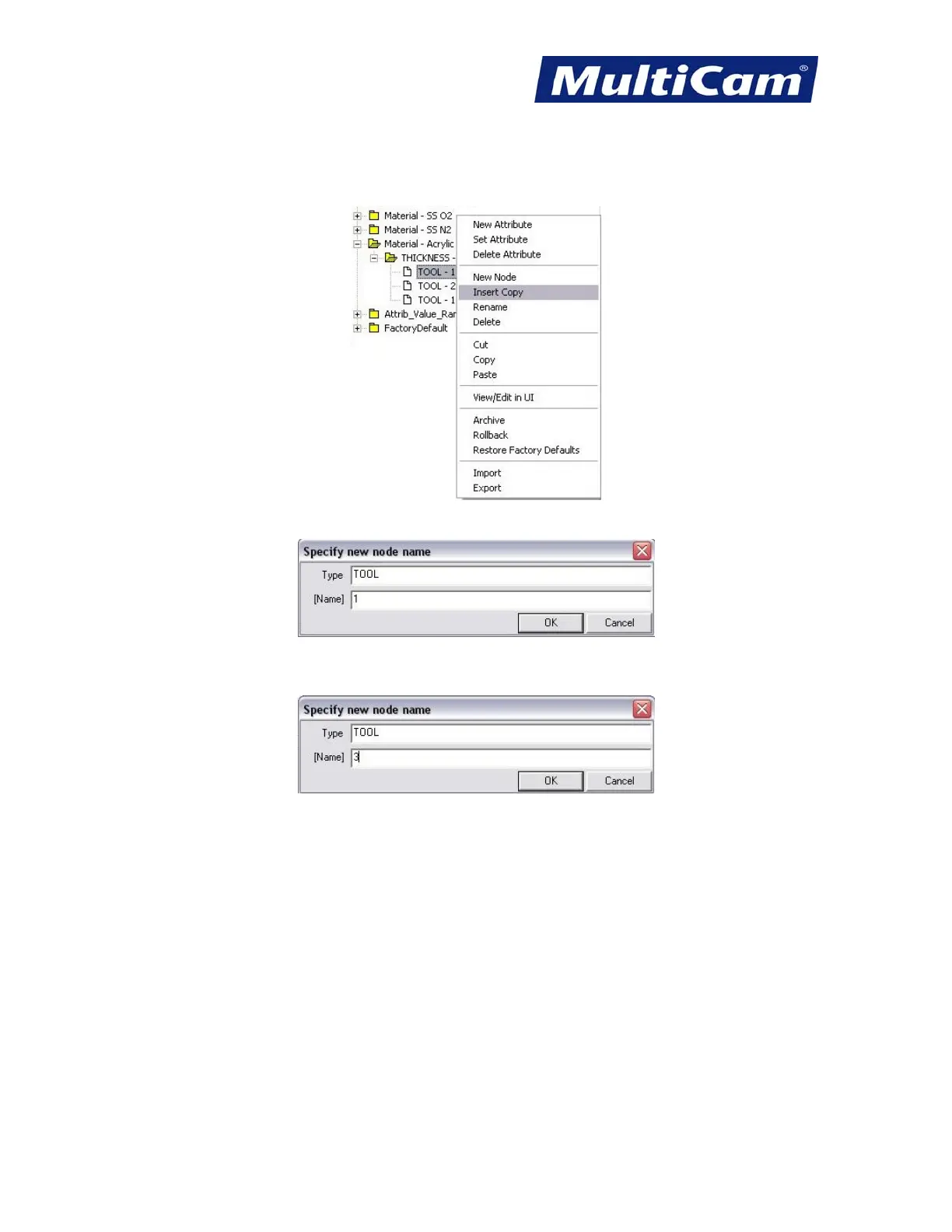
1. Right-click on any tool under the thickness and select Insert Copy.
This will automatically open the tool attribute folder.
2. Change the number of the tool (e.g., 1 to 3) and select OK. Operators can only modify tools 3 – 15 only since
tools 1, 2, and 16 default to specific functions.
Tools 1, 2, and 16 are defined in Material Library as the following:
• Tool 1 – Cutting
• Tool 2 – Engraving
• Tool 16 – Rastering
3. Change tool attributes as needed.
4. Select File >> Save in Material Library Editor to save all the changes.
5. Select File >> Reload and close out of Material Library Editor.
Routers * Lasers * Plasma * WaterJets * Knife Cutters
www.MultiCam.com v. 11 10


 To Next Page
 Loading...
