User’s Guide – Ultima cutting plotter
56 AP-75032, Rev 2.2, 20/04/07
4.2.5. Page Mode
The page mode determines the cutter’s reaction to a PAGE command sent by the cutting software. The
PAGE command is a command, which is used to relocate the origin after a job is finished and which can take
control remotely of the cutter’s automatic sheet-off feature. Sheeting-off automatically, without user
intervention, is a feature which is unique to Mutoh cutting-plotters and which enhances the cutter’s versatility
and overall performance enormously.
A page-command looks like this: “PG;” or “Pgn;” with “n” a number in millimeters.
If the PAGE command “PG;” is sent, the cutter will automatically sheet of regardless of the Page mode,
minimizing the loss of vinyl.
If the PAGE command “Pgn;” is sent, the number mentioned after the PG command will be interpreted
differently, depending on the page mode you have chosen :
Page Mode 0 :
The number after the page command is ignored. The media will be cut 5 mm (0.2”) after the latest vector.
The new cutting limit will be located 0.5 (0.2”) from the lower media border.
Page Mode 1 :
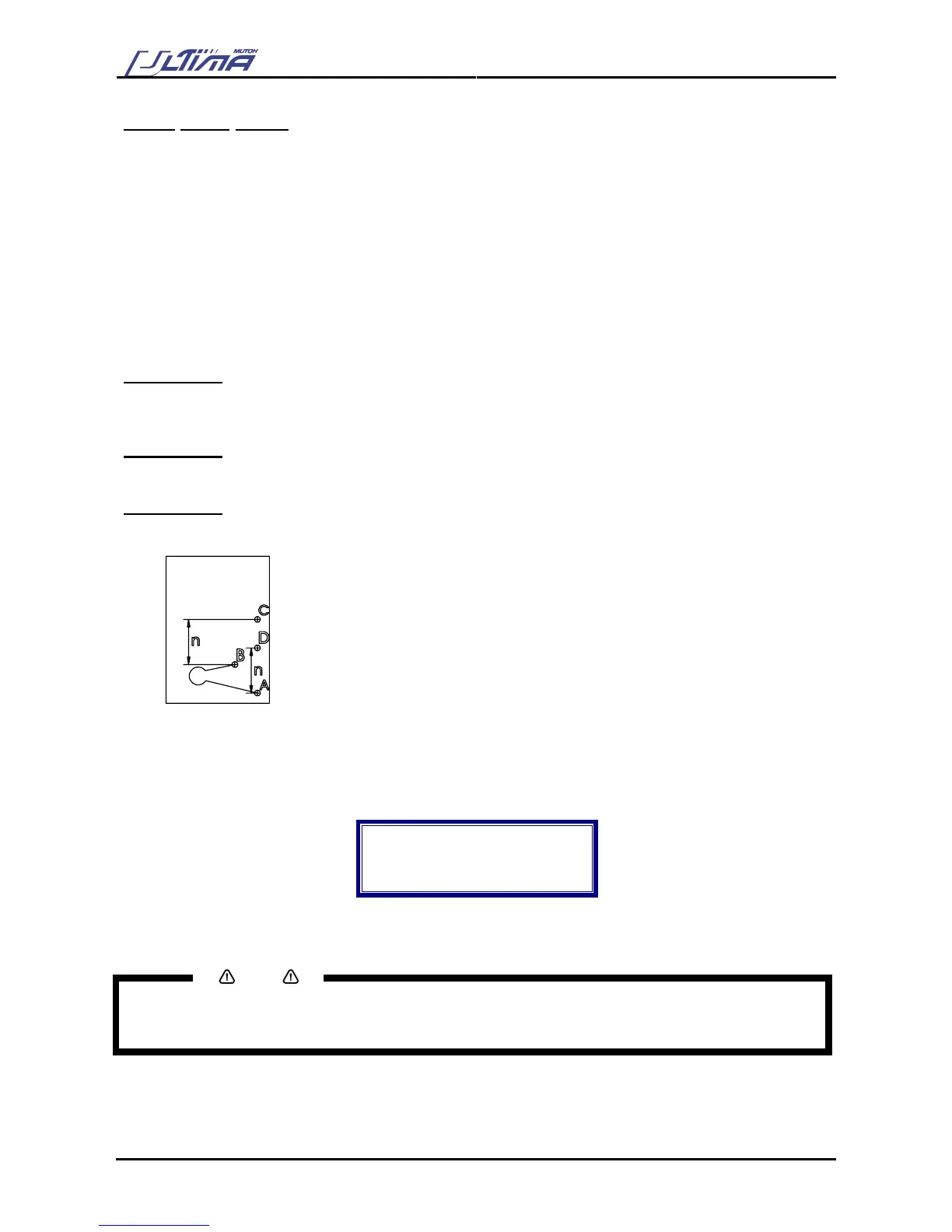
The new origin is located “n” millimeters beyond the last vector that was sent.
Page Mode 2 :
The new origin is located “n” millimeters beyond the previous origin position.
“PGn” is sent (n is a number in mm).
A : Original origin
B : End point last vector
C : New origin with Page Mode 1
D : New origin with Page Mode 2
To change the Page Mode, please follow the instructions mentioned below :
Step 1 : In the general setting select ‘Page Mode’ by using the [UP] or [DOWN] key.
Step 2 : Press the [ENTER] key to confirm your selection. The actual Page Mode value will now be
shown on the display
Page Mode
Actual : 1
New : 1
0, 1 or 2
Step 3 : By using the [UP] or [DOWN] key select an appropriate value.
Step 4 : Press the [ENTER] key to confirm.
Notes
To cancel the changes of the parameter, press the [CANCEL] key. The display will show the previous
value for the parameter.
When you press the [EXIT] key the changed value will be ignored and you go back to the previous menu.









 To Next Page