Handling the printer VJ-1324X OPERATION MANUAL
128 4.4 Operating from the operation panel
4.4.5.2 Settings that can be changed or confirmed while printing
• When you change a setting during operation, be sure to select “Backup” to save the setting that you
changed.
If the printer returns to Normal without “Backup” being selected, the changed setting is not saved.
• Check the following before using the Job status items
• The values displayed in the Job status items are rough indications. They do not guarantee the
strict accuracy.
• If the length information is not included in the print data, “0” is displayed for all items.
• You can check the “remaining print” and “remaining time” in the way described in
4.4.8
Normal Display while Printing
.
• To check the information about the printed data, refer to the following.
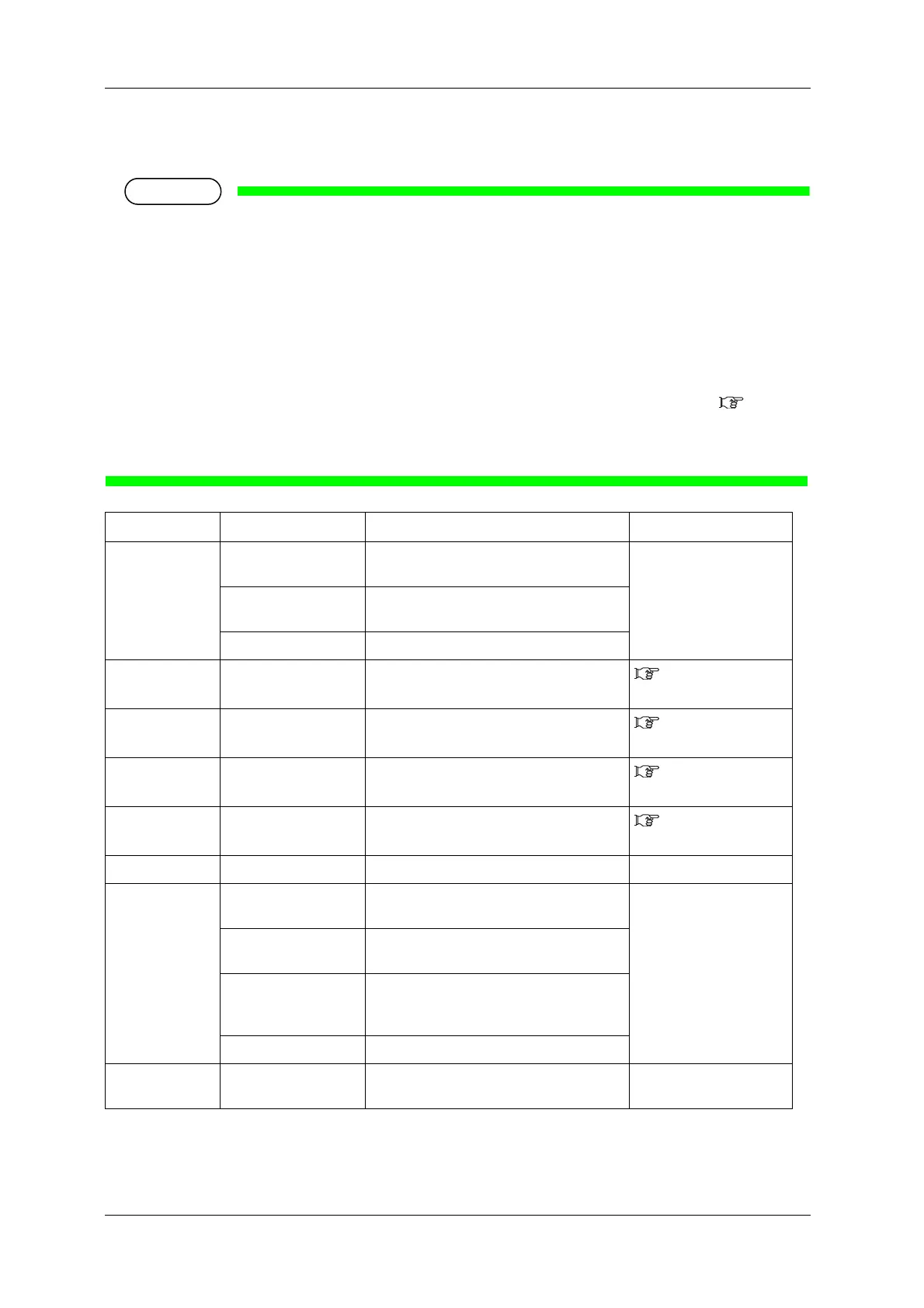
Setup item Setting Description Reference
Temperature Pre Checks the current temperature of the pre-
heater.
—
Platen Checks the current temperature of the platen
heater.
Dryer Checks the current temperature of the dryer.
Pre heater Off / 30 ºC to 50 ºC Changes the temperature of the pre-heater.
5.1.1.1.5 Pre-heater
menu
Platen heater Off / 30 ºC to 50 ºC Changes the temperature of the platen heater.
5.1.1.1.6 Platen
heater menu
Dryer Off / 30 ºC to 50 ºC Changes the temperature of the dryer.
5.1.1.1.7 Dryer
menu
PF Adjust -5.00% to 0.00 to 5.00% Change the feed adjustment value.
5.1.1.1.4 Dist.Adj
menu
Backup — • [Enter] key: Save the changed setting. —
Job Status ToDo Length • Check the whole length of the data (media
feed direction) currently being printed.
—
Done • Check the printed length of the data
currently being printed.
Remain • For the data currently being printed, check
the length of the data that has not been
printed.
Remain Time • Displays the time remaining for printing.
— • [Cancel] key: The printer returns to
Normal.
—















 To Next Page