EasyManua.ls Logo

Numatics G3 Series - Main Menu Structure

Numatics G3 Series
164 pages
Print Icon
To Next Page IconTo Next Page
To Previous Page IconTo Previous Page
Loading...
G3 Series EtherNet/IP
TM
DLR Technical Manual
5-29
TDG3EDM1-6EN 3/18
Subject to change without notice
www.asco.com/g3
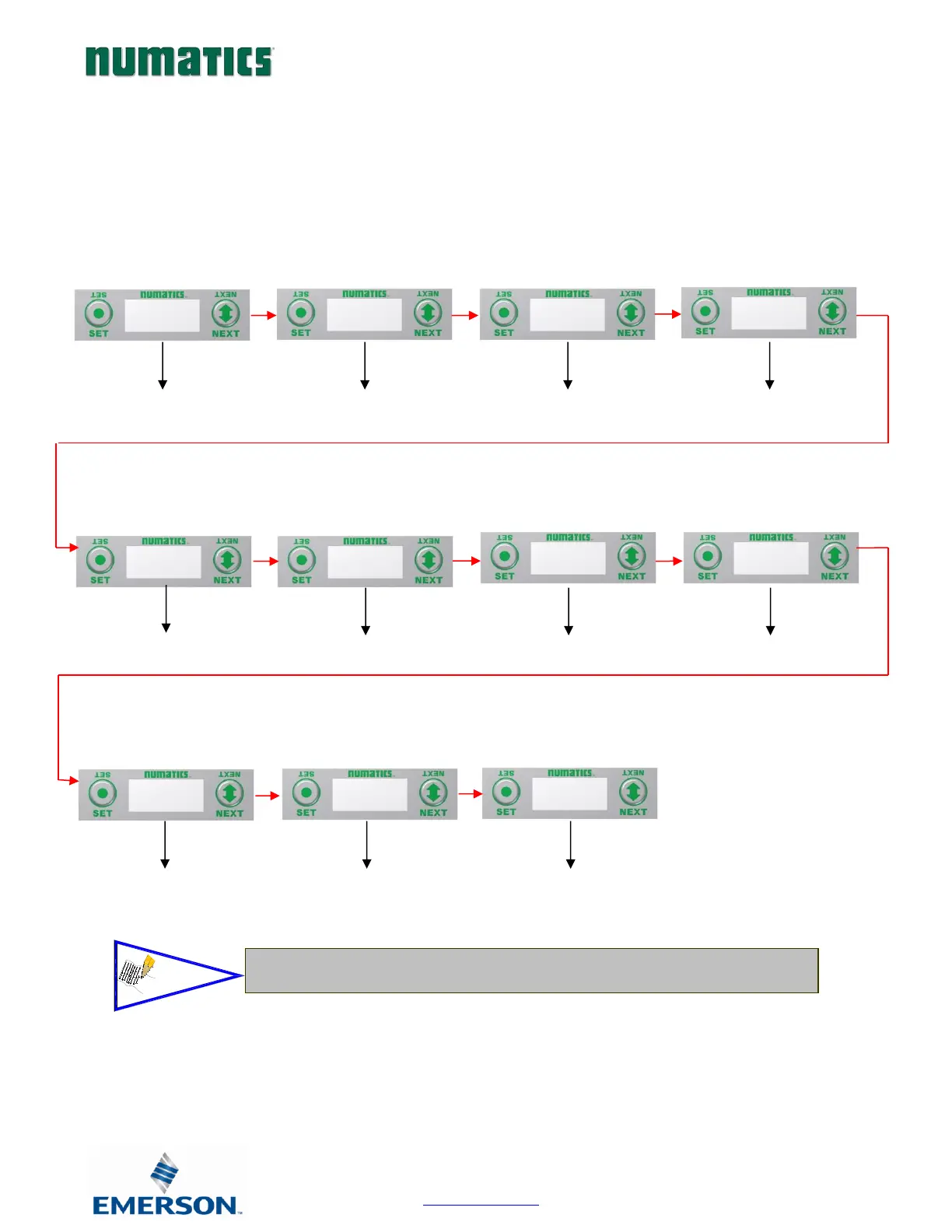
5.1 Main Menu Structure
Use the NEXT button to scroll through the Main menu headings shown below. At this level pressing the SET button allows
access the Sub-Menus. Please see the appropriate page referenced below for further details and descriptions of the Sub-
Menus. Note that many of these settings can also be adjusted via software with GSD file parameters.
NOTE: When a network I/O connection is established manual changes to node parameters are not allowed!
See page 33
for Sub-Menu
When a network I/O connection is established manual changes to node
parameters are not allowed!
See page 45 for
Sub-Menu
See page 30
for Sub-Menu
IP ADDRESS
192.168.3.120
See page 31
for Sub-Menu
SUBNET MASK
255.255.255.0
See page 32
for Sub-Menu
GATEWAY IP
192.168.3.200
DHCP-BOOTP
ENABLED
See page 35
for Sub-Menu
WEBSERVER
ENABLED
See page 36
for Sub-Menu
MAC
ADDRESS
See page 37
for Sub-Menu
ADVANCED
SETTINGS
FACTORY
DEFAULTS
DIAGNOSTICS
HELP
NUMATICS.COM
See page 46
for Sub-Menu
See page 34
for Sub-Menu
CONFIG MODE
32 COILS
NOTE!

Table of Contents

Related product manuals