14. EtherNet/IP
TM
Commissioning
14.1 G3 configuration for RSLogix 5000 (Rockwell Generic Ethernet Module)
When commissioning your EtherNet/IP
™
network, specific parameters must be entered into the RS Logix 5000 Generic Ethernet
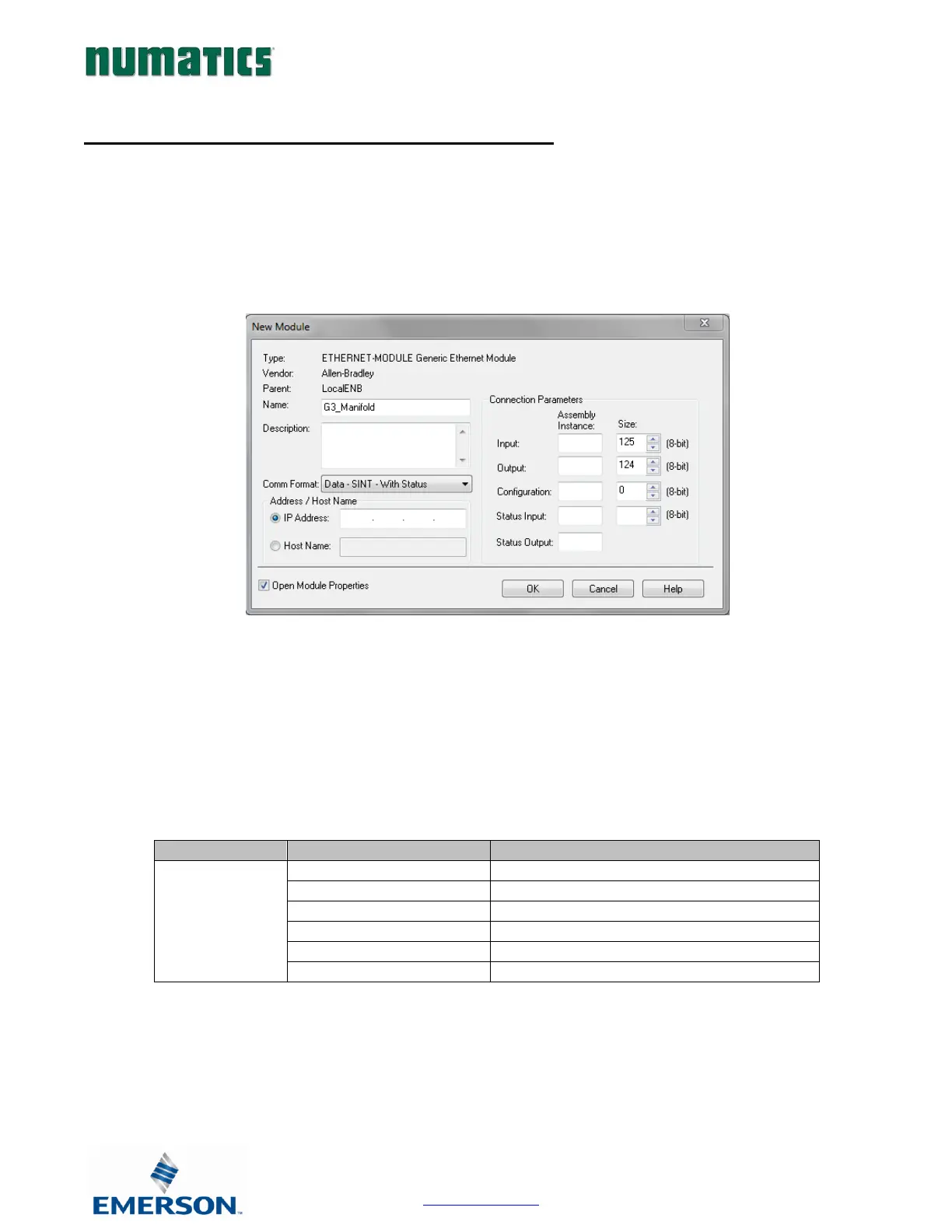
Module configuration. These parameters include: “Comm Format”, “Assembly Instance”, “Input Size”, “Output Size”, and
“Configuration”. The “Size” values are determined from the actual physical configuration of the manifold (i.e. how many and
which I/O modules are installed on the manifold. The manifold required data size can easily be determined through the RS
Logix 5000 Config. tab of the Ethernet IP webpage (see page 123). The size values are a minimum value; higher values can be
used if future manifold I/O expansion is required. An example of the Generic Ethernet module configuration box is shown
below.
Generic Ethernet Module Parameters
Comm. Format
The “Comm Format” determines the format of the data exchanged with the G3 EtherNet/IP
TM
node.
The “Comm Format” parameter “with status”; writes the G3 diagnostic and I/O status and diagnostic data to a separate PLC
status table.


 To Next Page