L
--
740
--
28
--
E
9.1.2 Switch operation
The transmitter has two infrared switches: "SEL" and "ENT". Operation of these switches is described
here. For information about parameter configuration and other functions, see the respective sections.
(1) "ENT" operation
This switch is used for scrolling the display, scrolling the cursor, etc.
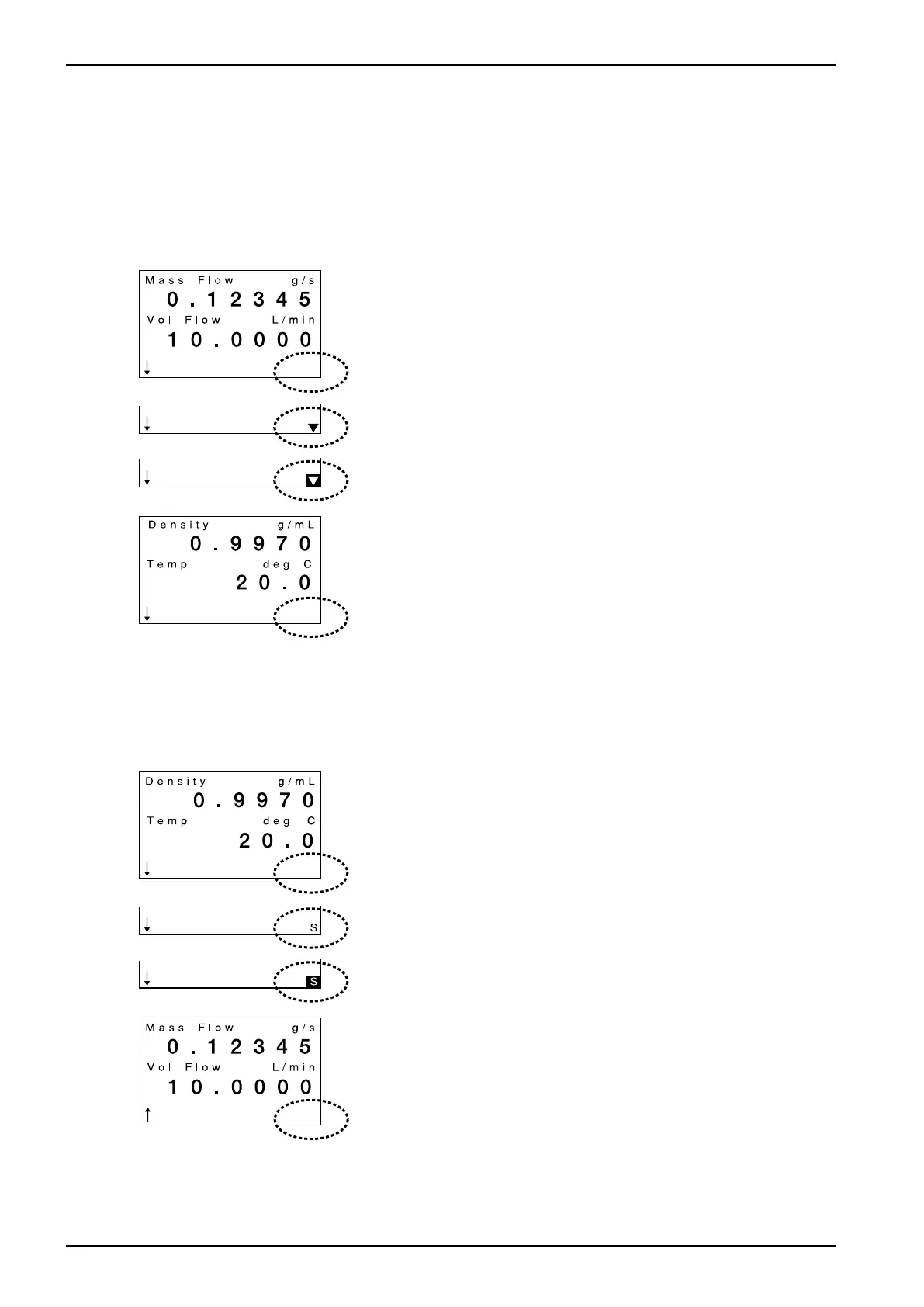
Here we cover "ENT" operation as an example of switching variables view screens.
(2) "SEL" operation
This operation is used to switch screen direction, increasing the number, parameter select, etc. Here
we cover "SEL1" operation as an example of switching screen direction.
① Touch ENT key at lower right of screen over glass faceplate with
your finger.
When the key responds, a down arrow ▼ appears at lower right of
screen (surrounded by a dotted circle) where nothing was found
as shown in the next screen.
② After down arrow comes on for 0.5 sec, arrow ▼ is highlighted as
shown in the following screen.
③ While the highlighted arrow stays on (0.5s), remove your finger.
Arrow ▼ goes out and the screen changes.
(With your finger held on, you can continue "ENT" operation. It is
beneficial for fast scroll.)
④ End of "ENT" operation
The next screen appears.
① Touch SEL key at lower left of screen over glass faceplate with
your finger.
When the key responds, a letter S appears at right bottom of
screen (surrounded by a dotted circle) where nothing was found
as shown in the next screen.
② After letter S comes on for 0.5 sec, the letter S appears highlighted
as shown in the following screen.
③ While the highlighted S stays on (0.5s), remove your finger.
Letter S goes out and arrow ↓at bottom left of screen changes to ↑.
(With your finger held on, you can continue "SEL" operation. It is
beneficial for quickly increasing the number.)
④ End of "SEL" operation
Arrow ↓ has changed to ↑.
Operating "ENT" in this state allows the screen to scroll in the
opposite direction.







 To Next Page