FUEL SYSTEM 20A
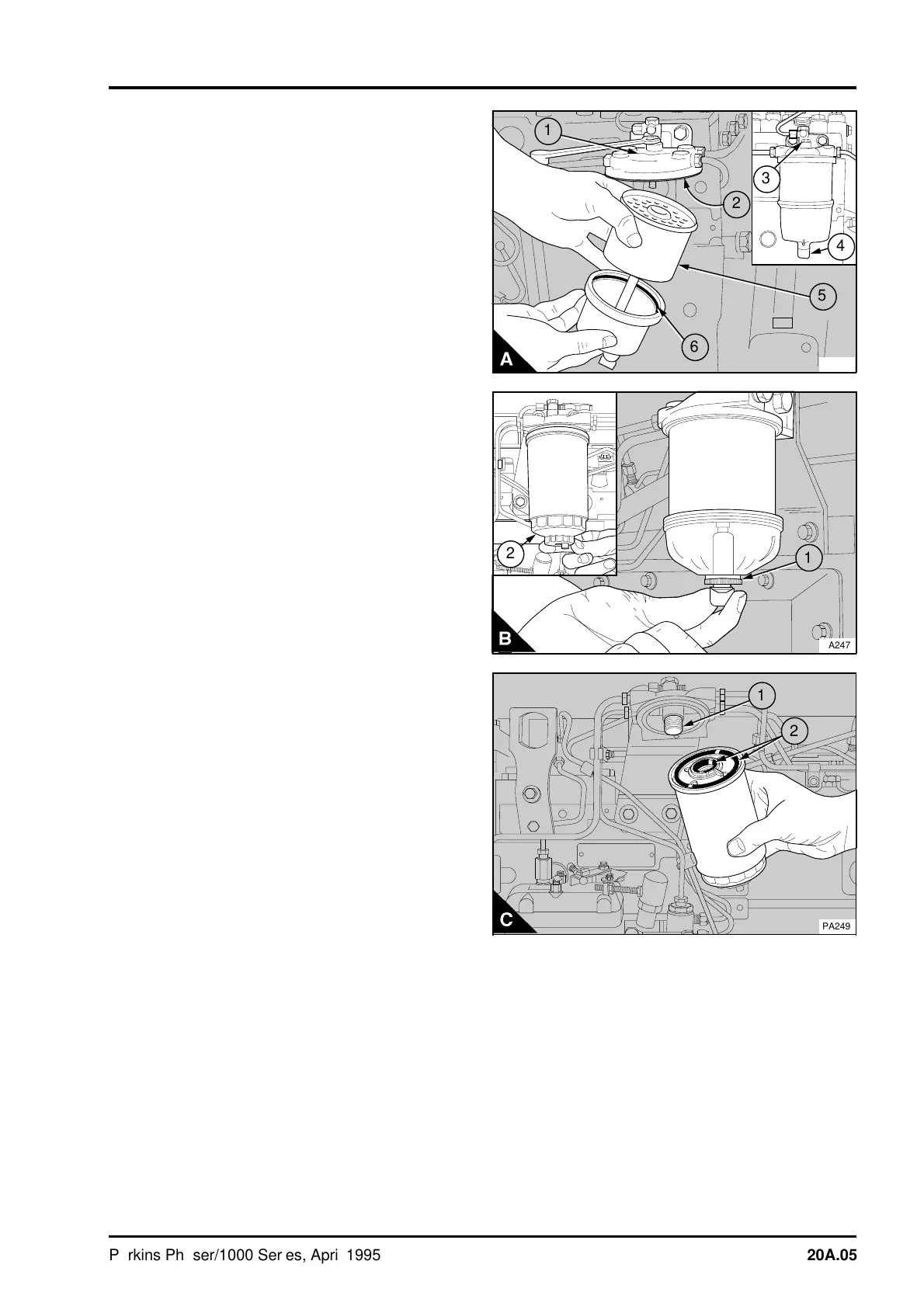
1 Clean the outside surfaces of the fuel filter
assembly. If a drain tap (A4) or (B1) is fitted to the
bottom cover of the filter, drain the fuel from the
filter.
2 Hold the bottom cover of the filter element and
release the setscrew (A3) which is fitted through
the filter head above the centre of each element.
3 Lower the bottom cover of the filter.
4 Remove the element (A5) and discard it.
5 Clean the inside surfaces of the filter head (A1)
and bottom filter cover.
6 Fit the new sealing rings (A6) and (A2).
7 Put the bottom cover on the bottom of the new
element (A5) and assemble it squarely to the filter
head to ensure that the element is fitted in the
centre against the joint in the filter head.
8 Hold the assembly in this position and engage
and tighten the setscrew.
9Eliminate all air from the fuel system, operation
20A-08.
To renew the filter element of the canister type:
1 Thoroughly clean the outside surfaces of the fuel
filter assembly.
2 Loosen the drain device (B2) at the bottom of
the canister and allow the water/fuel to drain into a
suitable container.
3 Use a strap wrench or similar tool to loosen the
filter canister and remove the canister.
4 Ensure that the threaded adaptor (C1) is secure
in the filter head and that the inside of the head is
clean.
5 Lubricate lightly the seals (C2) on the top of the
new canister with clean fuel. Fit the new canister to
the filter head and tighten by hand only.
6Eliminate the air from the fuel filter, operation
20A-08.
PL009
5
a
a
6
1
a
a
2
4
a
a
3
a
a
2
a
a
1
PA247
a
a
a
a
a
a
a
a
a
a
a
a
a
a
a
a
a
a
a
a
a
a
a
a
a
a
a
a
a
a
a
a
a
a
a
a
a
a
a
a
a
a
a
a
a
a
a
a
a
a
a
a
a
a
a
a
a
a
a
a
a
a
a
a
a
a
a
a
a
a
a
a
a
a
a
a
a
a
a
a
a
a
a
a
a
a
1
a
a
2
PA249
Perkins Phaser/1000 Series, April 1995 20A.05




 To Next Page