PAGE 1-71118824, VER. 00
1.3 PRODUCT OPERATING SOFTWARE UPGRADES
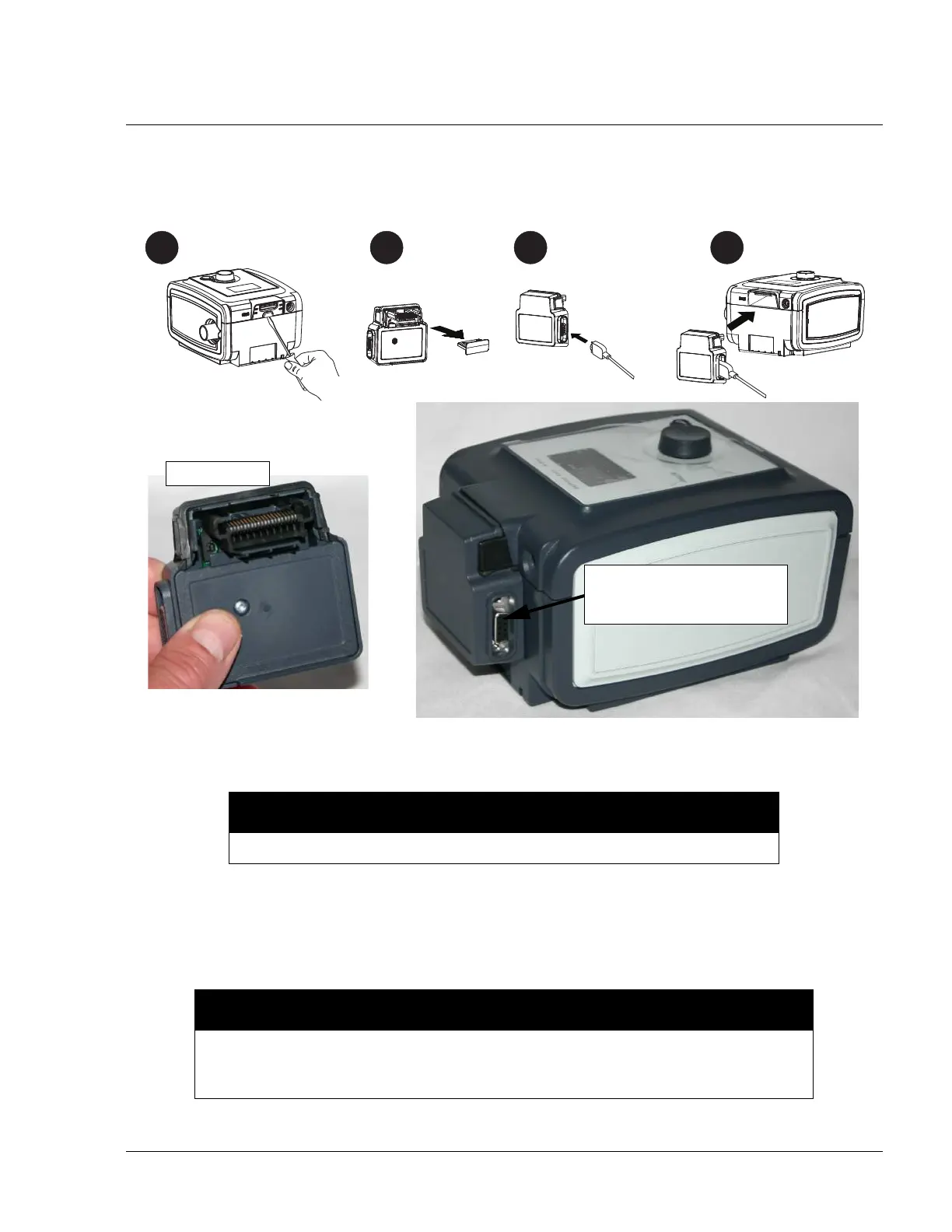
Most Respironics products can be upgraded with the latest available software via an Internet connection. To
connect the device to a PC with an internet connection, refer to the following illustration.
FIGURE 1-3: LINK MODULE
You must be a registered user to download software. If you are not a registered user, go to http://
my.respironics.com and complete the on-line registration process.
Once you have access to download the software, perform the following:
1. Log into http://my.respironics.com.
NOTE
The Link Module and DB9F-DB9M cable are available in RP kit #1074113.
NOTE
Respironics service software is now available at http://my.respironics.com. In the event
that you are unable to access this site, log onto http://servicesoftware.respironics.com
to download Respironics service software.
Connect a DB9F-DB9M
Cable between here and
COM1 of the PC.
2
3
1
4



 To Next Page
 Loading...











