FUNCTIONAL OV£RVIEW
l.O0:0 nO
I, uu u O'u
4
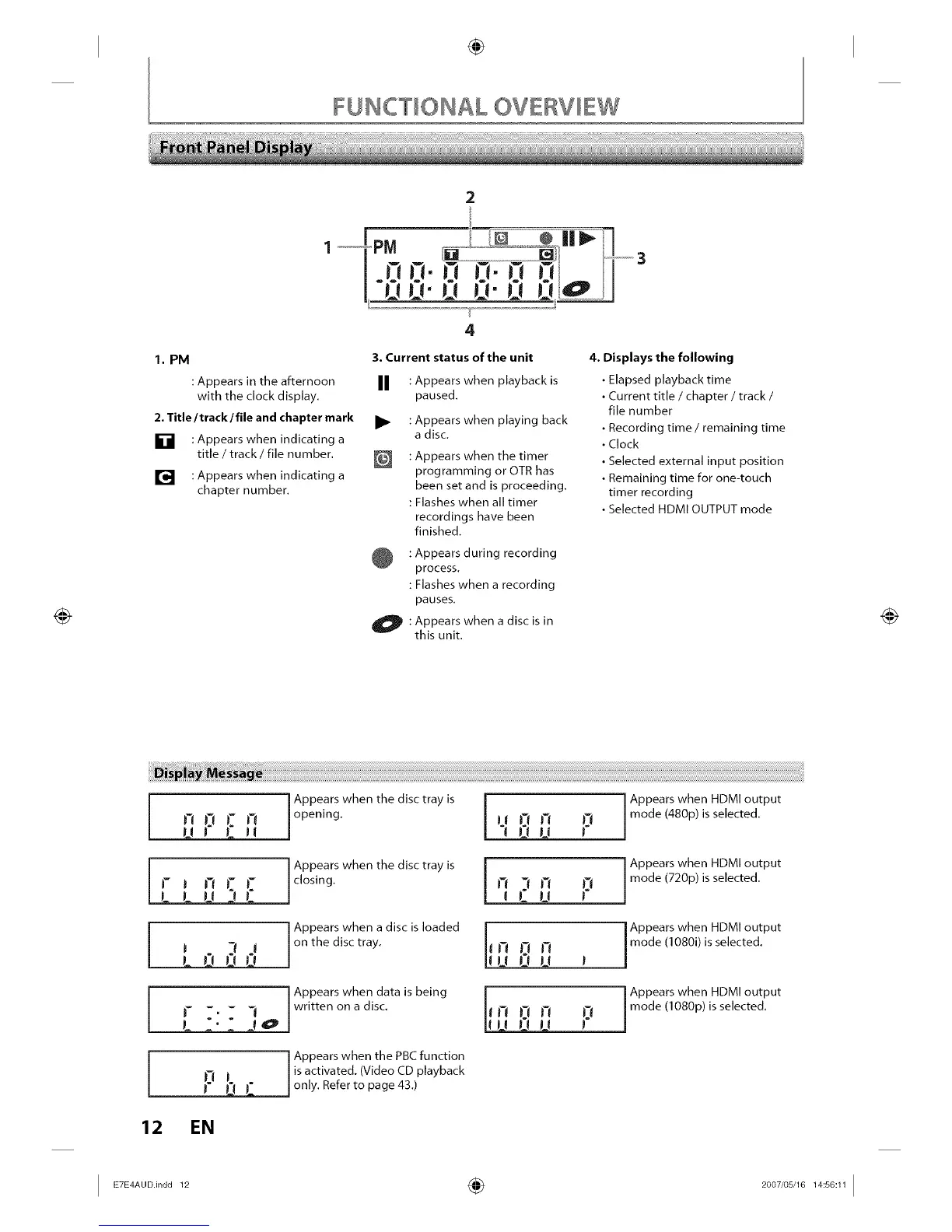
1. PM
3. Current status of the unit
: Appears in the afternoon II
with the clock display.
2. Title/track / file and chapter mark •
[] : Appears when indicating a
title / track / file number.
[] : Appears when indicating a
chapter number.
: Appears when playback is
paused.
: Appears when playing back
a disc.
: Appears when the timer
programming or OTR has
been set and is proceeding.
: Flashes when all timer
recordings have been
finished.
: Appears during recording
process.
: Flashes when a recording
pauses.
O :
Appears when a disc is in
this unit.
4. Displays the following
• Elapsed playback time
• Current title / chapter / track /
file number
• Recording time / remaining time
• Clock
• Selected external input position
• Remaining time for one-touch
timer recording
• Selected HDMI OUTPUT mode
no_n
rJ nJTL-
1 I II IL
i m . 3 J
I I'I I'! 1"1
[ -,
L
12 EN
Appears when the disc tray is j-
opening, l "l I_ L'I-' P
Appears when the disc tray is [
closing, l q i_| UI7 P
Appears when a disc is loaded |
on the disc tray. _ 17 17 Ii
uOu
Appears when data is being
written on a disc,
Appears when the PBC function
is activated. (Video CD playback
only. Refer to page 43.)
Appears when HDMI output
mode (480p) is se ected.
Appears when HDMI output
mode (720p) is se ected.
i Appears when HDMI output
mode (1080i) is selected.
r Appears when HDMI output
_17 twl t7 iwt I m°de(1080p) is selected"
I ETE_AU°in°°12 ÷ 2°°7'°s'161_:s°:111














 To Next Page