Before you play back DVD, read the following information.
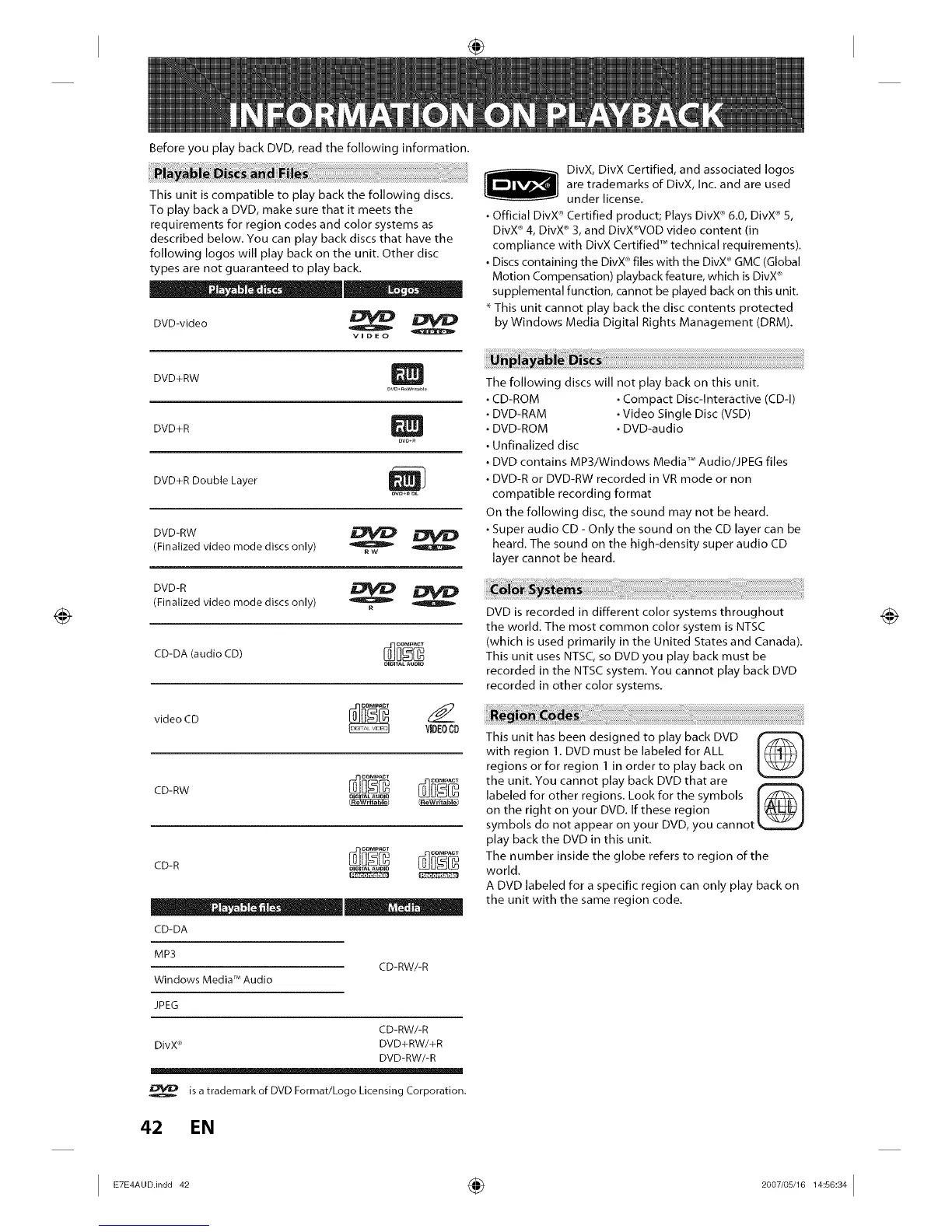
This unit is compatible to play back the following discs.
To play back a DVD, make sure that it meets the
requirements for region codes and color systems as
described below. You can play back discs that have the
following Iogos will play back on the unit. Other disc
types are not guaranteed to play back.
DVD-video o
VIDEO
DVD+RW
DVD+R
DVO_
DVD+R Double Layer
ow+n DL
DVD-RW
(Finalized video mode discs only)
o
RW
DVD-R
(Finalized video mode discs only) R
CD-DA (audio CD)
video CD
VIDEOCD
CD-RW
OIGITA_AUOIO
CD-R
CD-DA
MP3
Windows Media TM Audio
JPEG
CD-RW/-R
CD-RW/-R
DivX _' DVD+RW/+R
DVD-RW/-R
is a trademark of DVD Format/Logo Licensing Corporation.
42 EN
DivX, DivX Certified, and associated Iogos
are trademarks of DivX, Inc. and are used
under license.
• Official DivX 'r_Certified product; Plays DivX _'6.0, DivX ®5,
DivX _ 4, DivX _ 3, and DivX_r_VODvideo content (in
compliance with DivX Certified TM technical requirements).
• Discs containing the DivX _'files with the DivX_'GMC (Global
Motion Compensation) playback feature, which is DivX _'
supplemental function, cannot be played back on this unit.
This unit cannot play back the disc contents protected
by Windows Media Digital Rights Management (DRM).
The following discs will not play back on this unit.
CD-BOM • Compact Disc-Interactive (CD-I)
DVD-BAM • Video Single Disc (VSD)
DVD-BOM • DVD-audio
Unfinalized disc
DVD contains MP3/Windows Media TM Audio/JPEG files
DVD-R or DVD-RW recorded in VB mode or non
compatible recording format
On the following disc, the sound may not be heard.
• Super audio CD - Only the sound on the CD layer can be
heard. The sound on the high-density super audio CD
layer cannot be heard.
DVD is recorded in different color systems throughout
the world. The most common color system is NTSC
(which is used primarily in the United States and Canada).
This unit uses NTSC, so DVD you play back must be
recorded in the NTSC system. You cannot play back DVD
recorded in other color systems.
This unit has been designed to play back DVD _'_
with region 1. DVD must be labeled for ALL
regions or for region 1 in order to play back on
the unit. You cannot play back DVD that are
labeled for other regions. Look for the symbols I/_l
on the right on your DVD. If these region I _(_ I
symbols do not appear on your DVD, you cannot _
play back the DVD in this unit.
The number inside the globe refers to region of the
world.
A DVD labeled for a specific region can only play back on
the unit with the same region code.
I E7E4AUDindd 42 _ 2007/05/1614:56:34 I














 To Next Page