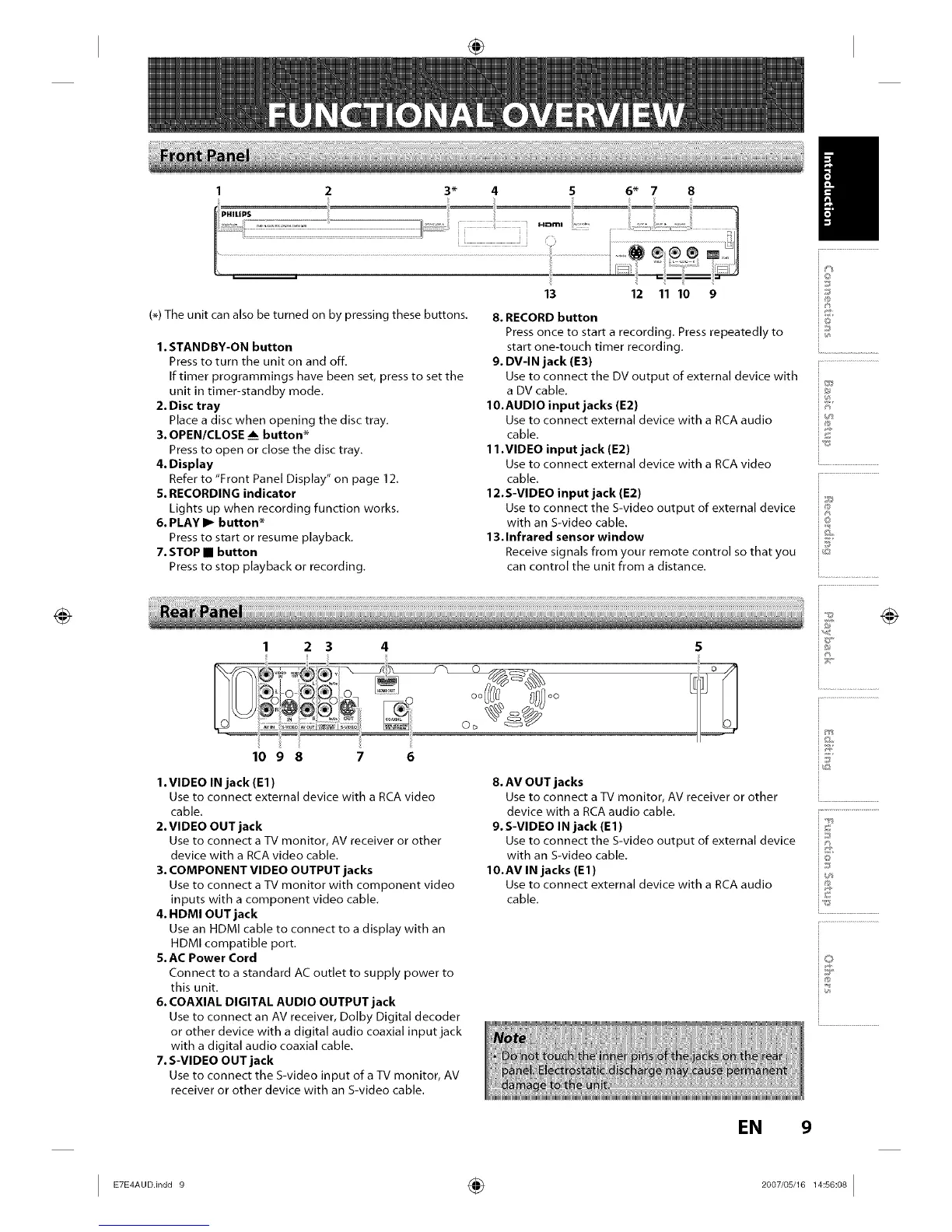
1 2 3* 4 5 6* 7 8
(_) The unit can also be turned on by pressing these buttons.
1. STANDBY-ON button
Press to turn the unit on and off,
If timer programmings have been set, press to set the
unit in timer-standby mode.
2. Disc tray
Place a disc when opening the disc tray.
3. OPEN/CLOSE ___button*
Press to open or close the disc tray.
4. Display
Refer to "Front Panel Display" on page 12.
5. RECORDING indicator
Lights up when recording function works.
6. PLAY I_ button*
Press to start or resume playback.
7. STOP • button
Press to stop playback or recording.
13 12 11 10 9
8. RECORD button
Press once to start a recording. Press repeatedly to
start one-touch timer recording.
9. DV-IN jack (E3)
Use to connect the DV output of external device with
a DV cable.
10.AUDIO input jacks (E2)
Use to connect external device with a RCA audio
cable.
11.VIDEO input jack (E2)
Use to connect external device with a RCA video
cable.
12.S-VIDEO input jack (E2)
Use to connect the S-video output of external device
with an S-video cable.
13.Infrared sensor window
Receive signals from your remote control so that you
can control the unit from a distance.
I
io
_J
i®
©
io
i.........................
2 3 4
iiii i i
1098 7 6
1. VIDEO IN jack (El)
Use to connect external device with a RCA video
cable.
2. VIDEO OUT jack
Use to connect a %/monitor, AV receiver or other
device with a RCA video cable.
3. COMPONENT VIDEO OUTPUT jacks
Use to connect a %/monitor with component video
inputs with a component video cable.
4. HDMI OUT jack
Use an HDMI cable to connect to a display with an
HDMI compatible port.
5. AC Power Cord
Connect to a standard AC outlet to supply power to
this unit.
6. COAXIAL DIGITAL AUDIO OUTPUT jack
Use to connect an AV receiver, Dolby Digital decoder
or other device with a digital audio coaxial input jack
with a digital audio coaxial cable.
7. S-VIDEO OUT jack
Use to connect the S-video input ofa TV monitor, AV
receiver or other device with an S-video cable.
8. AV OUT jacks
Use to connect a %/monitor, AV receiver or other ..................................
device with a RCA audio cable. ............................................
9. S-VIDEO IN jack (El) ::
Use to connect the S-video output of external device i:_
with an S-video cable. Q
10.AV IN jacks (El) iI:1_
_s
Use to connect external device with a RCA audio ::_
cable. ,_
S
@
EN 9
I ° ÷ I














 To Next Page