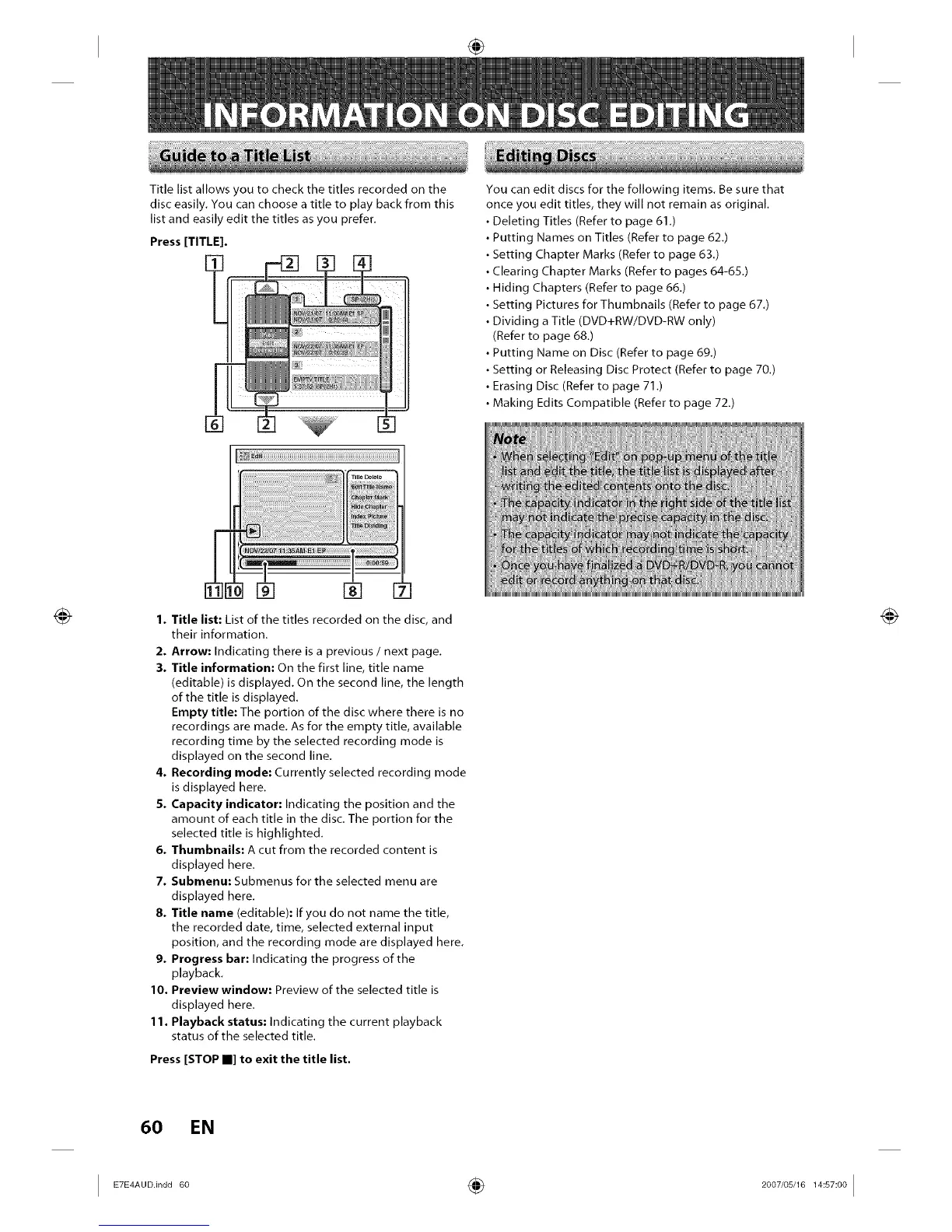
Title list allows you to check the titles recorded on the
disc easily. You can choose a title to play back from this
list and easily edit the titles as you prefer.
Press [TITLE].
[]
1. Title list: List of the titles recorded on the disc, and
their information.
2. Arrow: Indicating there is a previous / next page.
3. Title information: On the first line, title name
(editable) is displayed. On the second line, the length
of the title is displayed.
Empty title: The portion of the disc where there is no
recordings are made. As for the empty title, available
recording time by the selected recording mode is
displayed on the second line.
4. Recording mode: Currently selected recording mode
is displayed here,
5. Capacity indicator: Indicating the position and the
amount of each title in the disc, The portion for the
selected title is highlighted,
6. Thumbnails: A cut from the recorded content is
displayed here,
7. Submenu: Submenus for the selected menu are
displayed here,
8. Title name (editable): If you do not name the title,
the recorded date, time, selected external input
position, and the recording mode are displayed here,
9. Progress bar: Indicating the progress of the
playback,
I0. Preview window: Preview of the selected title is
displayed here,
11. Playback status: Indicating the current playback
status of the selected title.
Press [STOP II] to exit the title list.
You can edit discs for the following items, Be sure that
once you edit titles, they will not remain as original,
Deleting Titles (Refer to page 61,)
Putting Names on Titles (Refer to page 62,)
Setting Chapter Marks (Refer to page 63,)
Clearing Chapter Marks (Refer to pages 64-65,)
Hiding Chapters (Refer to page 66,)
Setting Pictures for Thumbnails (Refer to page 67,)
Dividing a Title (DVD+RW/DVD-RW only)
(Refer to page 68,)
• Putting Name on Disc (Refer to page 69,)
• Setting or Releasing Disc Protect (Refer to page 70.)
• Erasing Disc (Refer to page 71,)
• Making Edits Compatible (Refer to page 72,)
_uD m
_||st JIS,
irmatlr_
_filn[flfiln[flfiln[fifiln[flfiln
_ort. [[ii[i!
[fl]fil_[fl]fil_[fl]fil_[fi]fil_[fl]fil_[fl
60 EN
I ETE A00i"0060 ÷ 2007'0SJ1 I S 001














 To Next Page