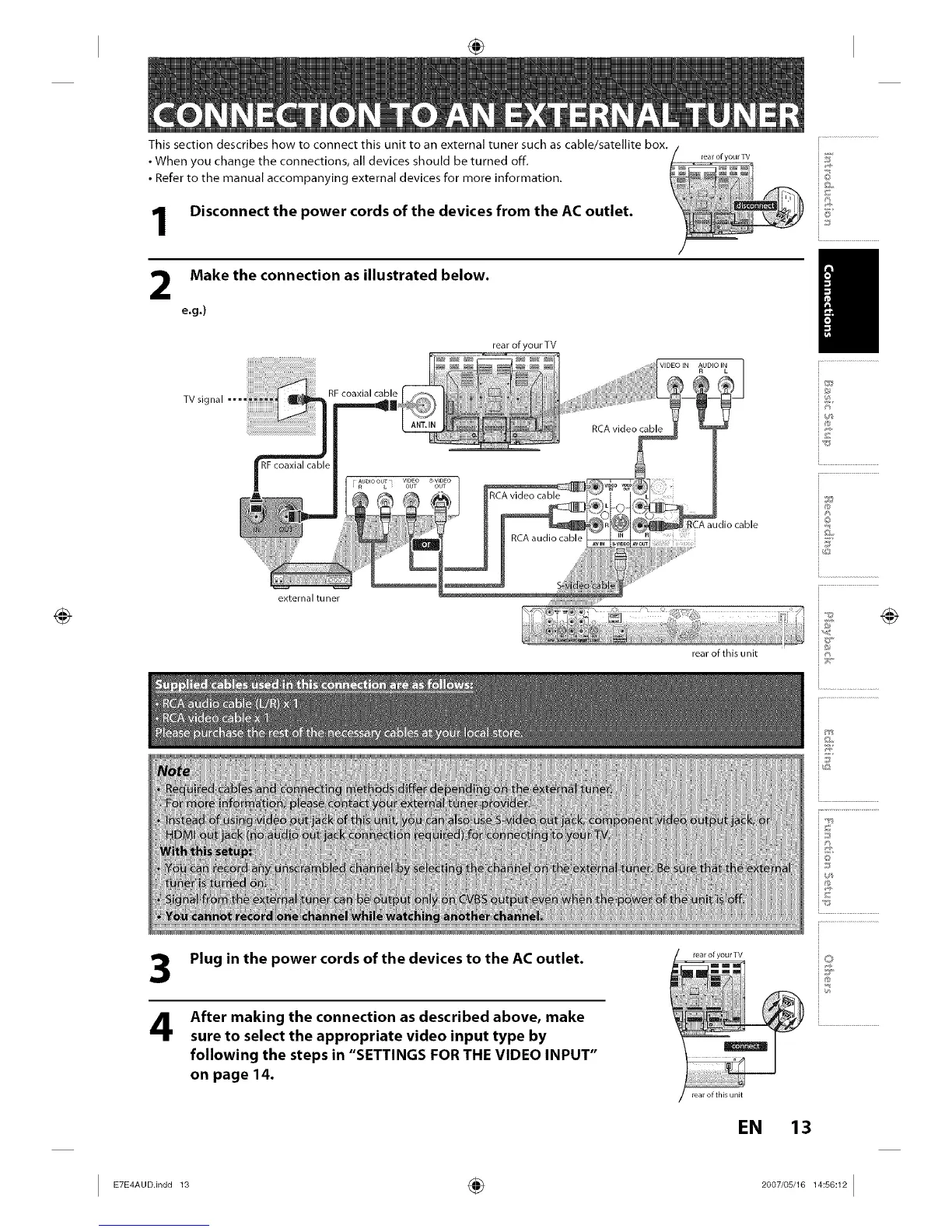
This section describes how to connect this unit to an external tuner such as cable/satellite box+
• When you change the connections, all devices should be turned off+
• Refer to the manual accompanying external devices for more information.
Disconnect the power cords of the devices from the AC outlet.
rea r of your TV
Make the connection as illustrated below.
e.g.)
TV signal ....
rear of your TV
externaltuner
rear of this unit
+5
_©
i°
/
+®
+©
i.............................................
+
i+
+++:+
+++
++
+ +++
i+"
3
4
Plug in the power cords of the devices to the AC outlet.
After making the connection as described above, make
sure to select the appropriate video input type by
following the steps in "SETTINGS FOR THE VIDEO INPUT"
on page 14.
rear of your TV
real of this unit
EN 13
I ETE+AUO.+°O01+ ÷ 2007'0+J1+14:++:121














 To Next Page