SPECIAL PLAYBACK
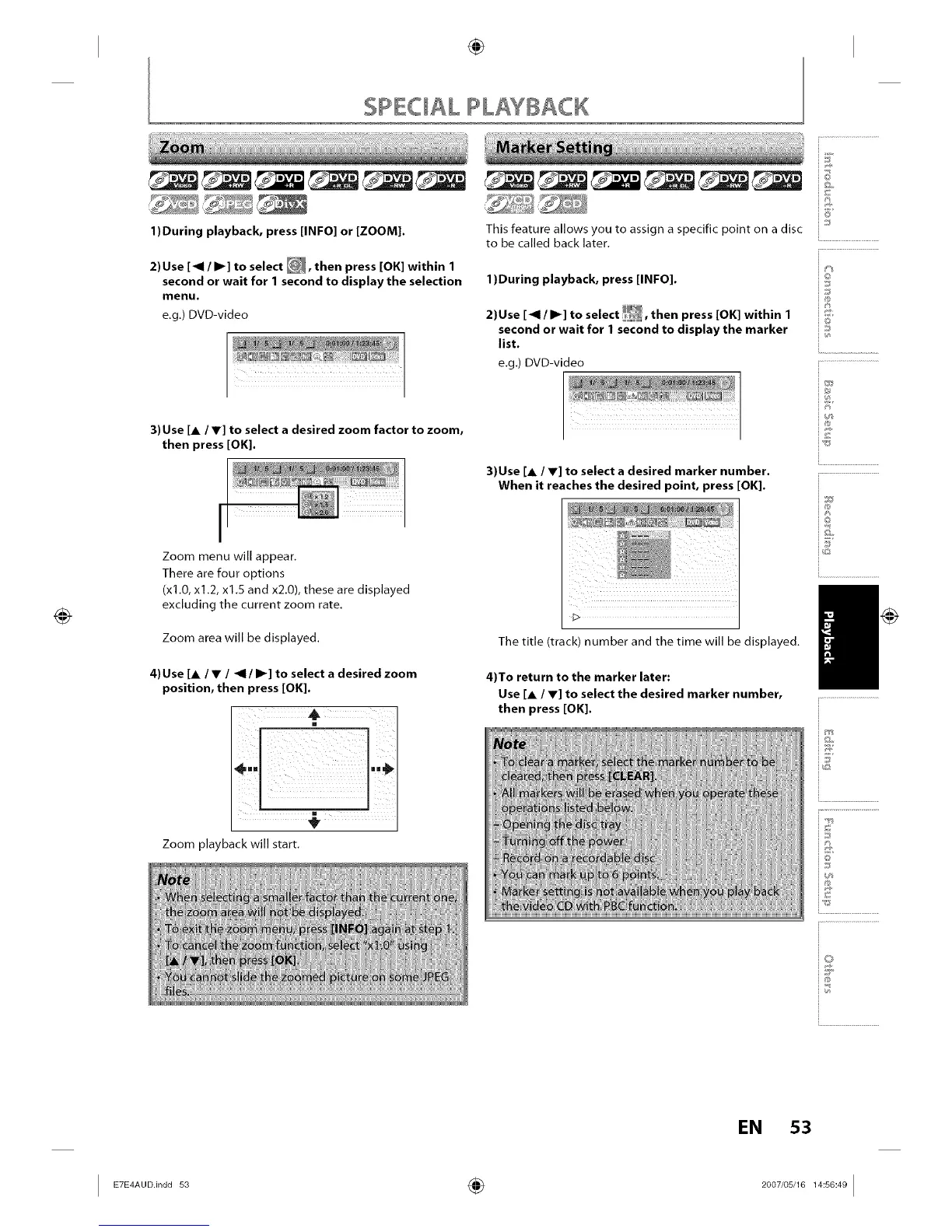
1)During playback, press [INFO] or [ZOOM).
2)Use [_1 / I1_] to select _, then press [OK] within 1
second or wait for 1 second to display the selection
menu.
e.g.) DVD-video
3) Use [A / V] to select a desired zoom factor to zoom,
then press [OK].
iI
Zoom menu will appear.
There are four options
(x1.0, x1.2, x1.5 and x2.0), these are displayed
excluding the current zoom rate.
Zoom area will be displayed.
4)Use [A/V / ,,91/ I1_] to select a desired zoom
position, then press [OK].
m
Zoom playback will start.
_a
_e Pr
fl:tl ti(
:hE
lO1
______ i_
This feature allows you to assign a specific point on a disc
to be called back later.
1)During playback, press [INFO].
2)Use [_1 / I1_]to se ect _, then press [OK] within I
second or wait for 1 second to display the marker
list.
e.g.) DVD-video
3)Use [A / V] to select a desired marker number.
When it reaches the desired point, press [OK).
The title (track) number and the time will be displayed.
4)To return to the marker later:
Use [A / V] to select the desired marker number,
then press [OK].
©
J
@
i®
i©
/
i.............................................
EN 53
I _°Dn°°s_ ÷ _°°_'°s'_"s°_°I














 To Next Page