You can program the unit to record up to 12 programs
within a month in advance. Daily or weekly program
recordings are also available.
Before recording, make sure
• Connect the external tuner to either E1 or E2 and set it
to output audio/video signals when it comes to the time
you want to start recording.
• Do not change the external tuner's channel while you
are recording. You cannot watch one channel and
record another at the same time.
• Set the clock before setting a timer programming.
• Insert a recordable disc with enough recordable space.
PLaY
.@/: AgC DEF
G.I JKL M.0
sl
_ett
nrn_n_:llSt
::"IJrner _rc
28 EN
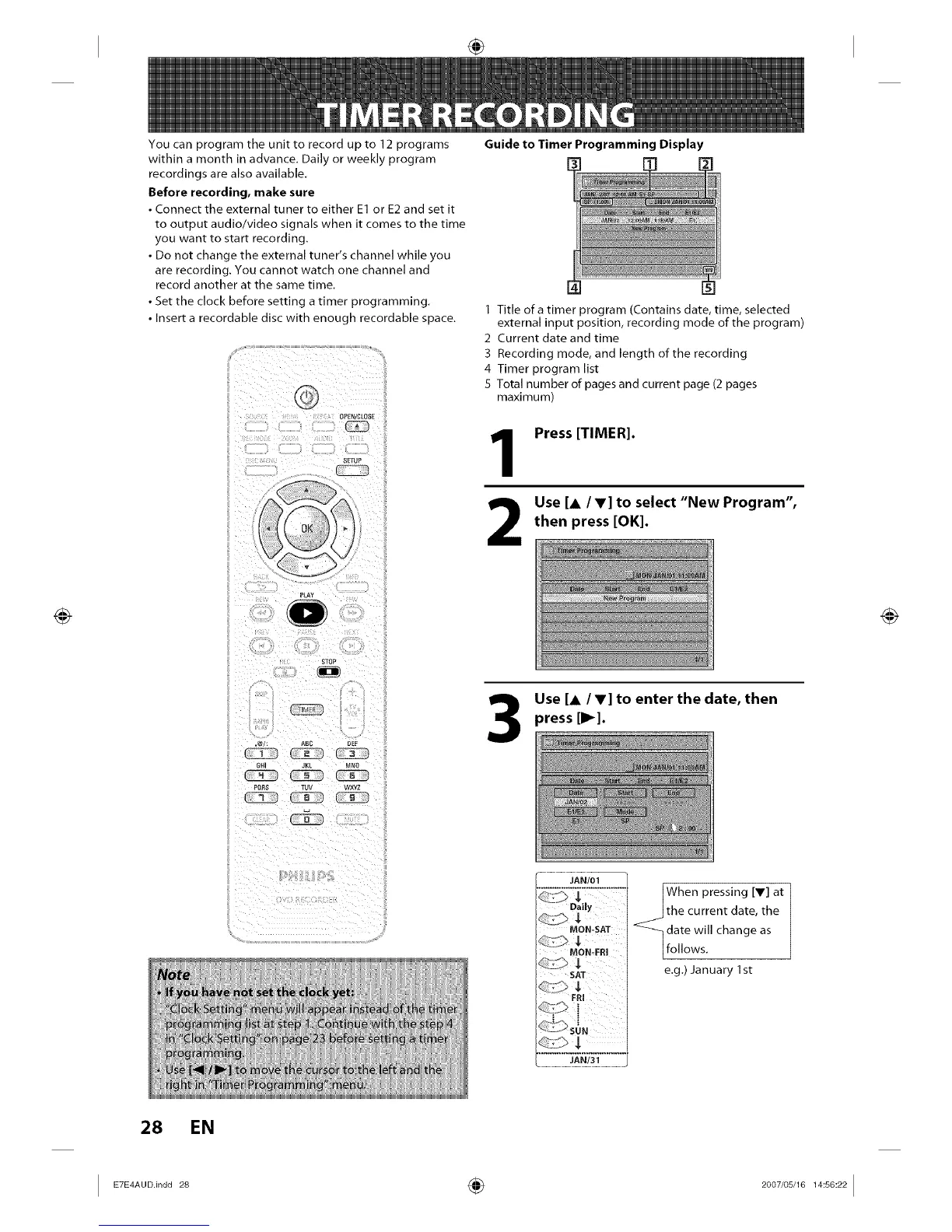
Guide to Timer Programming Display
1 Title of a timer program (Contains date, time, selected
external input position, recording mode of the program)
2 Current date and time
3 Recording mode, and length of the recording
4 Timer program list
5 Total number of pages and current page (2 pages
maximum)
1
2
Press [TIMER].
Use [a /T] to select "New Program",
then press [OK].
Use [a IV] to enter the date, then
press [1_].
JAN/01
MON-SAT
MON_FRI
SAT
When pressing [V] at
the current date, the
_date change as
will
follows.
e.g.) January 1st
I E7E4AUD'indd 28 _ 2007/05/16 14:56:22 I














 To Next Page