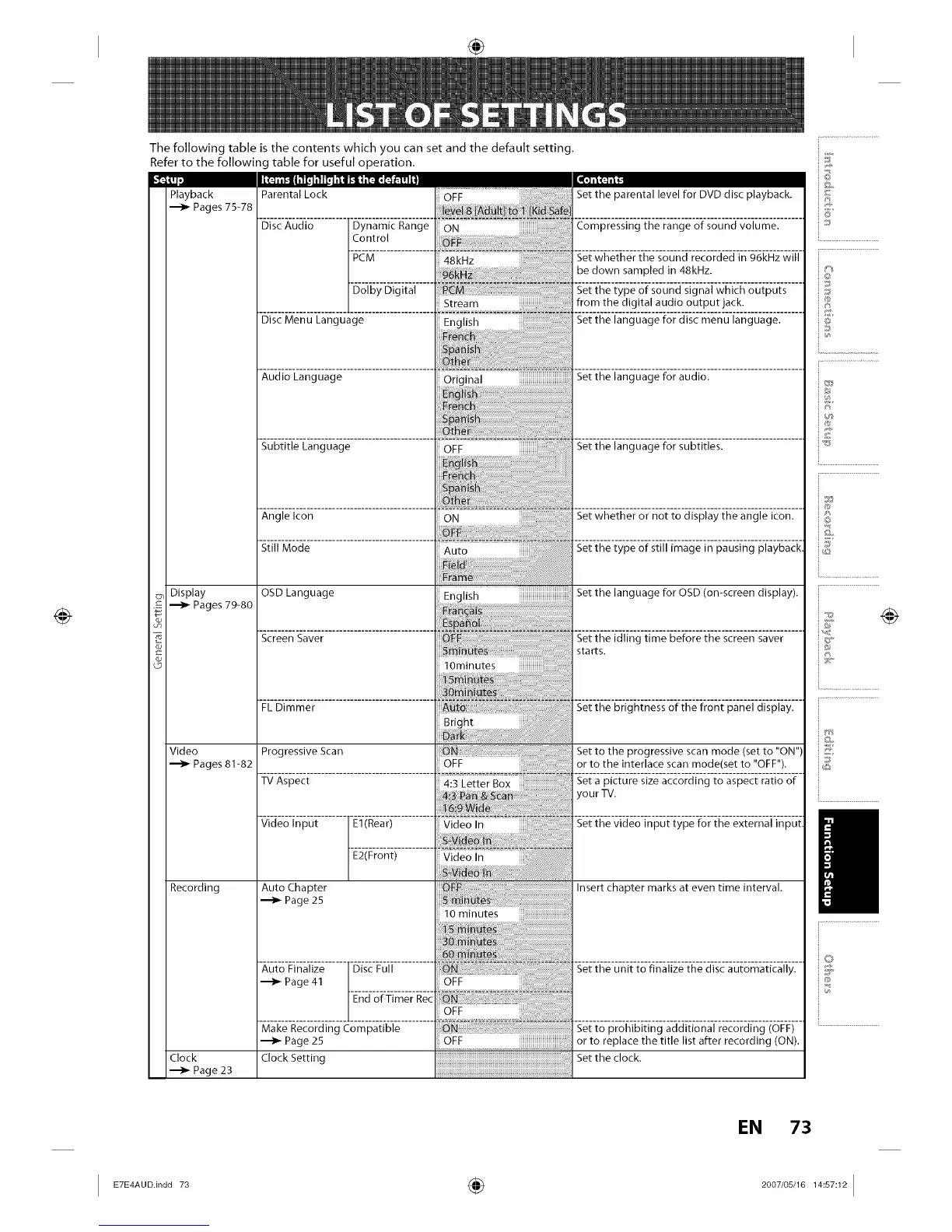
The following table is the contents which you can set and the default setting.
Refer to the following table for useful operation.
Playback
Pages 75-78
c_, Display
Pages 79-80
8
Video
Pages 81-82
Recording
Clock
Page 23
Parental Lock
l'ill_]lll"
Set the parental level for DVD disc playback.
Disc Audio Dynamic Range Compressing the range of sound volume.
Control
Set whether the sound recorded in 96kHz will
be down sampled in 48kHz.
Dolby Digital Set the type of sound signal which outputs
Stream from the digital audio output jack.
D,scMenuLangua ............... ..........
B
...... : ......................................... ......................... ........ =.............................
AudtoLan ua e • • Set the language for audlo
g g Original
Subtitle Language Set the language for subtitles.
Set whether or not to display the angle icon.
Set the type of still image in pausing playback,
Still Mode
OSD Language
Screen Saver
FLDimmer
Progressive Scan
TVAspect
Video Input E1(Rear)
E2(Front)
Auto Chapter
•--_ Page 25
Auto Finalize
m_Page 41
Make Recording Compatible
Page 25
Clock Setting
i English iiiiiiiiiiiiiiiiiiiiiiiiiiiiiiiiiiiii
OFF iiiiiiiiiiiiiiiiiiiiiiiiiiiiiiii.....
Set the language for OSD (on-screen display).
Set to the progressive scan mode (set to "ON")
or to the interlace scan mode(set to "OFF").
Set a picture size according to aspect ratio of
your TV.
Set the video input type for the external input,
........................................Insert chapter marks at even time interval.
Set the unit to finalize the disc automatically.
Set to prohibiting additional recording (OFF)
or to replace the title list after recording (ON).
Set the clock.
_F
©
J
@
¢%
©
©
EN 73
I ÷ I














 To Next Page