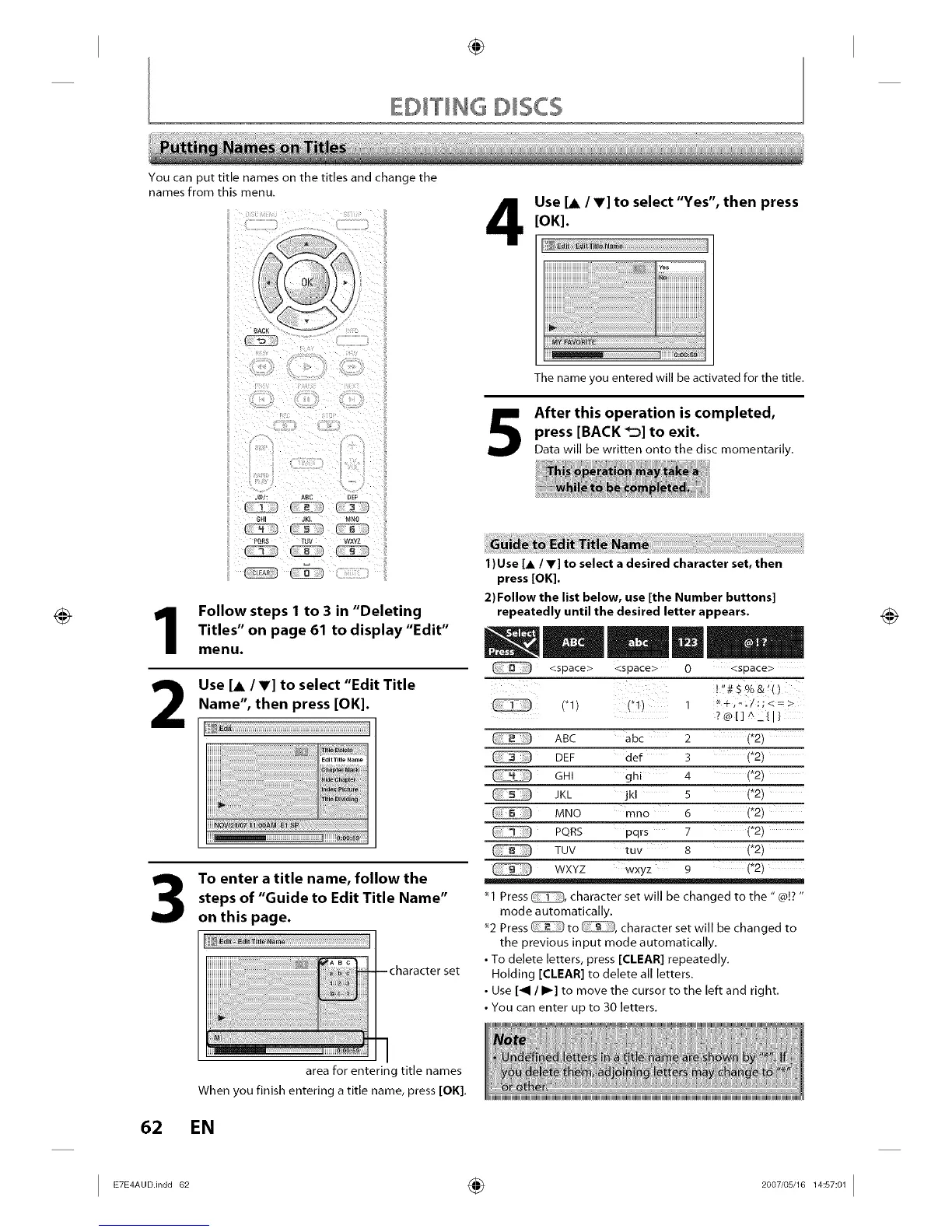
You can put title names on the titles and change the
names from this menu.
Use [A/V] to select "Yes", then press
[OK].
'es i
5
The name you entered will be activated for the title.
After this operation is completed,
press [BACK _] to exit.
Data will be written onto the disc momentarily.
6HI JKL MN0
1
2
Follow steps 1 to 3 in "Deleting
Titles" on page 61 to display "Edit"
menu.
Use [A IV] to select "Edit Title
Name", then press [OK].
3
62
To enter a title name, follow the
steps of "Guide to Edit Title Name"
on this page.
i!!_ili ............'................_;_;_;_;_;i_!_;i_!_;!!;ii_!!_iii!!_iii!!_iii!_iii!_iii!_iii!_iii!_i_!_i;!_!_i_i_i_i_iiiii_i_i_i!i_i_i!iiiiiiiiiii_!_!i!ii!;_i__!;_;_II;;_
--character set
area for entering title names
When you finish entering a title name, press [OK].
EN
I ) Use [, / V] to select a desired character set, then
press [OK].
2) Follow the list below, use [the Number buttons]
repeatedly until the desired letter appears.
<space> <space> 0 <space>
!!!#S% &'()
('1) ('1) 1
?®[]A/{I}
ABC abc 2 (*2)
DEF def 3 (*2)
GHI ghi 4 (*2)
JKL jkl 5 (*2)
MNO mno 6 (*2)
PQRS pqrs 7 (*2)
TUV tuv 8 (*2)
WXYZ wxyz 9 (*2)
*1 Press _, character set will be changed to the "@]? "
mode automatically.
"2 Press _ to _, character set will be changed to
the previous input mode automatically.
• To delete letters, press [(:LEAR] repeatedly.
Holding [(:LEAR] to delete all letters.
• Use [_1 / I1_] to move the cursor to the left and right.
• You can enter up to 30 letters.
I E7E4AUDIindd 62 _ 2007/05/16 14:57:01 I














 To Next Page