iiiiiiiiiiiiiiiiiii!!!!!i!!!!!i¸IIiiiiii¸ii !i !i!! ilii i i i iiii!¸II!!!!!! i i i¸ i i¸ ii¸ii¸i i! i ¸ iiiiiiiiii _!!!!!!!!!ili ! !! iiiii !!! ii¸¸i i¸i¸ i i i¸iiiii iii ¸i¸ii¸i i¸¸ilii ii ii ¸ii _!!!!!!!iiilliiiiii!! i!iii i¸i ii iii ¸ ! i!!!!!!!!!!!!!!!!!!!!!!!!!!!!!!!!!!!!!!!!!!!!!!!!!!!!!!!!!!!!!!!!!!!!!!!!!
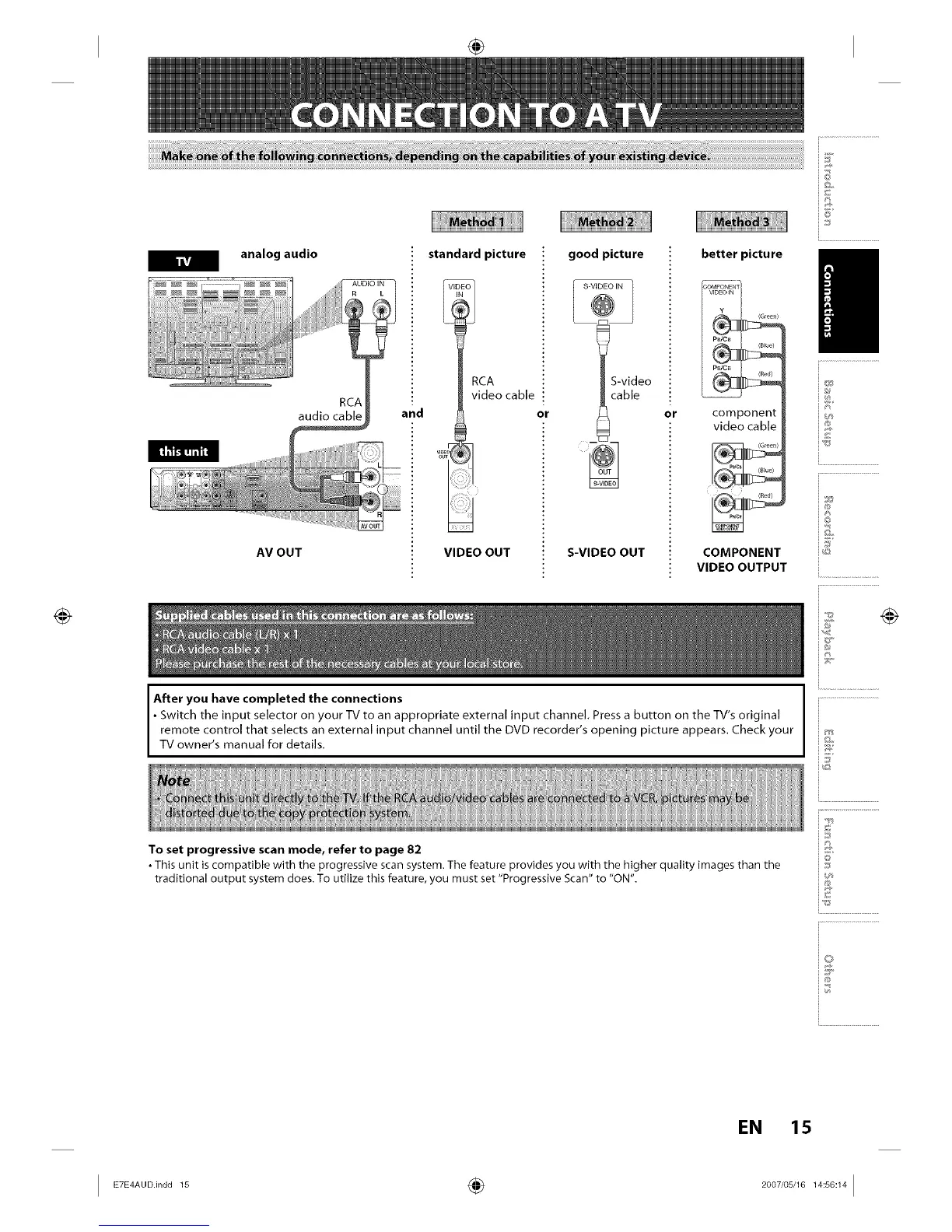
analog audio
RCA
audio cable
AV OUT
standard picture
RCA
video cable
and or
I
i
VIDEO OUT
good picture
_ _S-VI ) IN
S-video
cable
S-VIDEO OUT
or
better picture /
component
video cable
(Green)
(Red)
COMPONENT
VIDEO OUTPUT
After you have completed the connections
• Switch the input selector on your TV to an appropriate external input channel, Press a button on the TV's original
remote control that selects an external input channel until the DVD recorder's opening picture appears. Check your
TV owner s manual for deta Is.
iT
i®
io
iZ"
To set progressive scan mode, refer to page 82
• This unit is compatible with the progressive scan system. The feature provides you with the higher quality images than the
traditional output system does. To utilize this feature, you must set "Progressive Scan" to "ON".
i.............................................
io
i...........................
EN 15














 To Next Page