16 Getting Started with Webster Tools
TS and Webster
®
The Webster Software Main Window
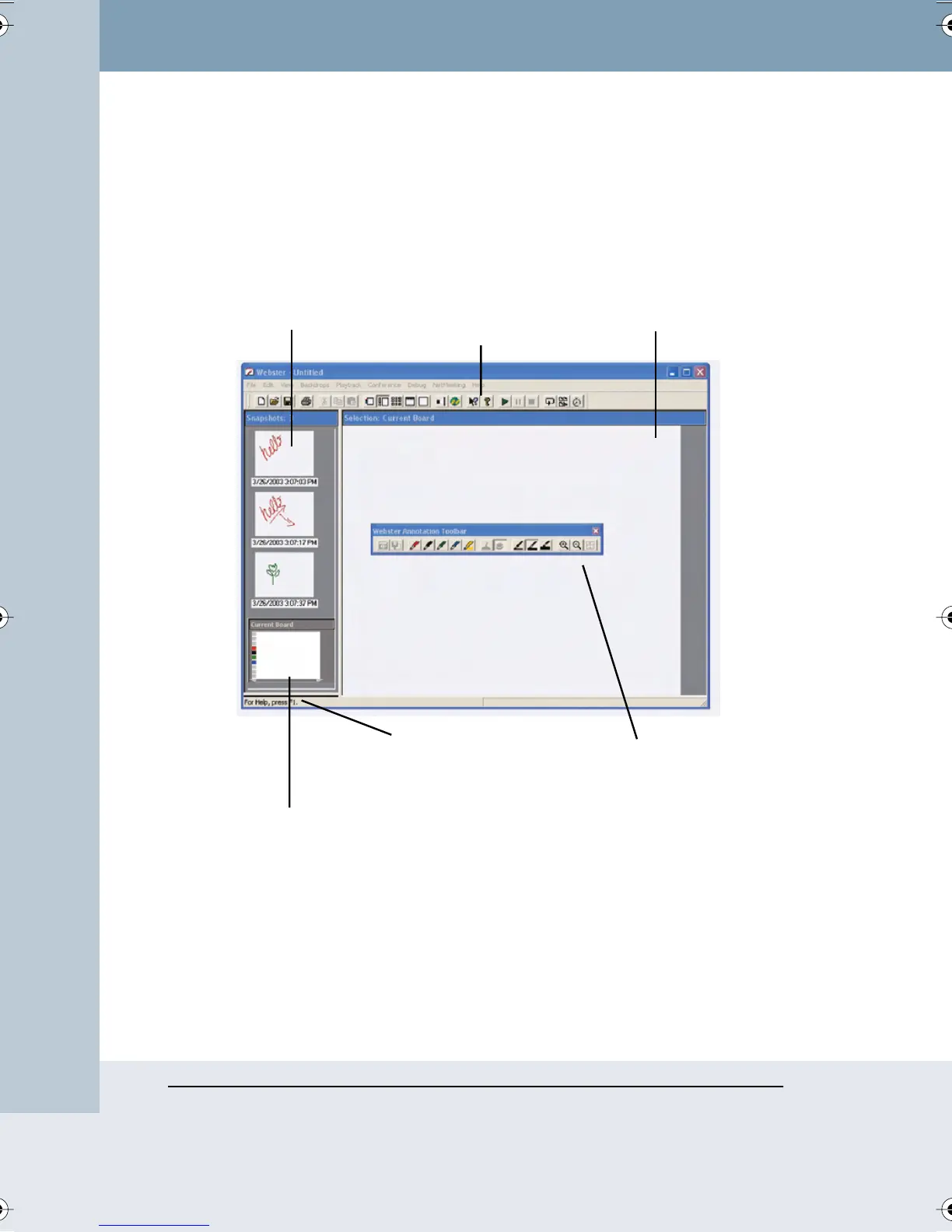
When you launch Webster software, the main window appears. Features of
the main window are described below.
The Snapshot pane is a scrolling list of snapshots in the currently open
Webster file. The Current Board pane displays whatever is currently on the
PolyVision product, regardless of whether it is captured as a snapshot. The
Selection pane provides an enlarged view of one snapshot or the Current
Board pane. Webster provides tools to help you view and edit the image in
the Selection pane.
Current Board Pane
Shows image from the
PolyVision product.
Status Bar
Displays tips (Windows
only) and status
messages.
Selection Pane
Shows currently
selected snapshot or
the current board pane
Annotation Toolbar
Contains pen, erase, and
zoom tools. On a
Macintosh, these tools
are in the command
toolbar.
Snapshot Pane
Shows all snapshots
in the open file with
date/time taken.
Command Toolbar
Contains file, view, and
help tools and includes
annotation tools on a
Macintosh.
Webster_draft2.book Page 16 Friday, November 3, 2006 2:24 PM



 To Next Page