86 Installing the TS and TSL Series Whiteboards
TS and Webster
®
3 Plug the power cord into an electrical outlet.
4 Plug the 9-pin male end of the serial port cable into the whiteboard
and tighten the screws.
5 Plug the other end into your computer’s serial port (if necessary, use a
USB to 9-pin serial adapter available from your Webster dealer).
note:NOTE:
The maximum serial port cable length is 25 feet (7.5 meters). For greater
distances, a serial amplifier is required (available at computer networking
suppliers).
INSTALLING AND USING THE TS WIRELESS OPTION
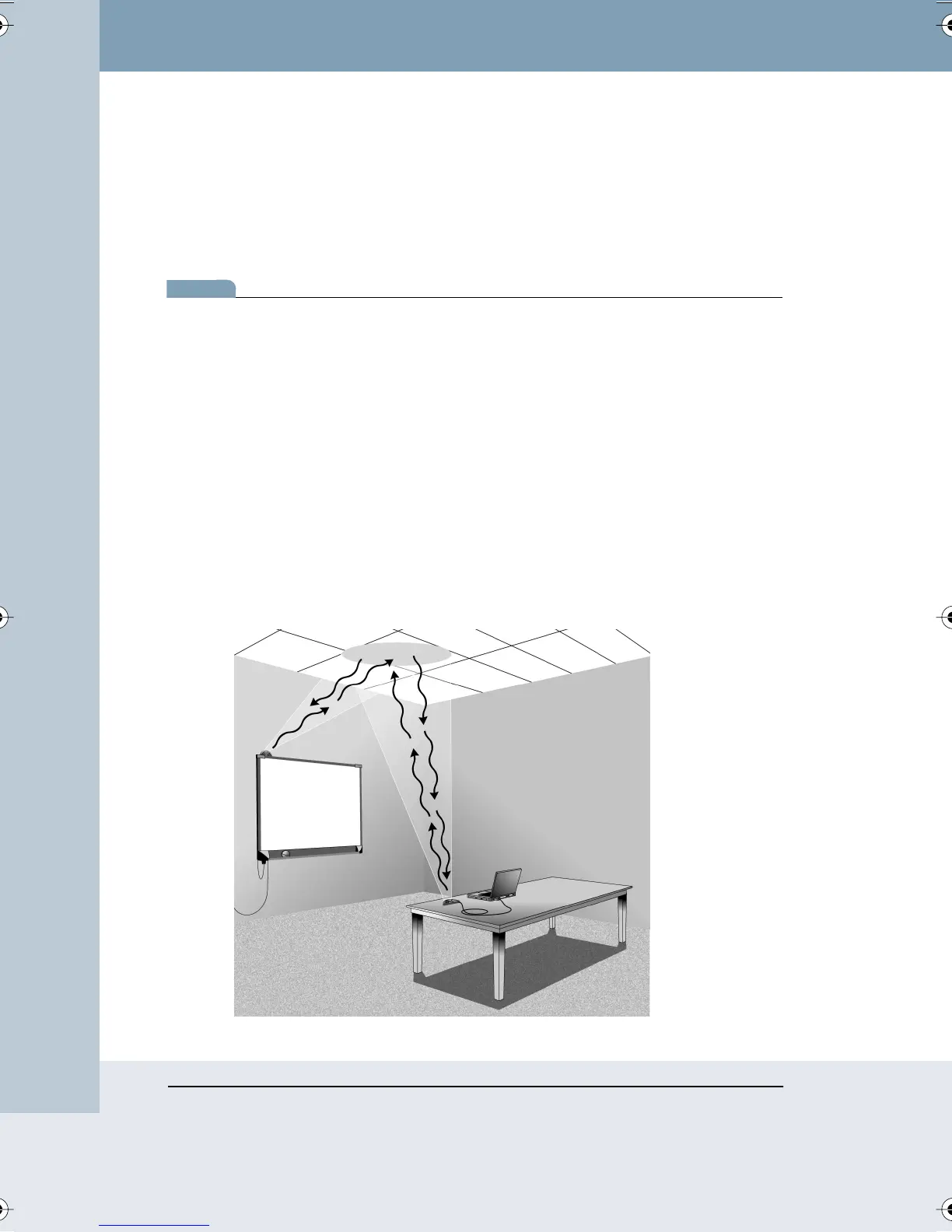
TS Wireless uses reflected infrared (IR) light to communicate between
transceivers on your whiteboard and your computer. A direct line of sight
between the transceivers is not needed for reliable communication. Both
transceivers are designed to shine and detect IR light using the ceiling.
Install TS Wireless so both transceivers have an unobstructed view of the
area of the ceiling between the two transceivers. This allows the IR from
each transceiver to bounce over the heads of people writing on the board
and sitting near the computer.
Webster_draft2.book Page 86 Friday, November 3, 2006 2:24 PM



 To Next Page