Webster Options 65
TS and Webster
®
WEBSTER OPTIONS
Software options enable you to customize your use of Webster.
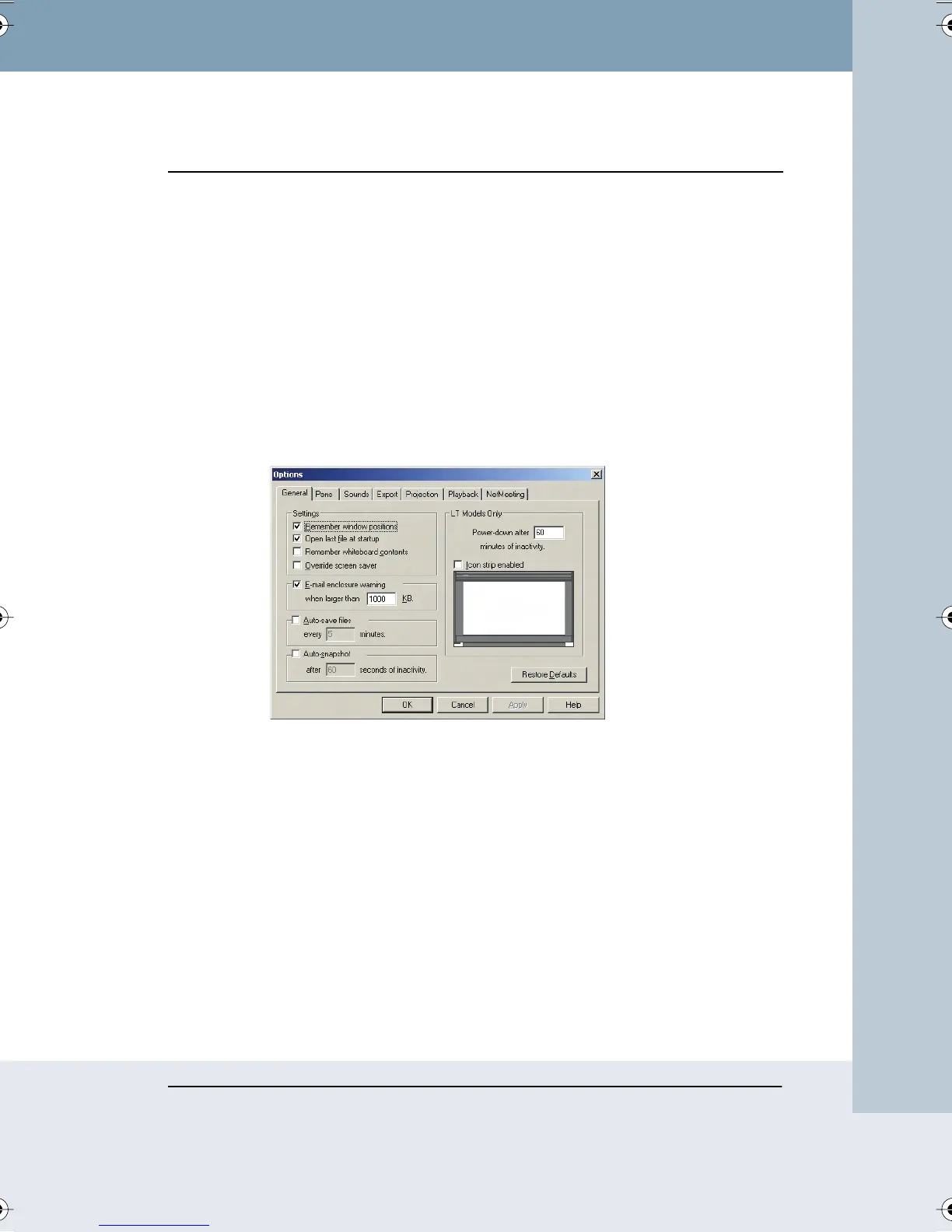
CUSTOMIZING GENERAL OPTIONS
Options on the General tab enable you to specify settings that apply to
features throughout Webster.
To customize General options:
1 Choose “Options” from the Edit menu (Windows) or “Preferences”
from the application menu (Mac).
2 Click the “General” tab. The following dialog appears.
“Remember window positions”: Check to remember the window size and
location on the screen when you next launch Webster or create a new file.
“Open last file at startup”: Check to return to the last file you were working
in when you launch Webster software. Leave unchecked to open a new
untitled file each time.
“Remember whiteboard contents”: Check to retain the Current Board pane
contents when you open a new file. Leave unchecked to start with a blank
Current Board pane when you open a new file.
“Override screen saver”: In Windows in projection mode, a screen saver
running on your computer may interfere with your work. Check to keep the
screen saver from starting in Webster without having to change display
Webster_draft2.book Page 65 Friday, November 3, 2006 2:24 PM



 To Next Page