EasyManua.ls Logo

Rapid 2005 - Page 41

Rapid 2005
162 pages
Print Icon
To Next Page IconTo Next Page
To Previous Page IconTo Previous Page
Loading...
SECTION 11: FILTER SECTION
31 of 147
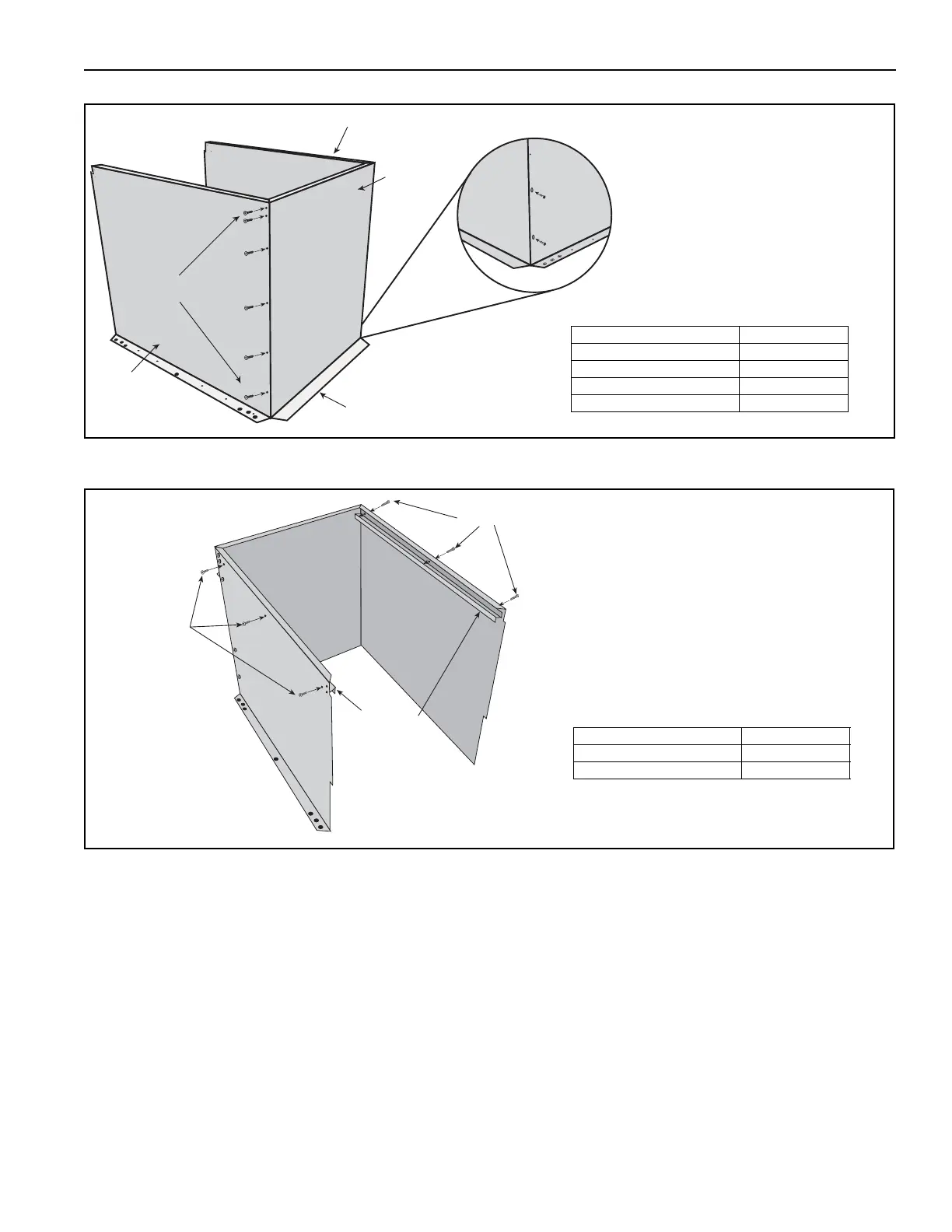
Step 11.2.1
Step 11.2.2
Flange
End Panel
Side Panel
Side Panel
Insert Screws
Attach left panel and right panel to
the end panel outside mounting
flanges. Fasten together with 6 TEK
screws on each side as shown.
Description Part Number
Left Panel 77403.002[W]
Right Panel 77403.001[W]
End Panel 77406.002[W]
TEK Screw 13404
Supports
Insert Screws
Insert Screws
Make sure that the bottom
flanges are facing out.
Attach supports to top inside of
the left and right panels, making
sure that the channel portion is
facing down into the filter
section.
Description Part Number
Supports 77405.002
TEK Screw 13404

Table of Contents

Related product manuals