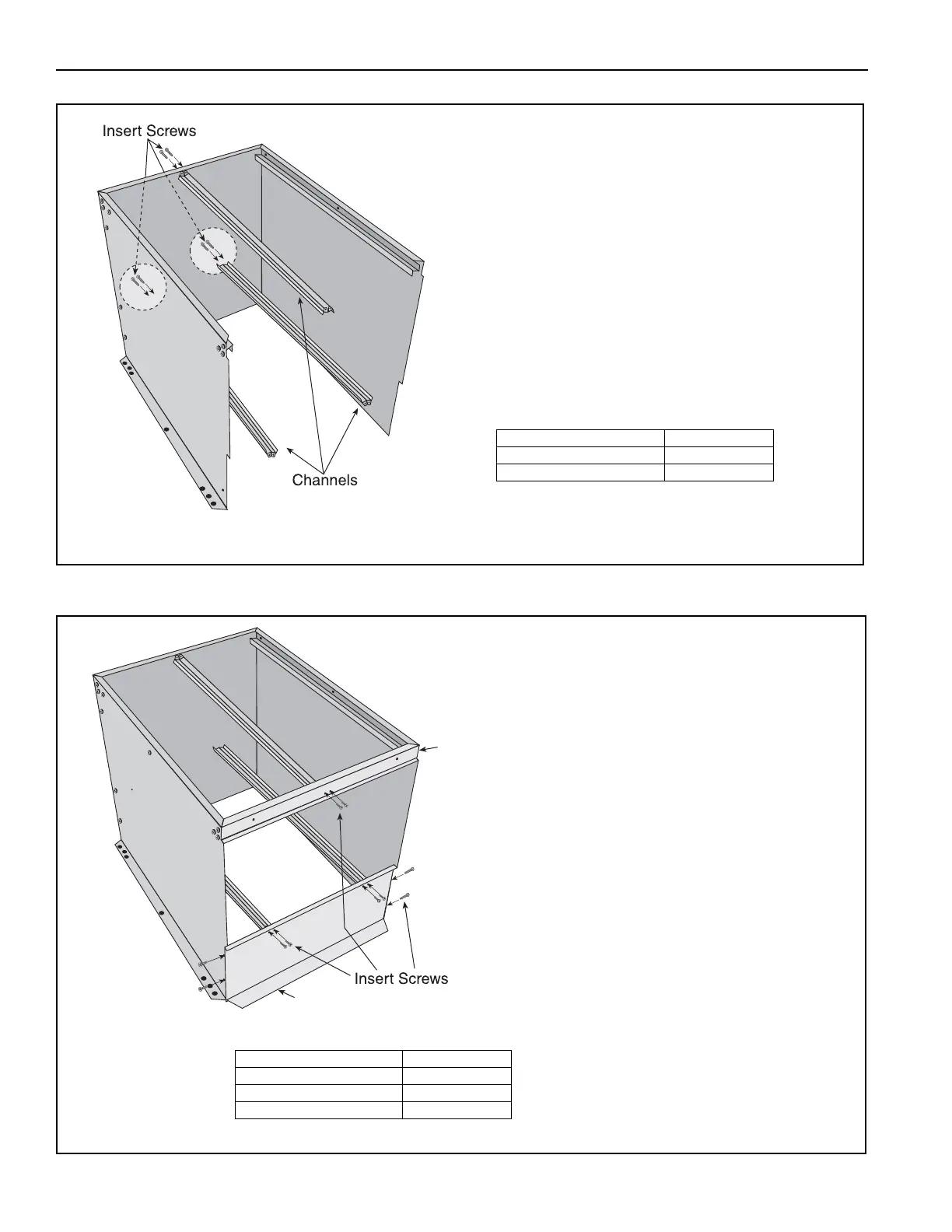
Attach channels to end plate. Make
sure top channel is facing down and
bottom channels are facing up.
NOTE: Channels "open" to the
inside of the filter box.
Description Part Number
Channels 77404.002
TEK screw 13404
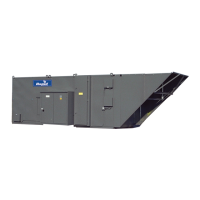
Attach header in between the lower
portion of the left and right side
panels.
Attach stiffener in between top
portion of left and right side panels.
Attach loose end of upper filter
channel to stiffener; attach loose
end of lower filter channels to
header piece.
On the inlet of the filter section,
rivnuts (P/N 91120106) are factory
installed. With additional 3/8"
hardware (P/N 20515 and
P/N 20517) the filter section can be
installed on the inlet of the unit. See
Page 43, Section 11.5 for additional
information on filter section
installation.
NOTE: For easier installation, the
filter section may be mounted to the
air handler at this point, prior to the
addition of filters and access door.
Refer to Page 43, Figure 11.5 for
installation instructions.
Description Part Number
Header Panel 77402.002[W]
Stiffner 77407.002[W]
TEK screw 13404



 To Next Page