3.6.13
HEADING IN
To select the type of
Heading
Input, press the
[T
softkeyuntil
the desired choice appears in the
boxon
the display. The choices are:
SHIPS
HD
=
This selects input of heading from a flux sensor using
either the
~~~~senten~e
from the
NMEA
0183 data or
SEATALK
data.
COGMAG
= This chooses the Magnetic COG course information from
the external navaid.
COGTRUE
= This selection uses the True COG course information
from the external navaid.
3.6.1.4
SPEEDIN
Normally, the Fishfinding and Navigation displays show the the
paddle-
wheel speed readout. If you would prefer to see the GPS or external navaid
calculated Speed-Over-Ground (SOG) readout on the various displays,
press the
m
key and
select-l.
Then press
the~INPUT/OUTPUT~
softkey
for the
INPUT/OUTPUT
menu.
Press
the-1
softkey
for SOG
(Speed over Ground). If you select
?HRU
WIW, the paddlewheel speed
output is selected for display.
‘WI
is displayed next to each speed readout if the paddlewheel is used;
VG”
is displayed next to each speed readout if the navaid SOG speed is
used.
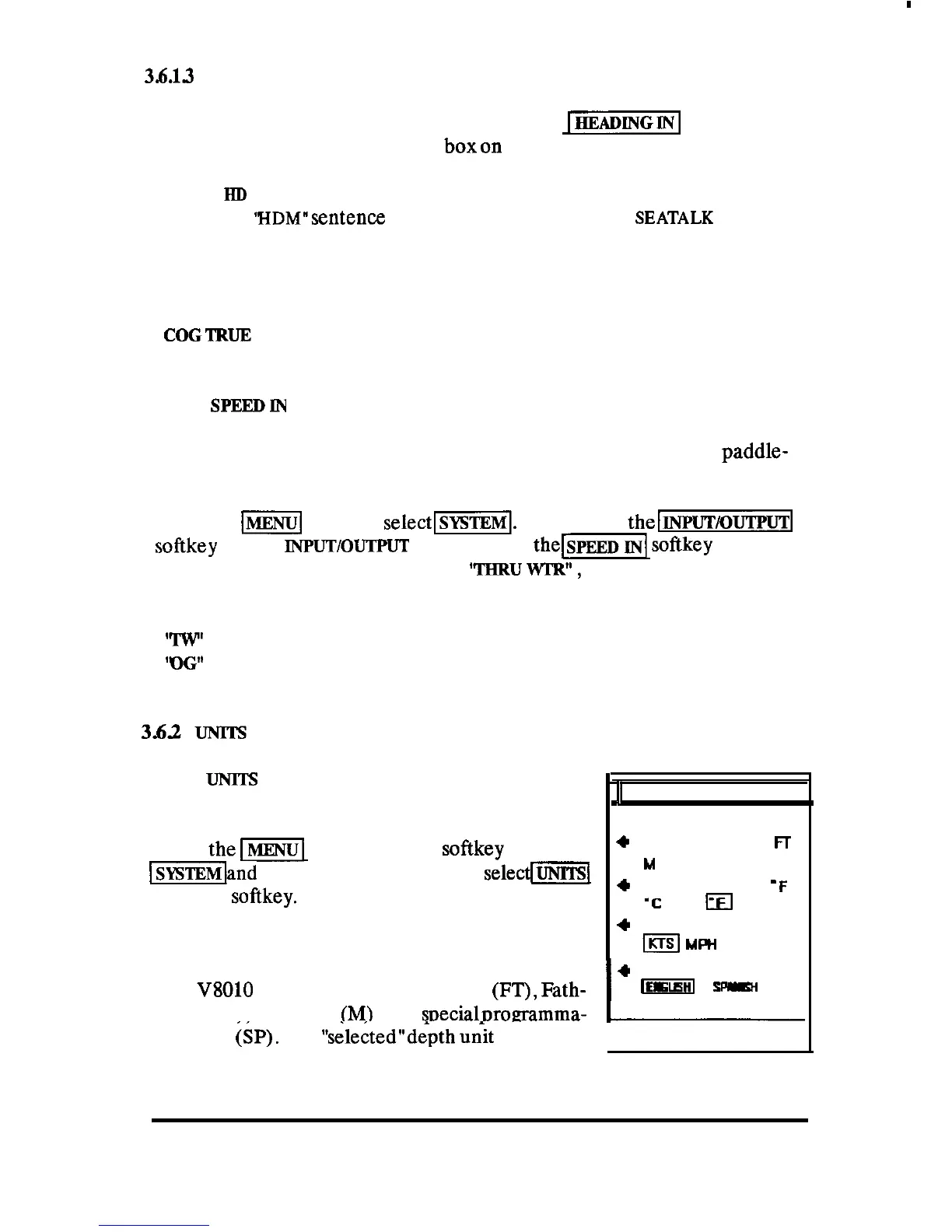
The
UNITS
menu permits the operator to select
different units of measure for depth, temperature,
speed, and language. To change any of these units,
press
them
key. Press the
softkey
to select
-land
from the SYSTEM menu,
selecfm
with the
softkey.
3.62.1 Selecting Units of Depth
B
UNITS MENU
I
+
DEPTH Fr
M
FM q SP
+
TEMP
‘C
m
‘F
4
SPEED
KTS
I
KTS
MRI
KPH
I
+
LANGUAGE
ENG
The
V8010
can indicate depths in Feet (FT), Fath-
~
sp*w
oms (FM), or Meters
(M)
or in soecialoroaramma-
I
ble units
(SP).
The
“sele&ed”depth
unit characters
PRESS MENU TO RETURN
OPERATION 107



 To Next Page