94
Important!
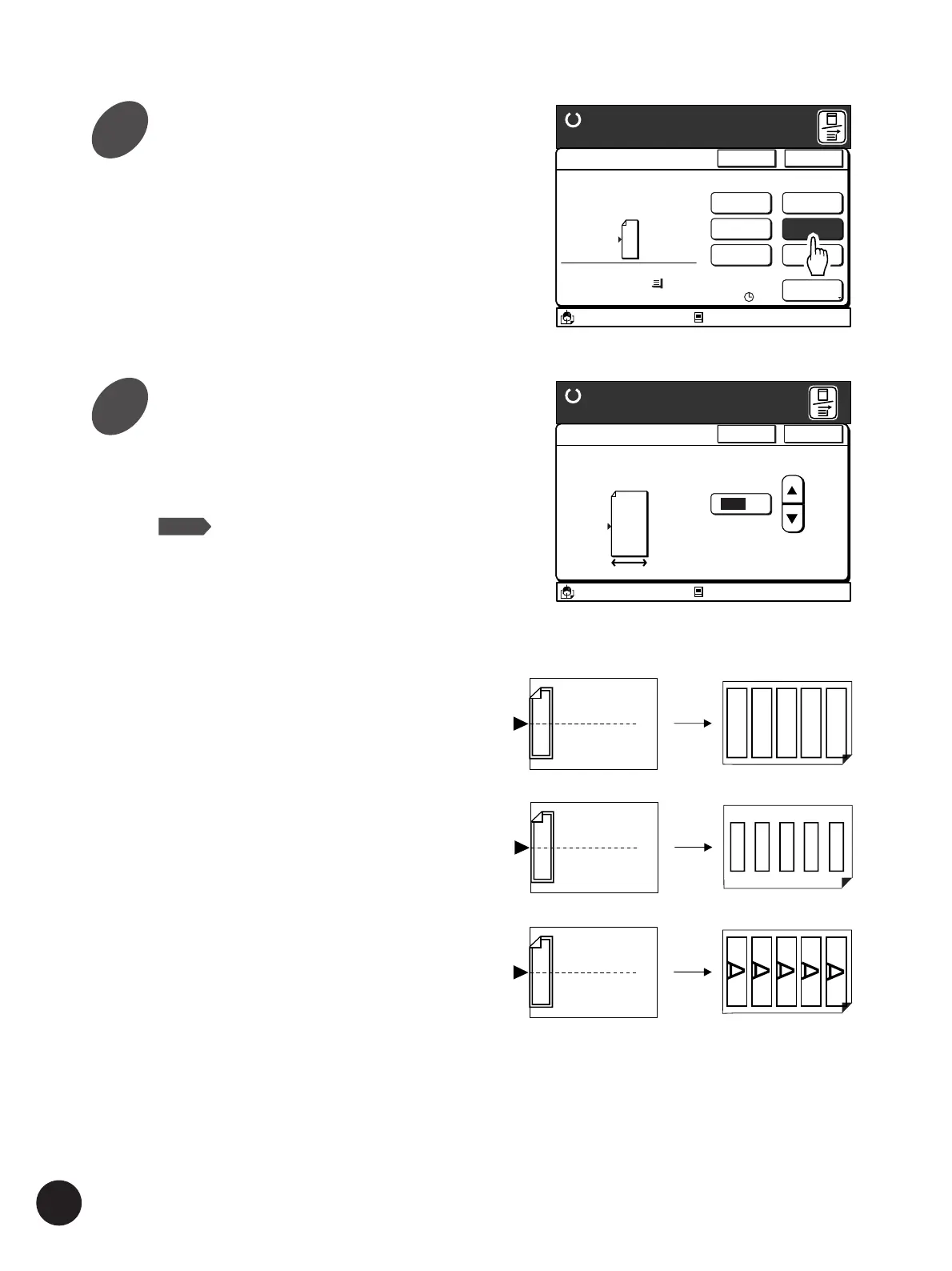
Take note of the following points when specifying
the width of the tickets if you change the
reproduction ratio.
• Specify the enlarged / reduced width of the
ticket.
• Set printing paper that matches the enlarged /
reduced size of the ticket beforehand.
A
A
A
A
A
A
Same size
If reduced ...
If enlarged ...
Touch the [Ticket] button.
The [Multi-Up Ticket] window appears.
A3/Black
13:59
Multiple pages can be
Printed on a sheet
[Page Direction]
Size Paper
100%
A 3
Cancel OK
Multi-Up Print
Ready to Make Master
2UP
4UP
8UP
16UP
Ticket
OFF
Interval
15s
Idle
A
M
A3/Black
13:59
Cancel OK
Multi-Up Tickets
Ready to Make Master
(50mm~210mm)
100
mm
The width of tickets can
be specified
Idle
M
A
Printing Originals Side by Side
Specify the width of the tickets by
touching the[
c
] and [
d
]
buttons.
The range of the width of the tickets to be
specified is shown on the window.
NOTE
• The value can be specified with the
Print Quantity keys also.
• Press the [C] key to return to the
default setting.
3
4



 To Next Page