Introducing the ZoneFlex Access Point
Getting to Know the Access Point Features
ZoneFlex Indoor Access Point 9.8.1 User Guide, 800-70601-001 Rev C 32
Rear Panel
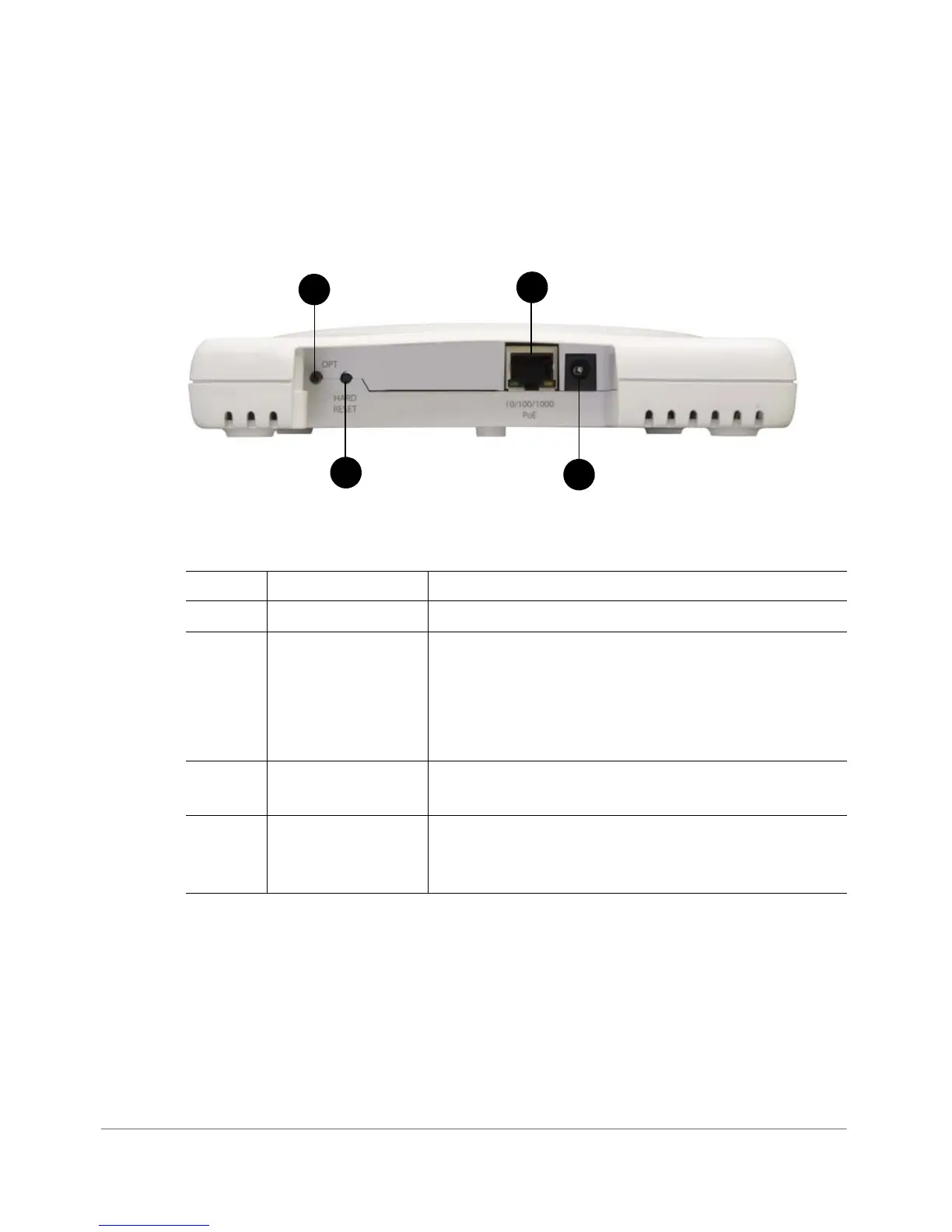
Figure 12 shows the rear panel of the ZoneFlex 7341. For a description of each rear
panel part, refer to Ta ble 1 4 .
Figure 12. ZoneFlex 7341 rear panel
Table 14. ZoneFlex 7341 rear panel elements
Number Item Name Description
1 OPT Button Not active in this model at this time.
2HARD RESET
Button
Pressing, and then quickly releasing this internal button
reboots the AP. Pressing and holding it for six seconds
resets the AP to factory default settings.
CAUTION! Resetting the AP to factory default
settings erases all previously configured settings.
3 10/100/1000 PoE
Port
One RJ-45 port for a 10/100/1000 PoE (Power over
Ethernet, 802.3af) connection.
4 Power Connect the power adapter (12 VDC/1.25A) to this
socket. Power can also be supplied via the 10/100/
1000 PoE (802.3af) port.










 To Next Page