Introducing the ZoneFlex Access Point
Getting to Know the Access Point Features
ZoneFlex Indoor Access Point 9.8.1 User Guide, 800-70601-001 Rev C 53
Rear Panel Features
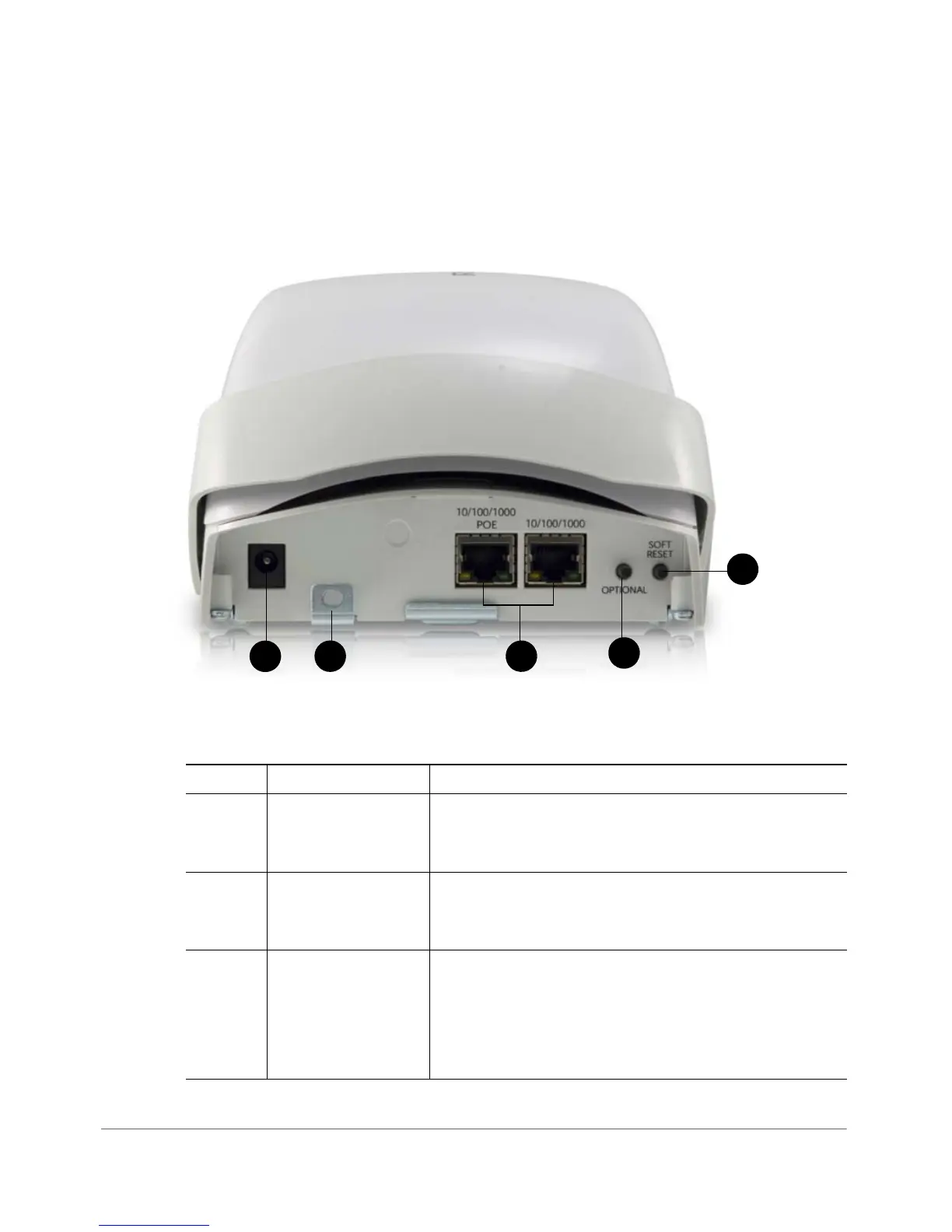
Figure 23 shows the rear panel of the ZoneFlex 7962. For a description of each rear
panel part, refer to Ta ble 2 6 .
Figure 23. ZoneFlex 7962 rear panel features
Table 26. ZoneFlex 7962 rear panel elements
Number Item Name Description
1 Power Connect the power adapter to this socket. (Input 110-
240V AC, Output 12V 1.0A DC). Power can also be
supplied via the 10/100/1000 PoE port.
2 Lock Hasp The lock hasp works with a cable or Ruckus Wireless
mounts. The recommended lock type is Masterlock
120 series (D, T, Q, KAD types).
3 LAN Ports Two RJ-45 ports, one for a 10/100/1000 PoE (Power
over Ethernet) connection and another for a 10/100/
1000Mbps connection.
Each Ethernet port has two LEDs. Refer to
Tab l e 2 7
for LED descriptions.










 To Next Page