10-12 Serial Port Communications and Commands Date Code 20001006
SEL-351 Instruction Manual
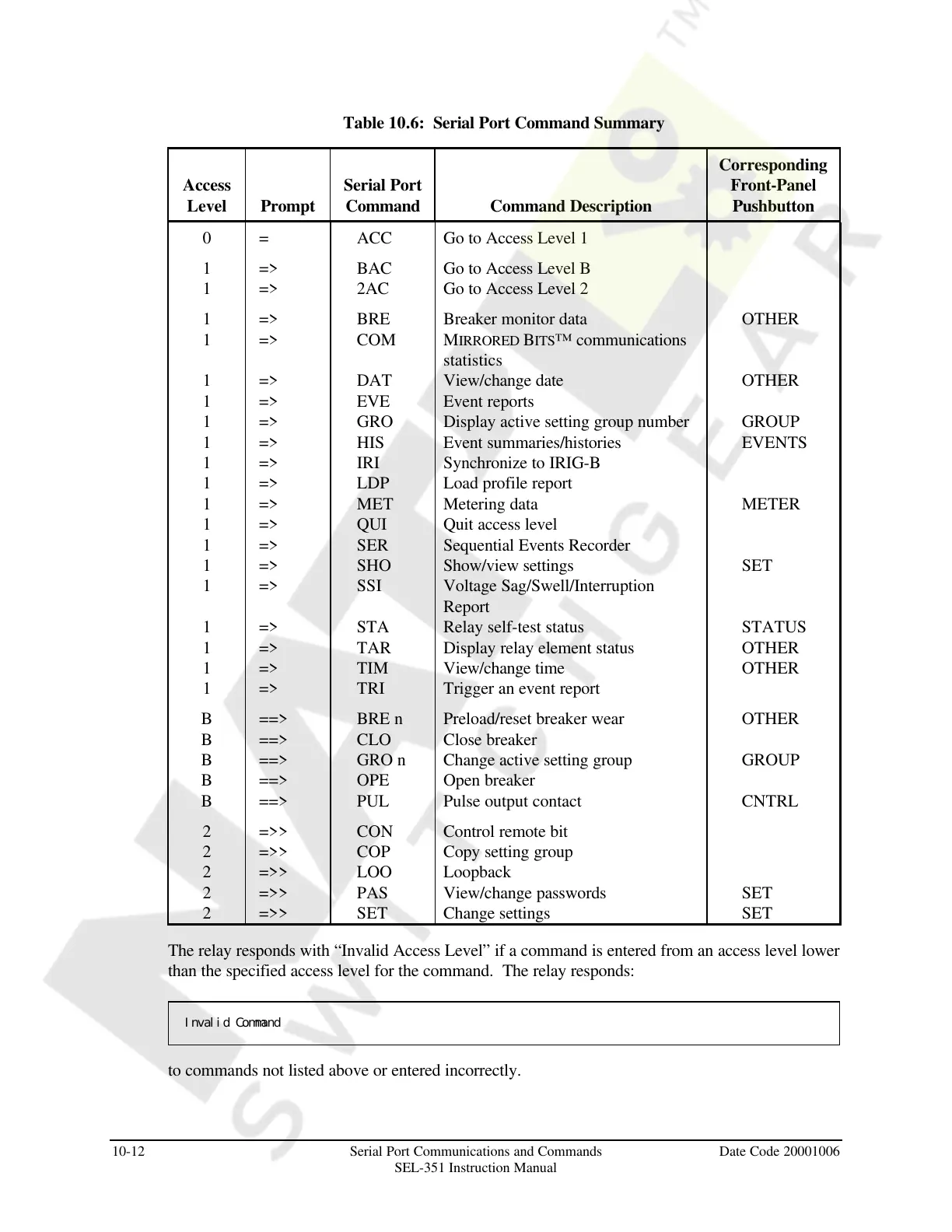
Table 10.6: Serial Port Command Summary
Access
Level Prompt
Serial Port
Command Command Description
Corresponding
Front-Panel
Pushbutton
0 = ACC Go to Access Level 1
1 => BAC Go to Access Level B
1 => 2AC Go to Access Level 2
1 => BRE Breaker monitor data OTHER
1 => COM MIRRORED BITS™ communications
statistics
1 => DAT View/change date OTHER
1 => EVE Event reports
1 => GRO Display active setting group number GROUP
1 => HIS Event summaries/histories EVENTS
1 => IRI Synchronize to IRIG-B
1 => LDP Load profile report
1 => MET Metering data METER
1 => QUI Quit access level
1 => SER Sequential Events Recorder
1 => SHO Show/view settings SET
1 => SSI Voltage Sag/Swell/Interruption
Report
1 => STA Relay self-test status STATUS
1 => TAR Display relay element status OTHER
1 => TIM View/change time OTHER
1 => TRI Trigger an event report
B ==> BRE n Preload/reset breaker wear OTHER
B ==> CLO Close breaker
B ==> GRO n Change active setting group GROUP
B ==> OPE Open breaker
B ==> PUL Pulse output contact CNTRL
2 =>> CON Control remote bit
2 =>> COP Copy setting group
2 =>> LOO Loopback
2 =>> PAS View/change passwords SET
2 =>> SET Change settings SET
The relay responds with “Invalid Access Level” if a command is entered from an access level lower
than the specified access level for the command. The relay responds:
Invalid Command
to commands not listed above or entered incorrectly.
Courtesy of NationalSwitchgear.com



 To Next Page