Date Code 20001006 Front-Panel Interface 11-9
SEL-351 Instruction Manual
Operate Local Control (With Factory Settings)
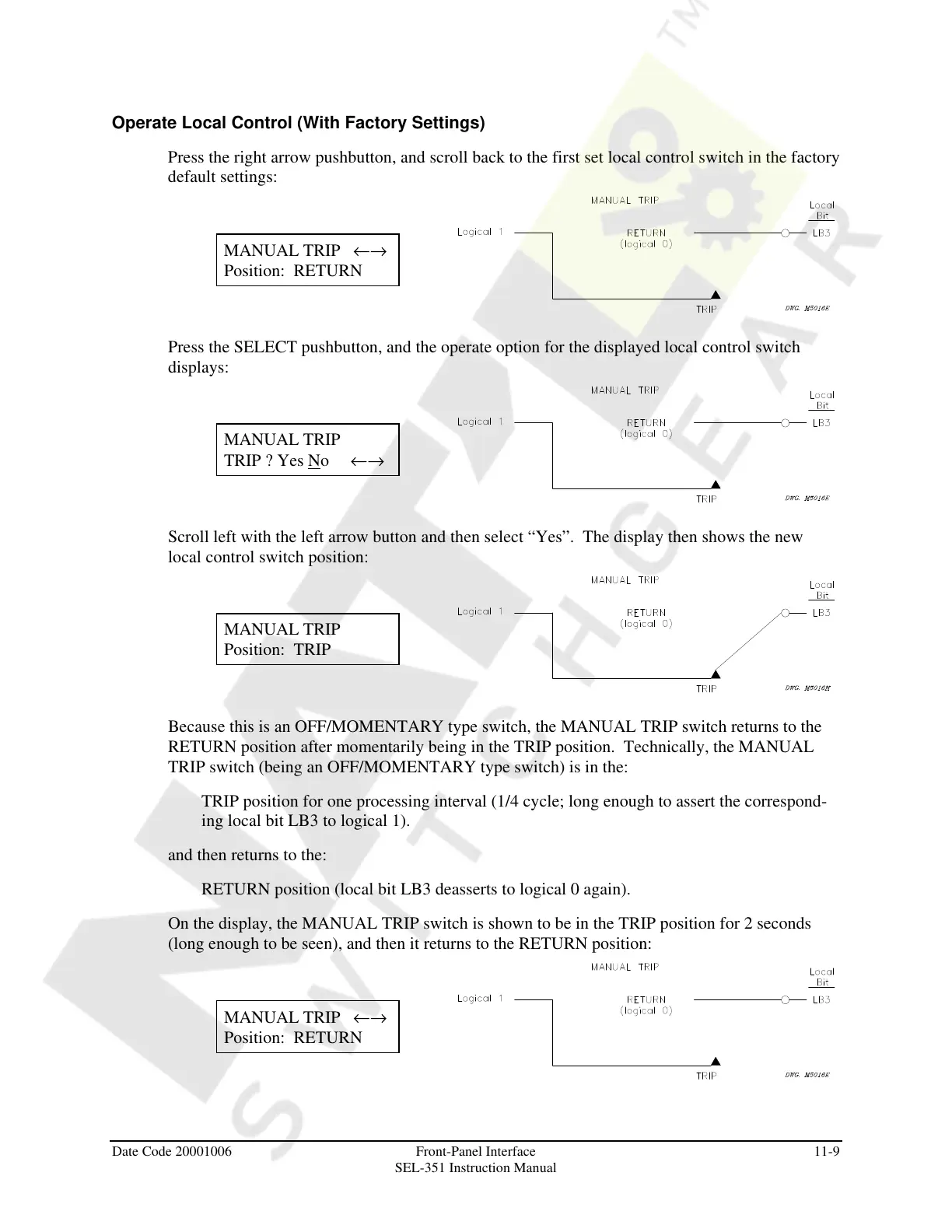
Press the right arrow pushbutton, and scroll back to the first set local control switch in the factory
default settings:
MANUAL TRIP ←→
Position: RETURN
Press the SELECT pushbutton, and the operate option for the displayed local control switch
displays:
MANUAL TRIP
TRIP ? Yes No ←→
Scroll left with the left arrow button and then select “Yes”. The display then shows the new
local control switch position:
MANUAL TRIP
Position: TRIP
Because this is an OFF/MOMENTARY type switch, the MANUAL TRIP switch returns to the
RETURN position after momentarily being in the TRIP position. Technically, the MANUAL
TRIP switch (being an OFF/MOMENTARY type switch) is in the:
TRIP position for one processing interval (1/4 cycle; long enough to assert the correspond-
ing local bit LB3 to logical 1).
and then returns to the:
RETURN position (local bit LB3 deasserts to logical 0 again).
On the display, the MANUAL TRIP switch is shown to be in the TRIP position for 2 seconds
(long enough to be seen), and then it returns to the RETURN position:
MANUAL TRIP ←→
Position: RETURN
Courtesy of NationalSwitchgear.com



 To Next Page