SEEDMASTER 2023
104
AUTO ZONE COMMAND LOOK AHEAD TIME SETUP
To access the Auto Zone Command Setup (Section Control Setup) page:
1. Touch the Can System Configuration Icon on the main screen to begin setting up the system.
2. The CAN configuration icons screen will be displayed. Touch on the AccuBoom
Icon.
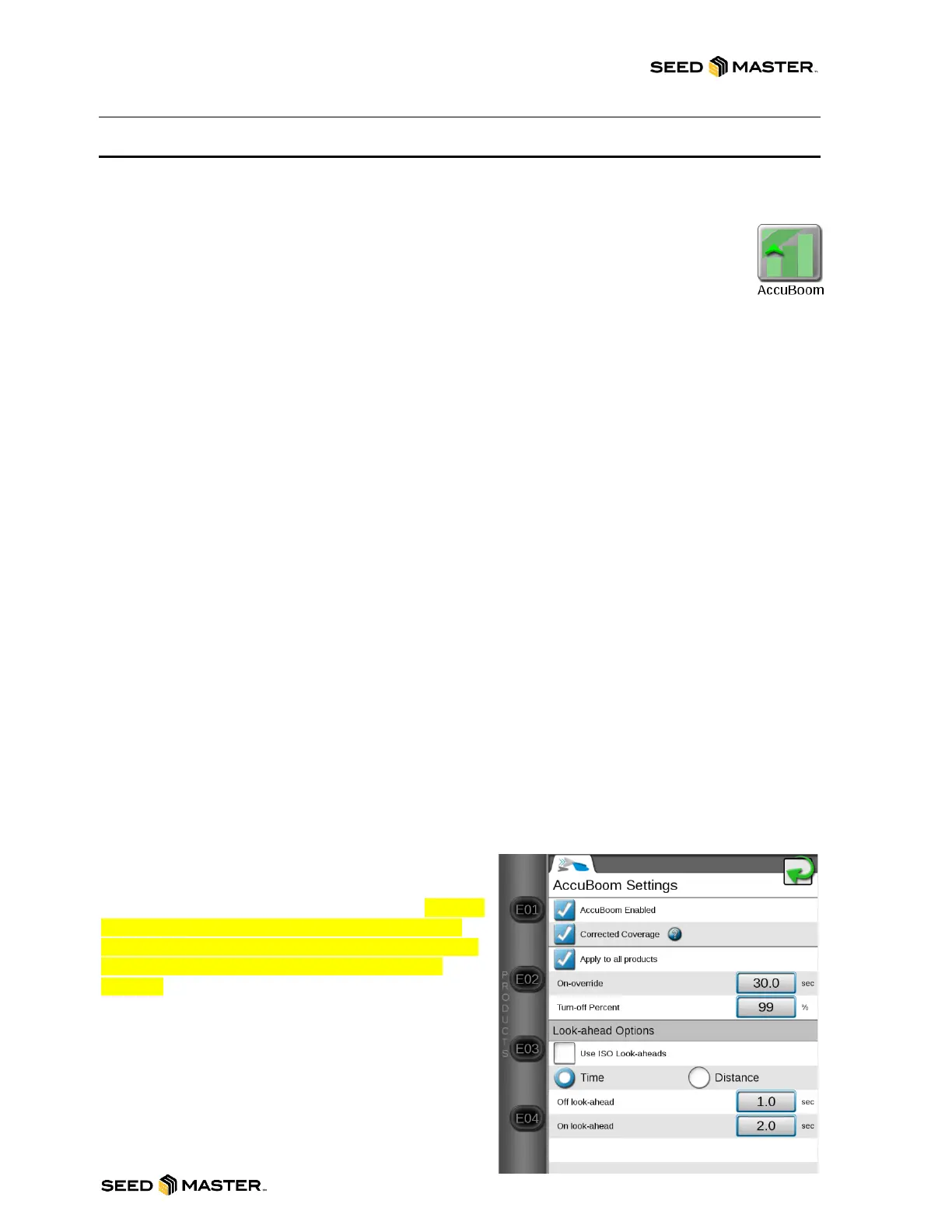
3. The AccuBoom Settings page will be displayed.
a. Confirm there is a check mark in “AccuBoom Enabled”
b. Confirm there is a check mark in “Corrected Coverage”
c. If all the Products share the same section drivers, place a check mark in “Apply to all
products”.
d. If products don’t share section drivers remove the check mark from “Apply to all products”
4. Set On-override time: The On-override feature allows the operator to momentarily apply
product to a previously applied area while in a job. The override feature is useful to ensure
product application in small unapplied areas near irregular headlands and previously applied
areas. Enter the number of seconds to override automatic section control and apply product
after the “OVERRIDE” button is pressed from within a job. Default setting is 30 seconds.
5. Set Turn-off Percent: This value controls the percentage of the section width that must be
inside a previously applied area for the section to turn off. The default value is 99%. This would
require that 99% of a section (zone) to be in a previously applied area before the Auto Zone
Command system would turn off that zone. SeedMaster recommends leaving this value at 99%.
6. Use ISO Look-aheads: The monitor can be configured to use look ahead times set on the RCM
in “Precision Farming Setup”. This is for future use and should be left unchecked.
7. Set Look ahead based on Time: Depending upon the type of valve used to control products,
control valves may take several seconds to adjust when opening or closing. To help
compensate for the valve response time and lag due to filling or emptying product supply lines,
the look-ahead values allow the Viper 4+ to begin adjusting control valves for map zones and
previously applied areas.
Note: The look-ahead times should always be entered as positive values.
8. Set Turn-Off Look-Ahead: Enter the number of seconds ahead of the vehicle (based on
vehicle speed) which the Viper 4+ will scan for zone boundaries and changes when turning
product application off.
9. Set Turn-On Look-Ahead: Enter the number of seconds ahead of the vehicle (based on
vehicle speed) which the Viper 4+ will scan for zone boundaries and changes when turning
product application on.
Factory Default Look ahead times: Use the chart
below as suggested starting look ahead times. It is not
SeedMaster’s responsibility for skips or misses.
Please ensure that you always have product being
delivered to unapplied areas when dispersing
product.



 To Next Page