SEEDMASTER 2023
26
MASTER SWITCH CONFIGURATION
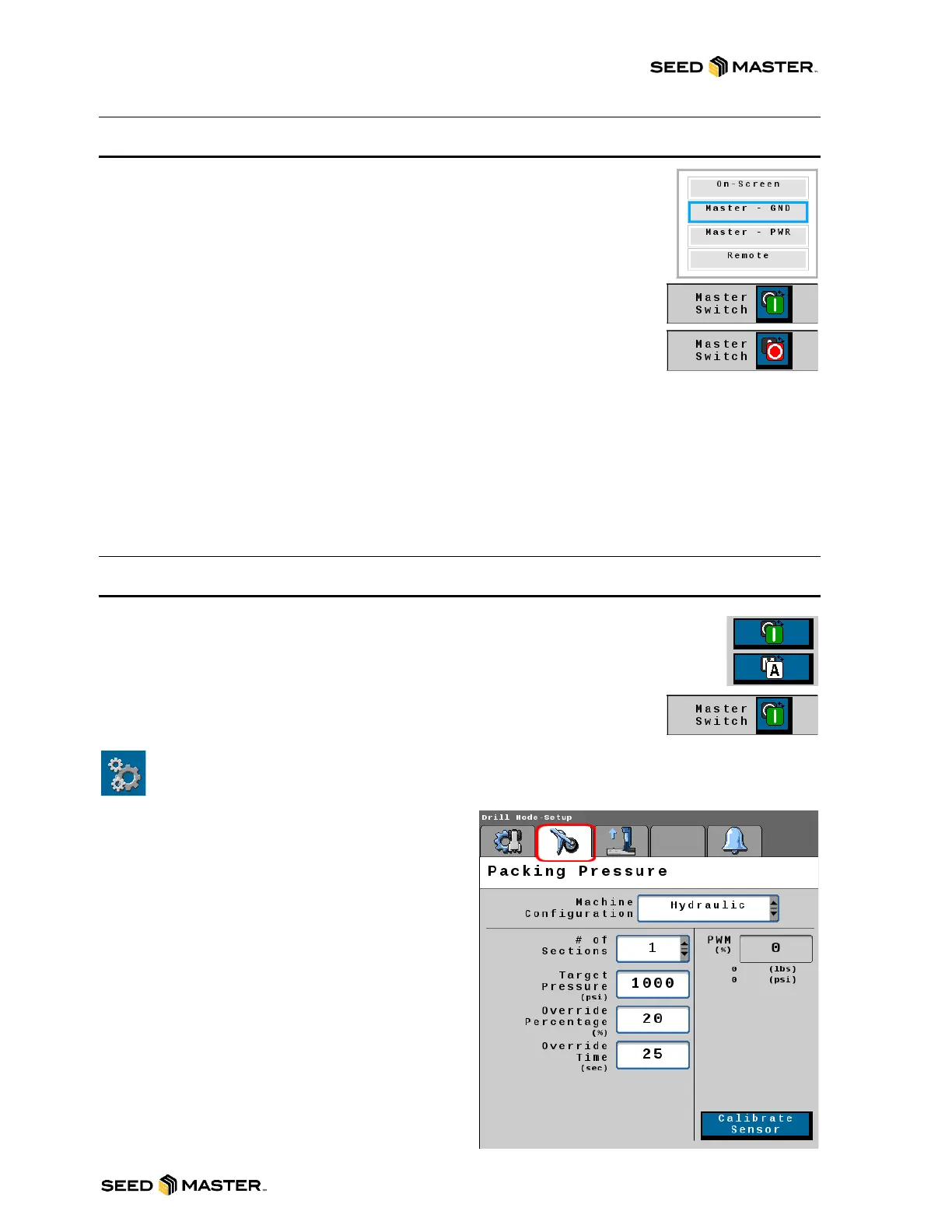
Packing pressure can be enabled by four different methods: On-Screen, Master –
GND, Master – PWR, and Remote. Touch in the white box to choose the method
of choice. The factory default setting is “Master - GND” to enable the In-cab Foot
Switch.
On-Screen: This setting uses the Soft Key on the Home Page. Simply touch the
soft key to enable or disable the packing pressure.
Master Switch - GND: Your SeedMaster machine comes standard with a Foot
Switch to enable and disable the packing pressure. This is the factory default
setting. Press the foot switch to enable/disable the packing pressure.
Master Switch - PWR: Your SeedMaster machine comes standard with a Foot Switch to enable and
disable the packing pressure. Use this setting when the ISO Toolbar uses +12v to enable, these were
only found on SM16 machines. Press the foot switch to enable/disable the packing pressure.
Remote Master: The Packing Pressure can be enabled or disabled by a third party +12v signal. The
“Implement Height Connection” found on the Toolbar is used for this function. Pin C or the Black/White
wire is the signal wire. This is also a power and ground wire supplied if the use of a relay is needed.
PACKING PRESSURE SET UP AND OPERATION
Packing Pressure keeps the openers engaged in the ground while seeding. The
“Packing Pressure ON/OFF” icon in the top left corner indicates whether Packing
Pressure is engaged or disengaged. The Icon will be green if the packing pressure is
ON. The Icon will be red when it is OFF.
Packing Pressure Setup
To access the packing pressure setup page, touch the Settings Soft Key found in the Soft Key
Area, then touch the Packing Pressure tab.
Mode Area – There are two packing pressure
options from which to choose. Currently, there is
only one option available.
Hydraulic Mode: This is the option that should be
chosen to run your machine. The transducer is
plumbed into the opener down circuit to display the
toolbar packing pressure.
PFS Mode: This option is not available at this time
and should not be chosen. Packing pressure will not
function correctly if this is chosen.
# of Sections: All machines are equipped with 1
packing pressure section. Multiple packing pressure
sections is for future use. Please set this to 1.



 To Next Page