SEEDMASTER 2023
29
LIFT KIT PRESSURE SET UP AND OPERATION
SeedMaster Toolbars are equipped with a hydraulic
pressure transducer enabling in-cab viewing of the Lift Kit
hydraulic pressure. The Toolbar is also equipped with a
PWM valve for controlling the Lift Kit pressure. The Lift Kit’s
hydraulic pressure can be controlled automatically or
manually from the comfort of the cab.
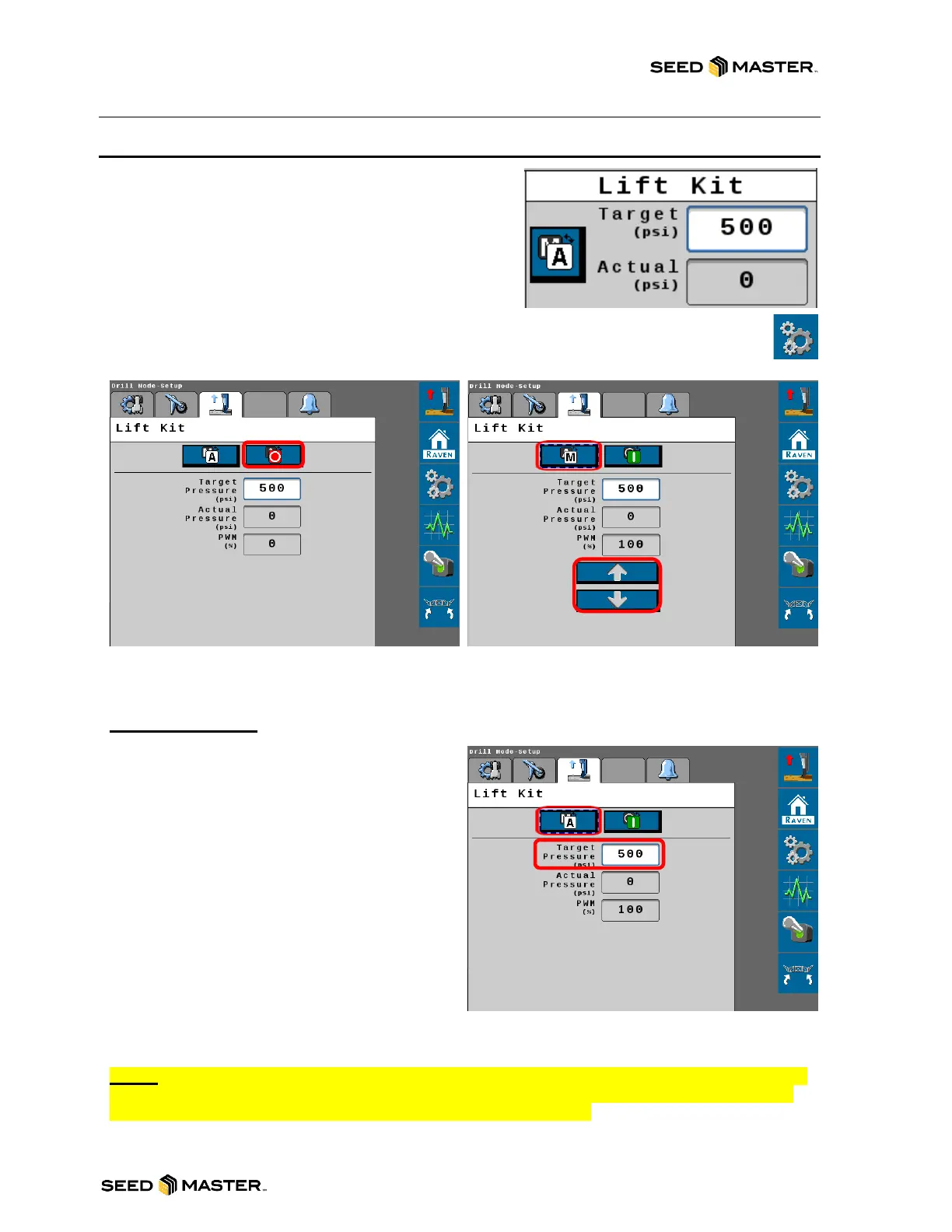
Touch the Settings soft key to access the Lift Kit Settings. Use this menu to change the
modes of operation.
LIFT KIT MODES
OFF MODE: When set on OFF mode, the lift kit
functions are disabled.
MANUAL MODE: When set on MANUAL mode,
the lift kit will display the Lift Kit’s pressure and is
adjusted manually from cab by touching the up or
down arrow.
AUTO MODE: When set on AUTO mode, the Lift
Kit pressure will be adjusted automatically to the
users set target pressure. Enter the psi value into
the Target Pressure area. Auto mode also
features an alarm. If the actual pressure is not on
target an alarm will sound. The factory setting is
200 psi.
NOTE: After each monitor power cycle, depending on software versions, the Lift Kit may need
to be activated from the DCM settings as shown above. Please ensure that the On/Off safety
switch is turned on if you want the lift kit active during operation.



 To Next Page