SEEDMASTER 2023
90
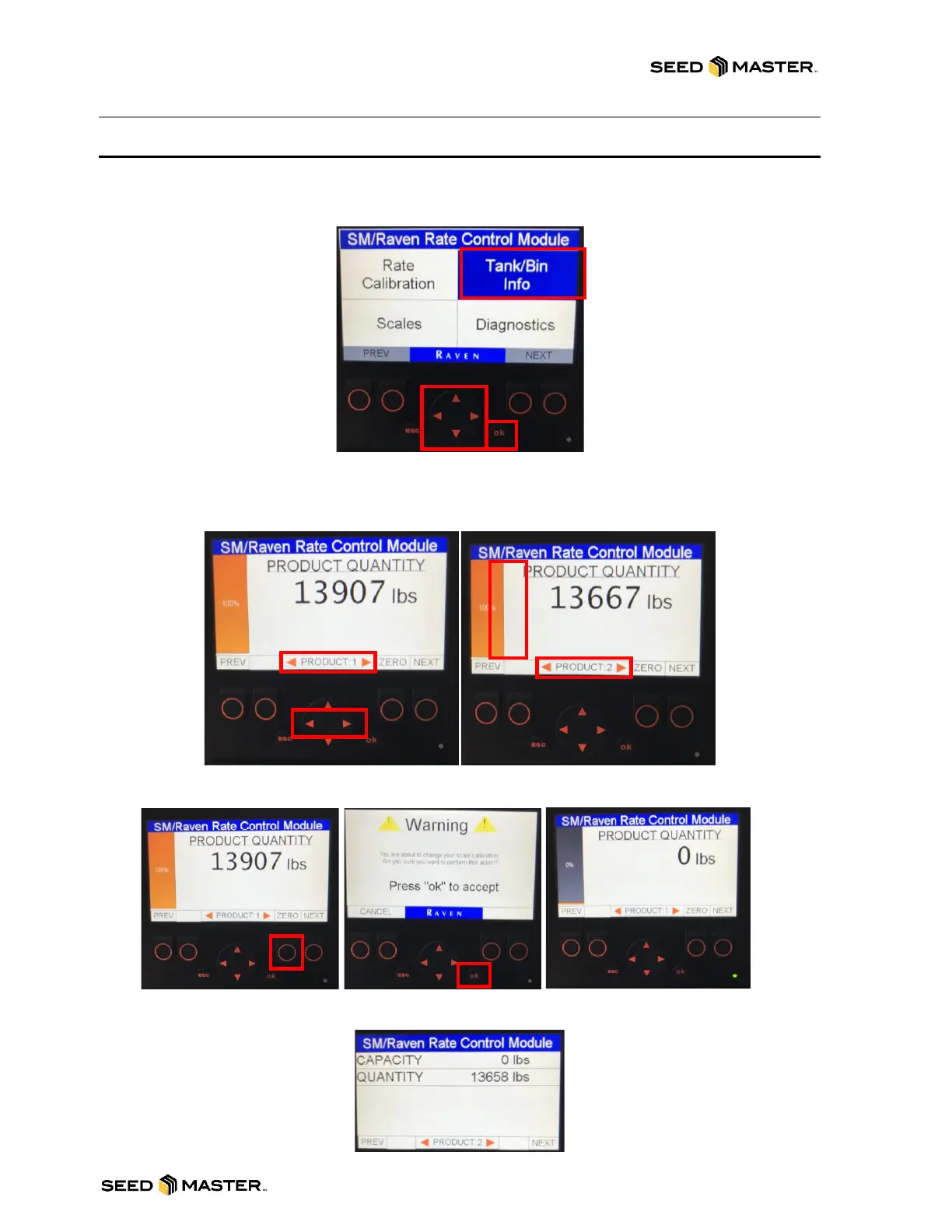
READ AND ZERO TANK WEIGHT VIA TANK/BIN INFO
1. Power on the remote monitor by pressing the “esc” button on the front of the monitor.
2. Using the UP/DOWN or LEFT/RIGHT arrows, highlight the “Tank/Bin Info” box blue.
3. Touch “ok” to enter the Tank/Bin Info screen.
4. The weight of the previously selected product will be displayed.
5. To change the selected product, press the LEFT/RIGHT arrows.
NOTE: The percentage on the right side will display the percentage of product in the
tank based on the Tank Capacity. The Tank Capacity is set from the In-Cab monitor.
6. To zero out the product weight, press the button directly below “ZERO”. Then, press ok
to accept that the tank will be zeroed out. Press CANCEL to cancel the operation.
7. Press the NEXT or PREV buttons to toggle screen view. The toggled view will display
text only for the Capacity and Quantity.
8. Press the “esc” button to return to the main menu.



 To Next Page