SEEDMASTER 2023
89
REMOTE TANK MONITOR
Use the Remote Tank Monitor to view tank weights, zero out tank weights, and calibrate products.
Before filling a tank with product, ensure it is empty and zero it. While filling, you can view the tank
weight in real time to gauge how much product is in the tank. This allows for filling to a pre-determined
weight. After filling the tanks, each tank will need to be calibrated for the product type inside the specific
tanks.
SELECT ACTIVE RCM
Some SeedMaster machines may be equipped with multiple RCMs. If the system consists of multiple
RCMs, it will need to be determined what RCM is on the On-Fame Tank and what RCM is on the NOVA
Tank. The Remote Tank Monitor determines the RCMs by serial number. If it is uncertain of the location
of the RCM, the serial number can be viewed from the in-cab monitor.
VIEWING RCM SERIAL NUMBER
1. Choose the RCM working set from the in-cab monitor for the desired
Tank.
2. Touch the Diagnostics button on the right side and the Serial
Number will be displayed.
NOTE: For more information view the “RCM DIAGNOSTICS PAGE”
in the ISOBUS RCM FUNCTIONS section of this operator’s manual,
PAGE 77.
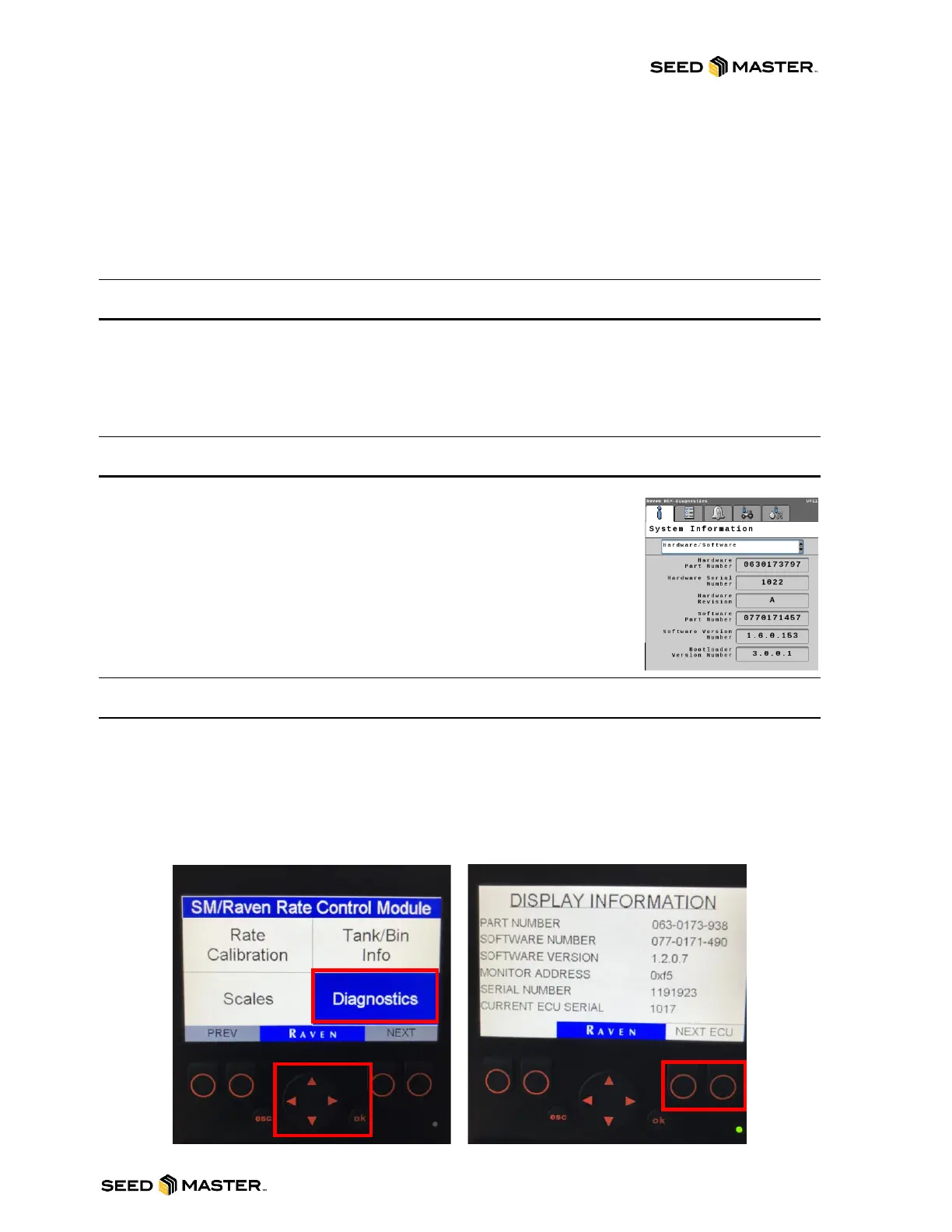
TOGGLING BETWEEN RCMS (UPII, NOVA, LIQUID)
1. Power on the remote monitor by pressing the “esc” button on the front of the monitor.
2. Using the UP/DOWN or LEFT/RIGHT arrows, highlight the box “Diagnostics” box blue.
3. Press “ok” to enter the Diagnostics Info screen.
4. Press either button below “Next ECU” to toggle between RCMs.
5. Once the desired RCM is chosen, press the “esc” button to return to the main menu.
NOTE: The Serial # is physically found on the face of the RCM located in its panel box.



 To Next Page