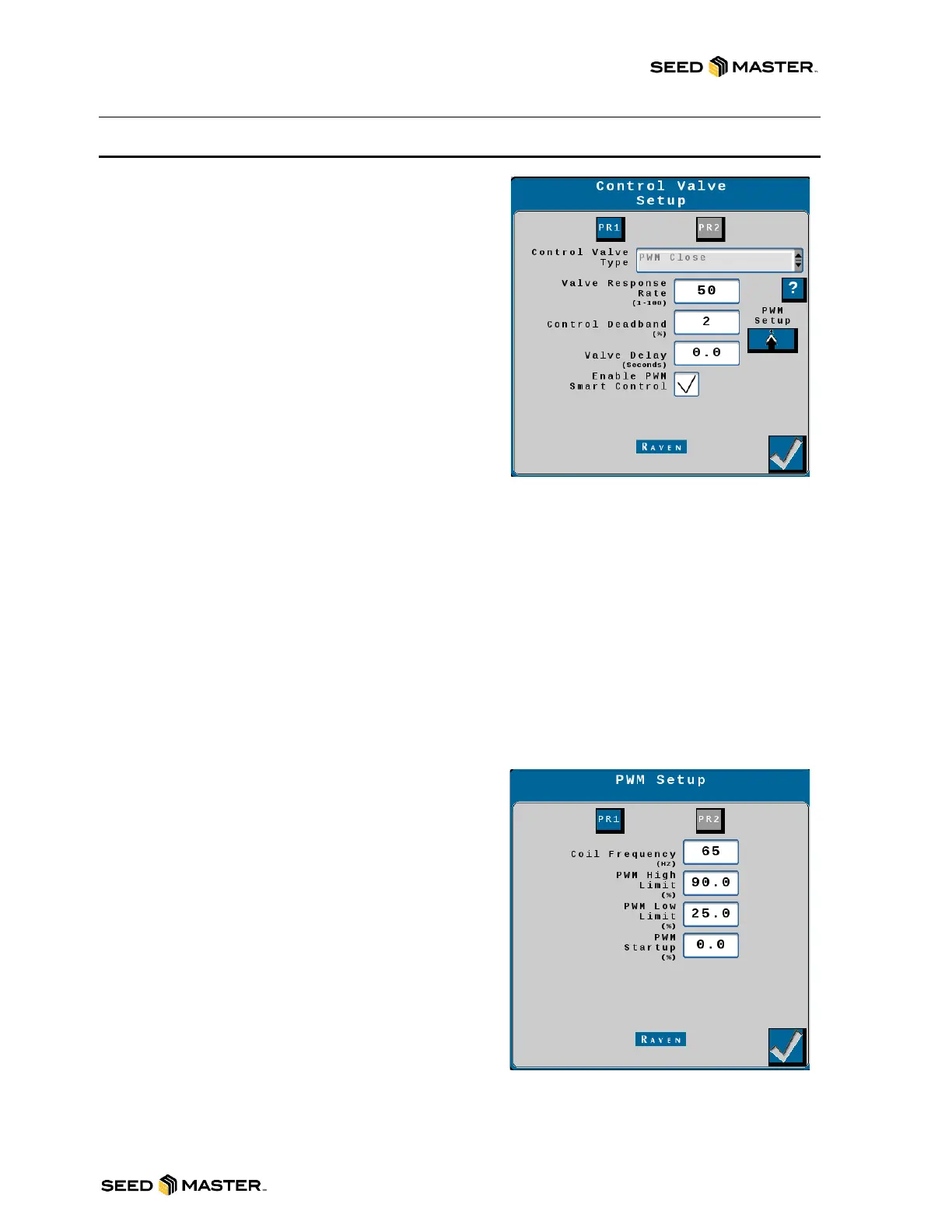
Control Type: This is set during setup wizard
process and can only be changed if you edit the
profile.
Valve Response Rate (1-100): Enter value for
aggressiveness of rate controller as it approaches
target rate. A value too high may lead to oscillation.
A value too low may take a long time to reach
target rate. Factory default is 50.
Control Deadband (%): Enter percentage of rate
tolerance for control valve. For example, if 2% is
entered, the rate controller attempts to adjust the
flow rate until the actual rate is within 2% of the
target rate. Factory default is 2%.
Valve Delay: This is the length of time that the
valve waits to react after an adjustment change is
called for. Factory default is 0.
Enable PWM Smart Control: This allows the
PWM to return to its previous setting after shutting
down.
PWM Setup Button: Touch this button to access
the PWM Valve Setup Page: See below.
- Coil Frequency: Frequency of pulses sent to
PWM valve. Factory default is 65.
- PWM High Limit (%): Maximum PWM percent
the rate controller allows the system to reach when
the product is applying. Factory default is 90.
- PWM Low Limit (%): Minimum PWM percent the
rate controller allows the system to reach when the
product is applying. Factory default is 25.
- PWM Startup (%): Duty cycle rate controller
commands to when the valve is opened. Factory
default is 0.



 To Next Page