SEEDMASTER 2023
22
ISOBUS TOOLBAR FUNCTIONS
HOME SCREEN LAYOUT
The Drill Control Module (DCM) will monitor and control your SeedMaster Toolbar via
the installed Universal Terminal (UT). To access the ISO Toolbar Functions, touch the
ISOBUS TXB soft key on your UT display. See your UT’s operator’s manual for more
information on locating UT soft keys.
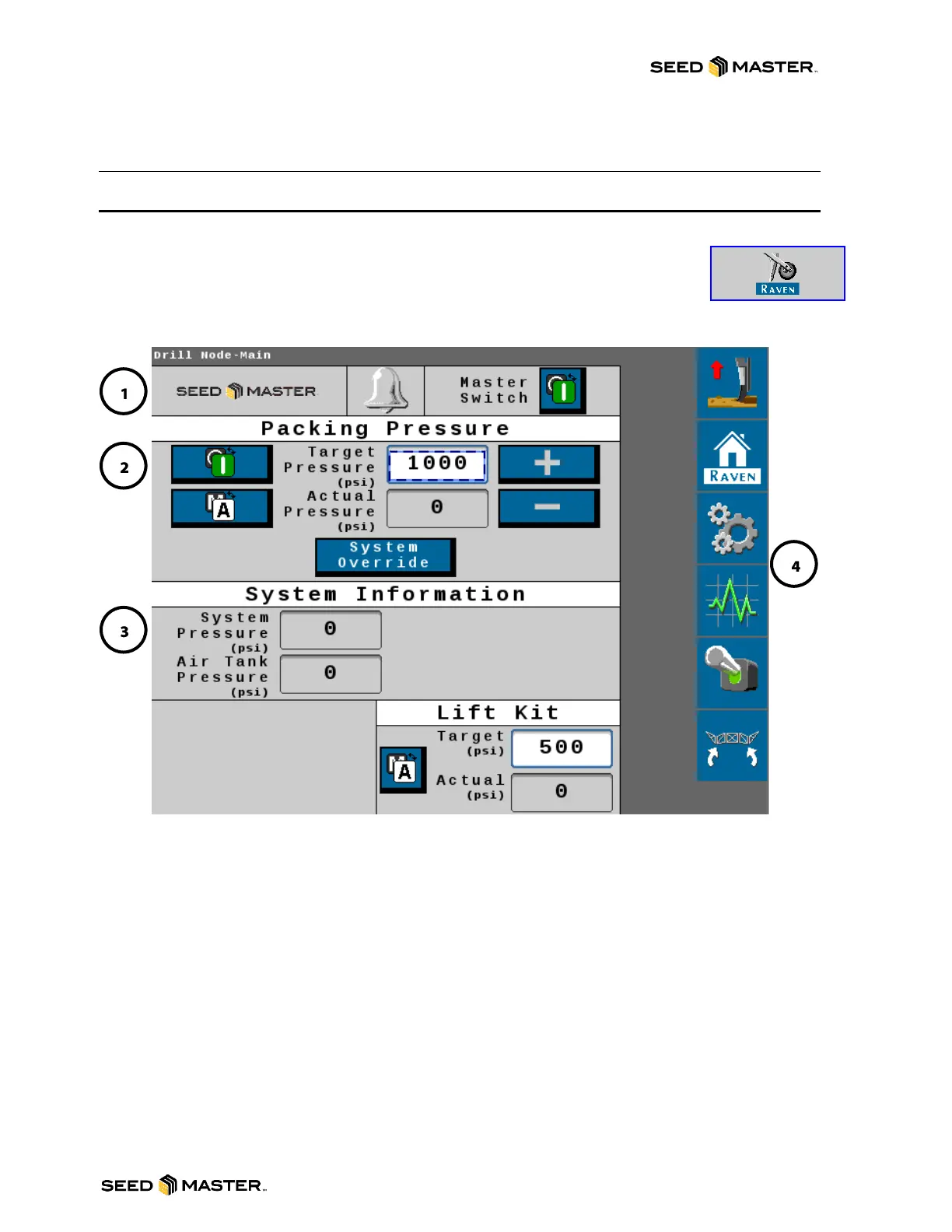
1. Status Area: This area shows the current status of the Master Switch and System Alarms.
2. Packing Pressure Area: This area will allow you to toggle the packing pressure safety switch
from OFF to ON and the function between Manual or Auto. The Packing pressure can also be
quickly changed by using the PLUS arrow to increase and MINUS arrow to decrease in 50psi
increments. The System Override will dump the opener pressure. This target override pressure
and override time can be adjusted in the settings page. See packing pressure setup and
operation section starting on page 26.
3. System Information Area: This area will allow for a quick view of different pressures and Lift
Kit status.
4. Soft Key Area: Touch soft keys to access different settings and functions.



 To Next Page