SEEDMASTER 2023
105
VIPER 4+ JOB QUICK START PROCEDURE
Before you go to the field, please review the steps below to ensure your Viper 4+ is field ready.
1. Review ISO TXB Quick Start Procedure (PAGE 23).
2. Review ISO RCM Quick Start Procedure (PAGE 59).
3. Review AutoZone Command Look Ahead Time Setup (PAGE 104).
4. Choose the correct Product Profile.
a. Touch the Product Profile Panel.
b. Choose the Product Profile for the specific field.
c. If you need to create a Product Profile, see PAGE 103 for more information.
5. Touch the Job Profile Icon.
6. Choose the correct Job Profile OR just touch “Start Job” if not using Job Profiles.
a. If you need to create a Job Profile, see PAGE 102 for more information.
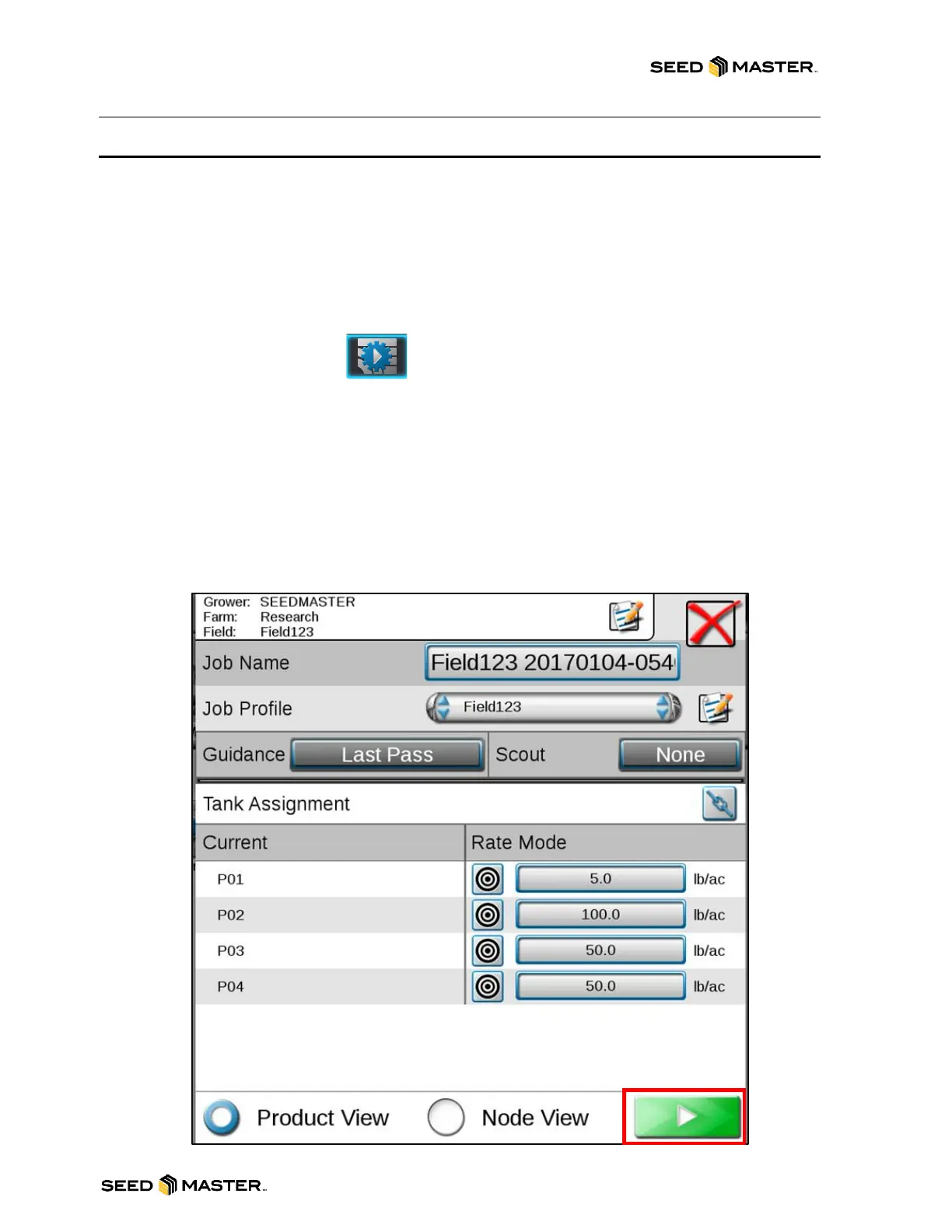
7. Review Job settings.
a. Review Grower/Farm/Field Information (if applicable).
b. Job Name: Enter the name of the Job.
c. Job Profile: Review or edit Job Profile information.
d. Guidance: Last Pass
e. Scout: None or if using FLIP Maps, choose the appropriate FLIP Map.
f. Rate Mode: Set the Rate for each product.
g. Touch the Play Button when ready to open the Job.



 To Next Page