SEEDMASTER 2023
32
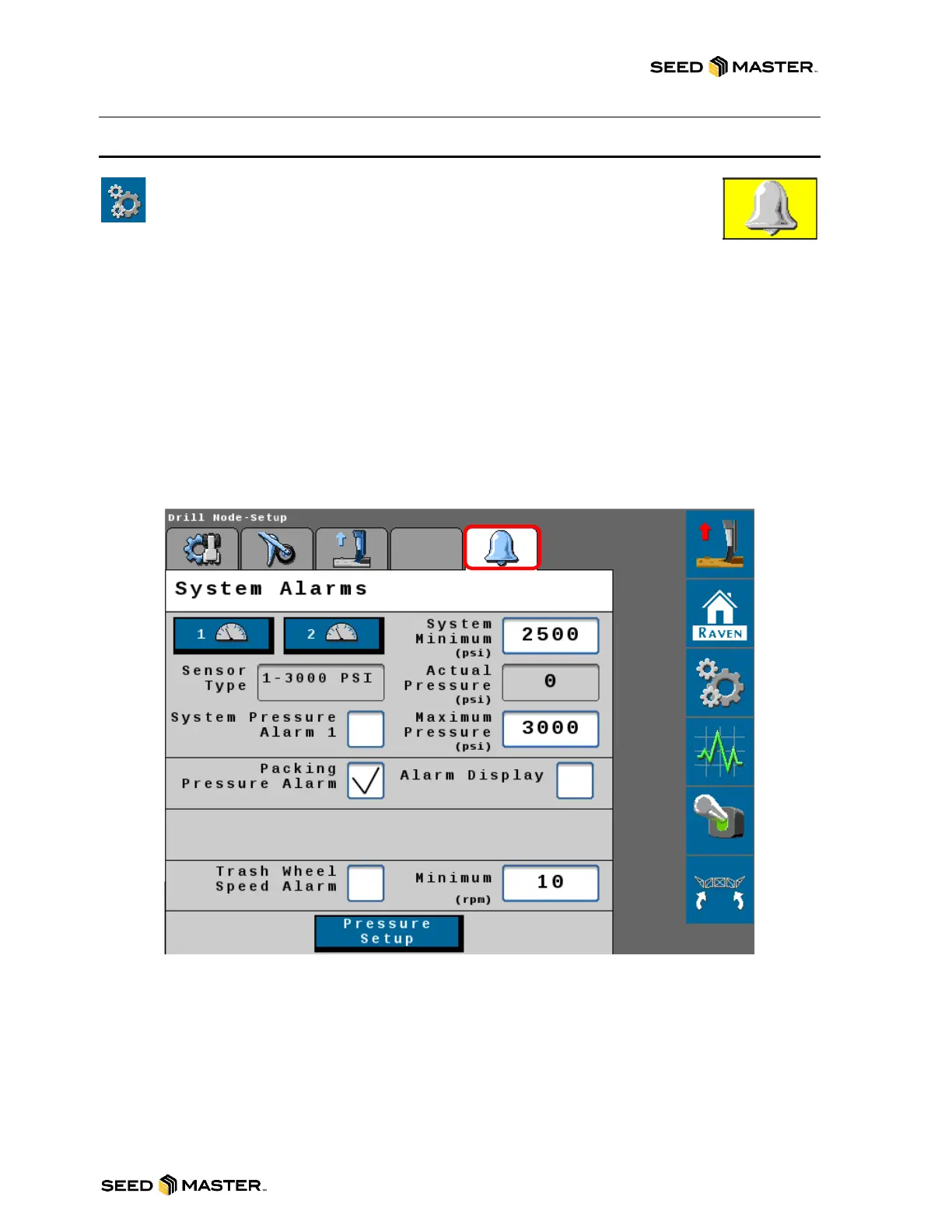
SYSTEM ALARMS
The system is equipped with alarms to warn the operator of any potential issues
on the machine. To access the System Alarms settings, touch the Settings Soft
Key. After touching the settings soft key, touch the Systems Alarm Tab to
access the System Alarm settings.
Enabling or Disabling an alarm: To enable an alarm, touch the corresponding checkbox. To disable
an alarm, remove the checkmark. If the alarm is enabled, the Min and Max values of the alarm range
must be set.
Setting the Min and Max Range: To set the min alarm value, touch the white area to the right of
System Minimum. If the installed sensor drops below this set value, the operator will be notified that a
System Alarm has been tripped. To set the max value, touch the white area to the right of Maximum
Pressure. The default is the maximum that the transducer can read. If the installed sensor rises above
this value, the operator will be notified that a System Alarm has been tripped. The recommended
minimum for System Pressure is 2500 PSI. For Air Tank Pressure, the minimum should be set to 30
PSI.
After the alarms have been set, touch the home button to return the operating home page.



 To Next Page