SEEDMASTER 2023
57
ISOBUS RCM FUNCTIONS
HOME SCREEN LAYOUT
The Raven Rate Control Module (RCM) is a multi-product application control system built on an
ISOBUS platform. Raven Rate Controller Module controls up to 4 product applications such as liquid,
granular, and NH3 via ISOBUS Universal Terminal (UT) and task control for as-applied documentation,
prescription rate, and section control. ISOBUS RCM will control your SeedMaster multi-
product On-Frame Tank or NOVA Air Cart via the installed Virtual Terminal. To access
the RCM Tank Functions, touch the ISOBUS RCM soft key on your VT display. See your
UT’s operator’s manual for more information on locating UT soft keys.
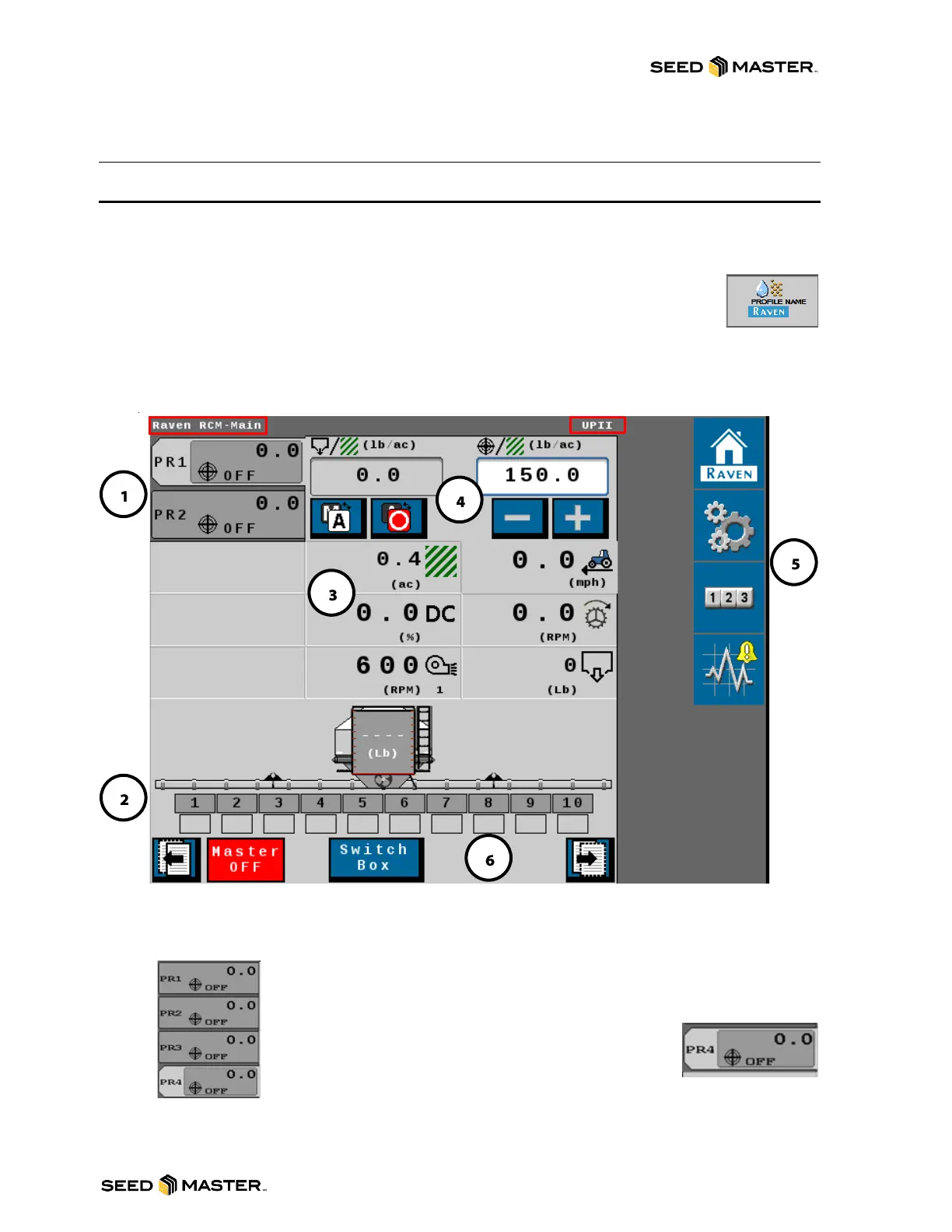
1. Product Area: Displays the products that are set up for the specific RCM. Each product
displays the state of the product. It will display “Off” when the product is off, it
will display the target rate when it is “On” and set to “Auto” and will display
“MAN” when it is on and set to Manual mode. Simply touch the desired product
to make it the active product. The active product shows
the product number in a light grey color. If the active
product button is touched while it is active, it will go to
the “Setup Rates” page.



 To Next Page