SEEDMASTER 2023
58
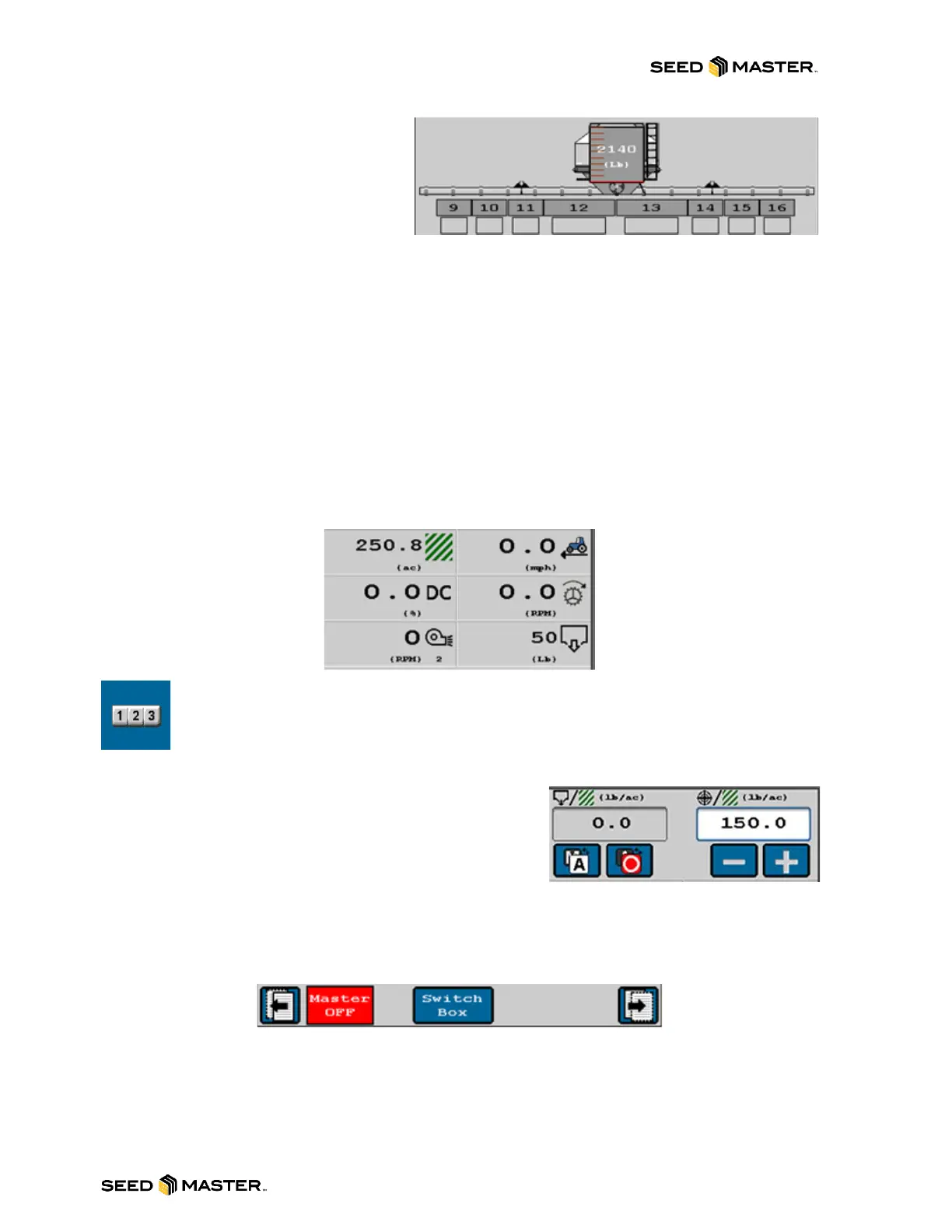
2. Tank Area: Displays the current
tank weight. The tank is also a
button that will go to the Refill
Tank/Bin page if touched. Below
the tank, implement sections are
displayed with their status. If they
are grey, that indicates that they
are off. If they are green in color, that indicates that they are on.
3. Display Menu: This area displays different information about the active product. Its factory
defaults are set up to display:
o Task Area (ac): this will display how many acres have been covered by the active
product.
o Traveling Speed (mph): this will display the current ground speed or Test Speed.
o PWM Duty Cycle (DC): this will display the current PWM position as a percentage.
o RPM sensor (rpm): this will display the current RPM of the drive motor for the active
product.
o RPM 1 or 2 (rpm): this will display the current FAN RPM for the active product.
o Volume Applied (lb): this will display how many pounds of product has been applied
for the active product.
NOTE: The Task Area and Volume Applied can be reset from the Current Totals page.
Touch the Tally Registers button to access the Totals page.
4. Rate Control: Adjust the rate control. This area
displays the actual rate and target rate. It includes the
Auto/Manual toggle button, Product Master ON/OFF
button, and the Rate increase or decrease buttons.
5. Softkeys: Touch soft keys to access different settings
and functions.
6. Switches: Displays the page left/right buttons, the Master Switch indicator, the Switch Box
button, and the Quick Start button.



 To Next Page