SEEDMASTER 2023
73
SCALE CALIBRATION
1. Touch the “Settings” soft key.
2. Touch the “System Settings” tab.
3. Touch “Scale Setup” button.
4. Choose the scale being calibrated.
5. Touch the “Scale Calibration” button.
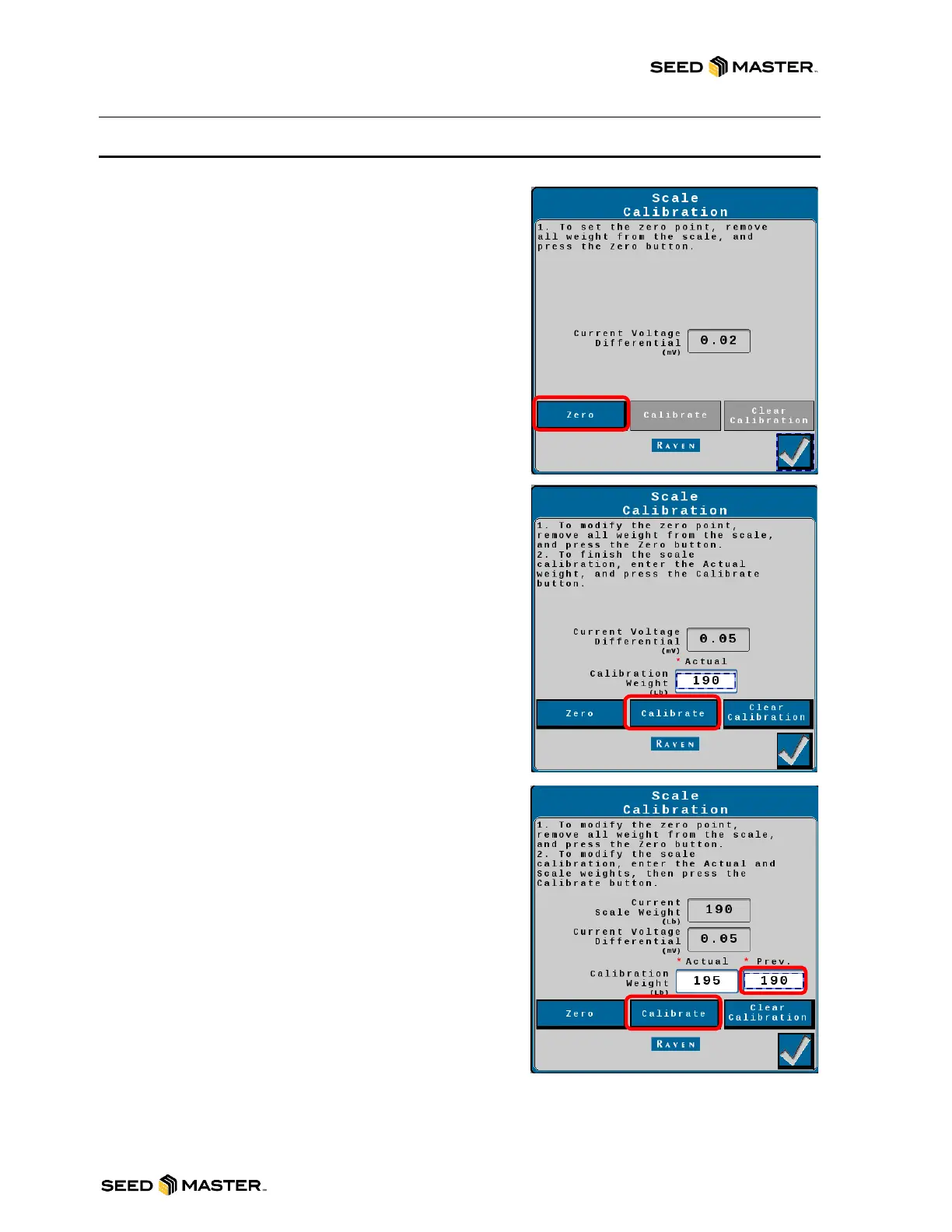
6. Ensure tank is empty. Touch the “Zero” button.
7. Touch the check mark to zero the bin.
8. Put an accurate, verified weight on or in the bin.
9. Enter that accurate, verified weight. Touch the
“Calibrate” button.
NOTE: The (mv) must change by 0.025 to calibrate the
scales. Add weight to increase the mv. Recommended
minimum is 200 lbs.
10. Touch the check mark to calibrate the bin.
11. Ensure the “Current Scale Weight” is accurate.
12. If the scale reading is off, enter the “Current Scale
Weight” into the Prev. box.
13. Touch the “Calibrate” button.
14. Touch the check mark to calibrate the bin.
15. Touch the check mark to finish scale calibration for
the selected bin.
16. Repeat from step 4 if other scales require
calibration.
17. Touch the check mark to exit Scale Setup.



 To Next Page