SEEDMASTER 2023
67
APPLIED PRODUCT CALIBRATION PROCEDURE
SeedMaster Machines equipped with Load Cells are capable of Auto Calibration on granular products.
The Applied Product Calibration (SmartCal) feature will maintain a high metering accuracy on granular
products. Auto Calibration software continuously reads the actual weight reduction in each tank and
compares that to how much weight should be reduced with a perfect calibration. It then makes the
necessary metering adjustments up or down and spins the rollers faster or slower to move it closer to
perfect. The SmartCal feature will become more accurate with more acres because an increasing
amount of ground-truth data is fed into the system. A heavy, bulky product such as granular fertilizer
going down at a high rate gives the system enough feedback so that it auto calibrates quickly and
accurately. A light weight, low-rate product such as canola takes more area to dial in.
NOTE: Before using the SmartCal feature, it is HIGHLY recommended to perform a catch test
calibration on each product. The initial product calibrations will determine the Cal Weight for the
products being metered. This will allow for a more accurate SmartCal.
APPLIED PRODUCT CALIBRATION PROCEDURE
1. Shut the MASTER SWITCH OFF (Foot Switch) and park the machine as
level as possible. Ensure the scales are still before proceeding.
2. Select the product that the applied product calibration will be performed
on.
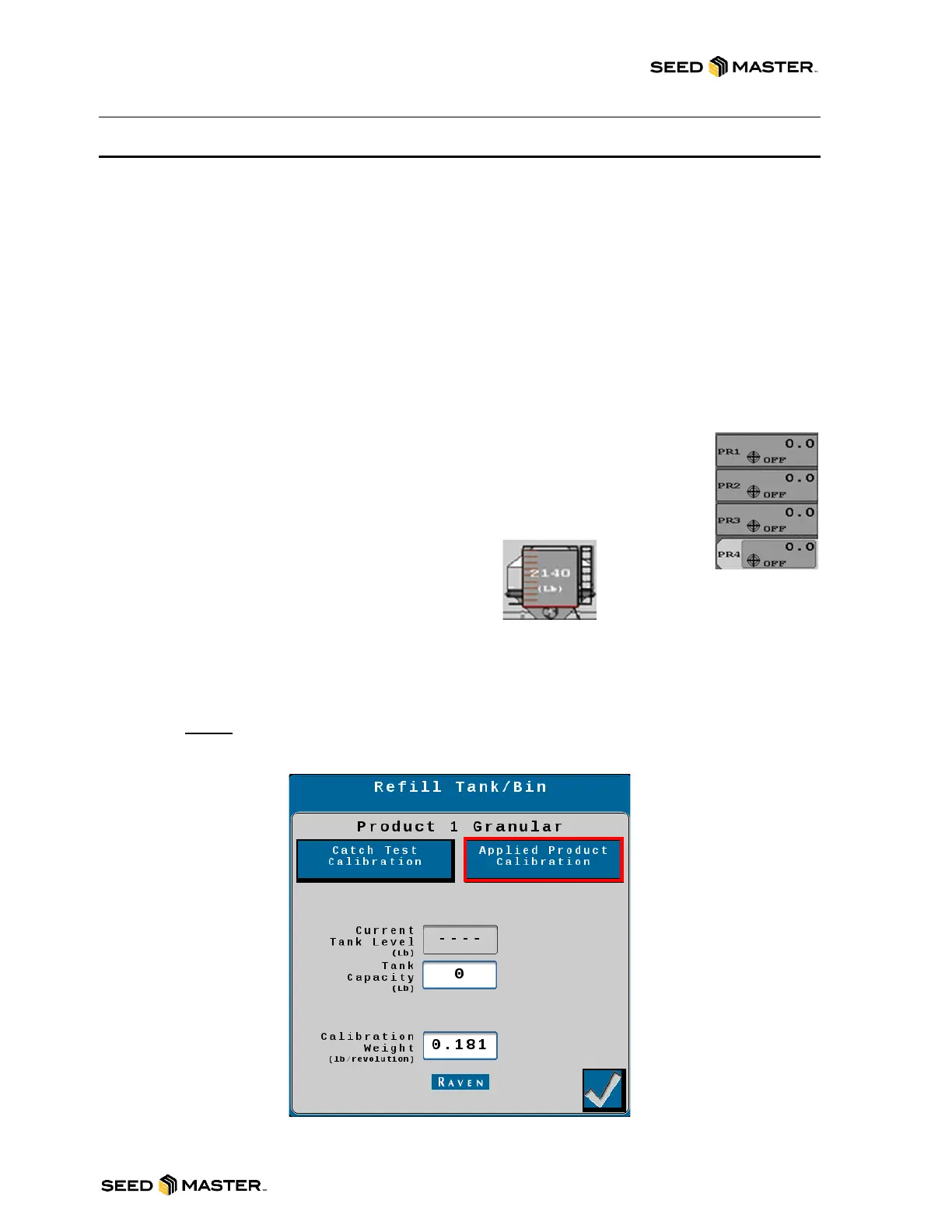
3. Touch the Tank in the middle of the screen.
REVIEW INITIAL CALIBRATION SETTINGS
4. Enter the Current Tank Level Reading or maximum product weight into the Tank Capacity
area.
5. Enter the Calibration Weight. A starting Calibration Weight can be found with the
SeedMaster App. The Estimated Cal Weight will be calculated as a starting point. Skip this
step if you have performed a catch test calibration.
NOTE: Please see the “SEEDMASTER APP” Chapter for more information.
6. After the settings have been reviewed, touch “Applied Product Calibration”.



 To Next Page